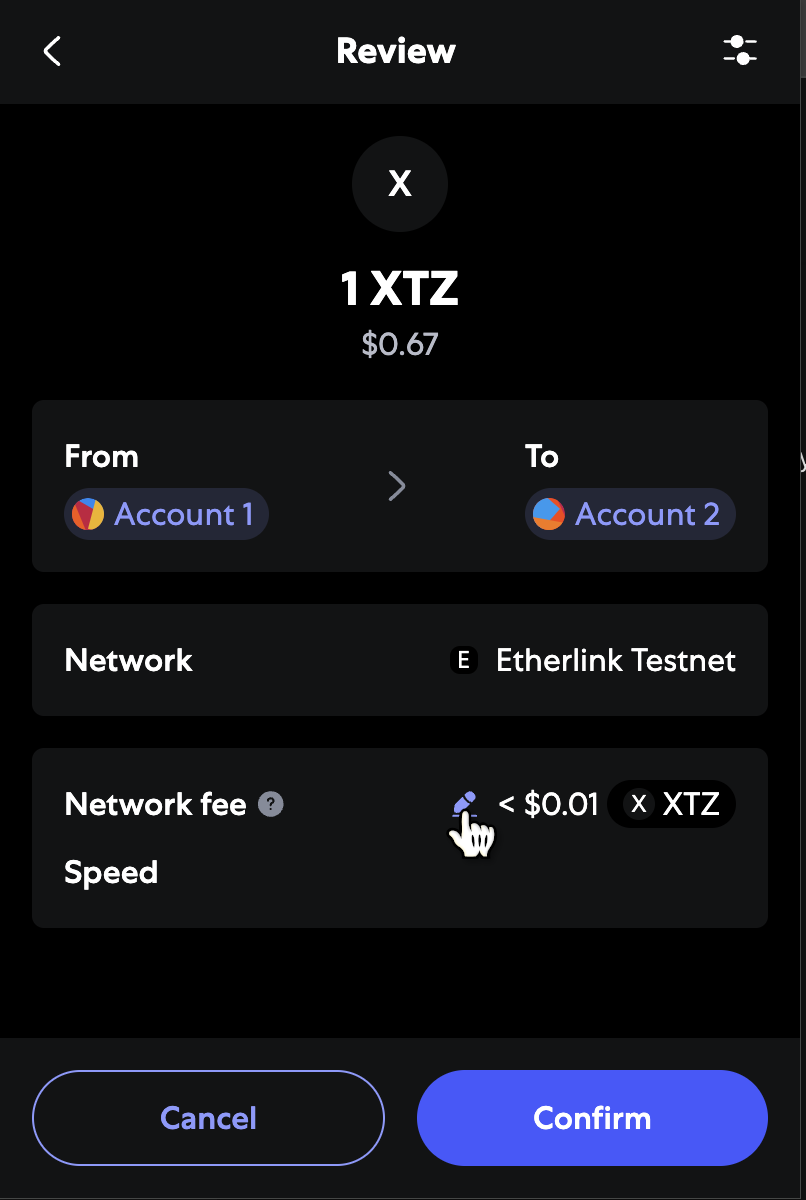
 From here, click **Advanced** to set a custom transaction fee:
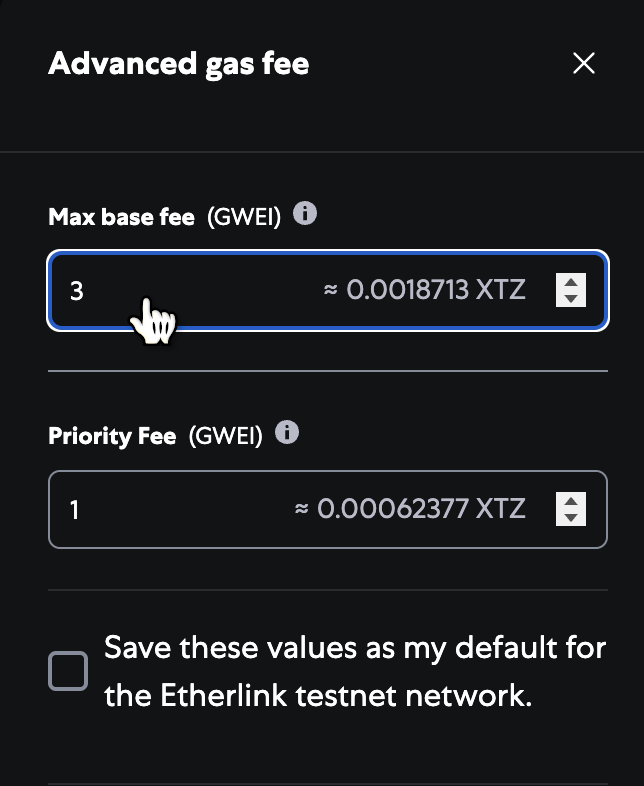
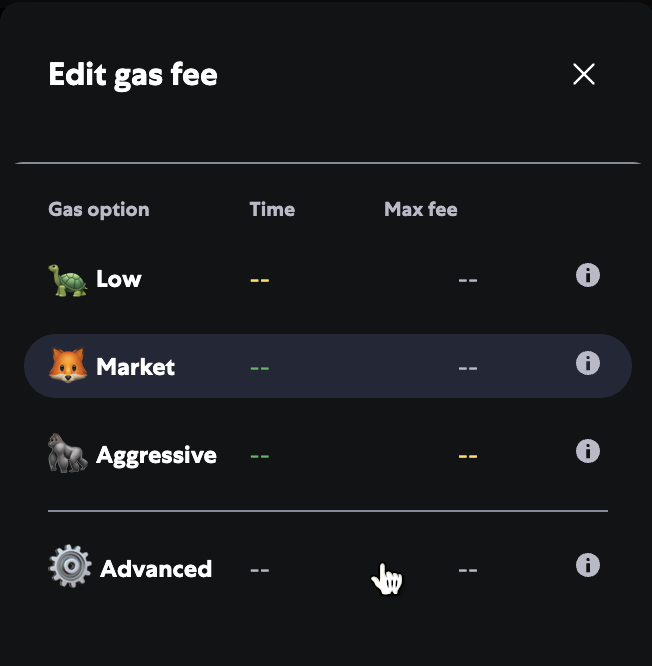 Then, increase the base fee in the **Max base fee (gwei)** field, not the Priority fee field, as in the following picture, which shows a base fee of 3 gwei, which is 3 times the default.
The resulting transaction fee is 0.0018713 XTZ.
Then, increase the base fee in the **Max base fee (gwei)** field, not the Priority fee field, as in the following picture, which shows a base fee of 3 gwei, which is 3 times the default.
The resulting transaction fee is 0.0018713 XTZ.
 Now you can send the transaction as usual and accept a higher fee if it is necessary based on the network's base fee.
### Increasing fees for a new transaction (Rabby wallet)
To change the fees in the Rabby wallet browser extension, start a transaction as usual and click the transaction speed button next to the transaction fee, as in this picture:
Now you can send the transaction as usual and accept a higher fee if it is necessary based on the network's base fee.
### Increasing fees for a new transaction (Rabby wallet)
To change the fees in the Rabby wallet browser extension, start a transaction as usual and click the transaction speed button next to the transaction fee, as in this picture:
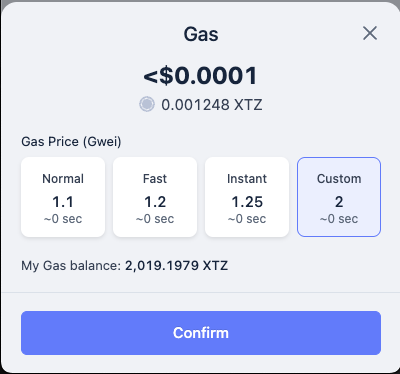
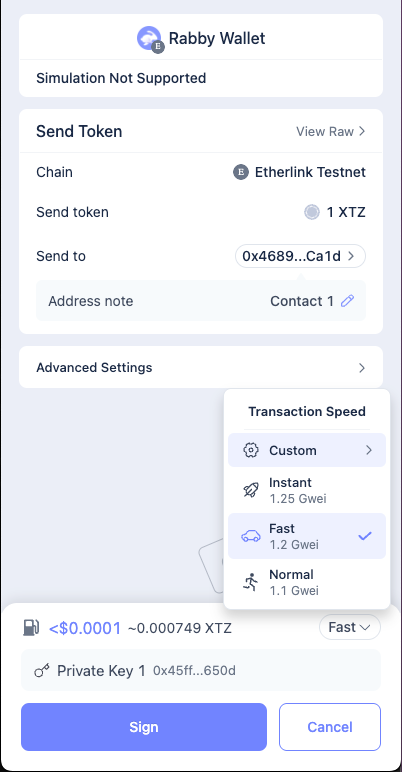 The popup window shows the transaction fees as a multiple of the current gas price, not as a raw amount of XTZ.
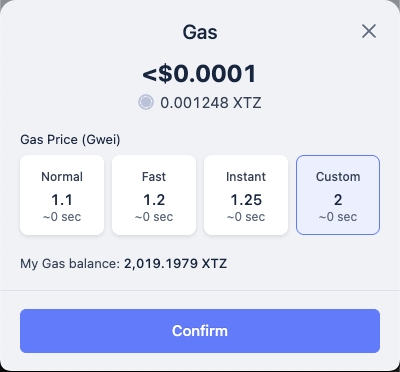
In the popup window, in the **Custom** field, set a new gas price multiple.
For example, if you enter 2, the transaction fee can be up to twice the estimate based on the current gas price, as in this picture:
The popup window shows the transaction fees as a multiple of the current gas price, not as a raw amount of XTZ.
In the popup window, in the **Custom** field, set a new gas price multiple.
For example, if you enter 2, the transaction fee can be up to twice the estimate based on the current gas price, as in this picture:
 Now you can send the transaction as usual and accept a higher fee if it is necessary based on the network's base fee.
### Increasing the fees on a pending transaction (Metamask)
This Metamask transaction is shown as pending because it did not include enough transaction fees.
Etherlink has dropped the transaction but the wallet has not updated its status yet:
Now you can send the transaction as usual and accept a higher fee if it is necessary based on the network's base fee.
### Increasing the fees on a pending transaction (Metamask)
This Metamask transaction is shown as pending because it did not include enough transaction fees.
Etherlink has dropped the transaction but the wallet has not updated its status yet:
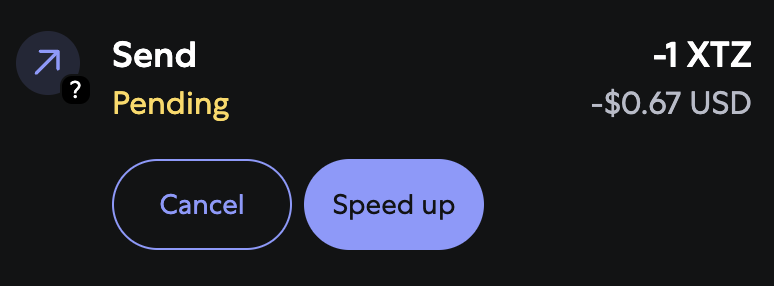 To increase the maximum fees in order to unlock the transaction, click **Speed up** and provide a larger transaction fee.
Note that this is only useful when the network is congested and the current base fee per gas increases beyond the value initially put in the transaction
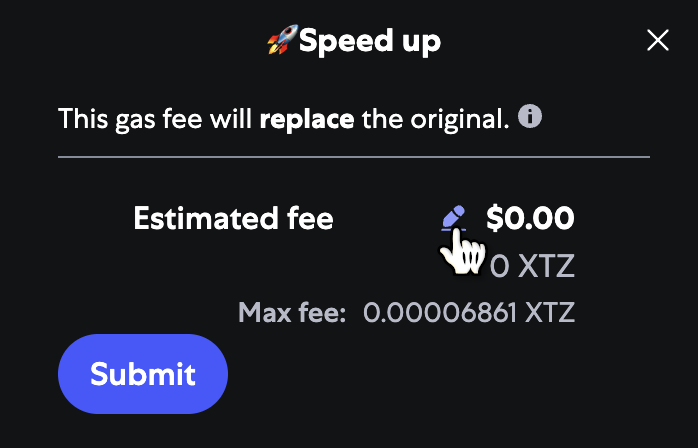
Then you can set a new fee, as shown in this picture:
To increase the maximum fees in order to unlock the transaction, click **Speed up** and provide a larger transaction fee.
Note that this is only useful when the network is congested and the current base fee per gas increases beyond the value initially put in the transaction
Then you can set a new fee, as shown in this picture:
 The wallet sends a new transaction with the increased fee.
### Increasing the fees on a pending transaction (Rabby wallet)
Rabby wallet shows a spinning indicator with a number to indicate pending transactions.
In this picture, one transaction is shown as pending because it did not include enough transaction fees.
Etherlink has dropped the transaction but the wallet has not updated its status yet:
The wallet sends a new transaction with the increased fee.
### Increasing the fees on a pending transaction (Rabby wallet)
Rabby wallet shows a spinning indicator with a number to indicate pending transactions.
In this picture, one transaction is shown as pending because it did not include enough transaction fees.
Etherlink has dropped the transaction but the wallet has not updated its status yet:
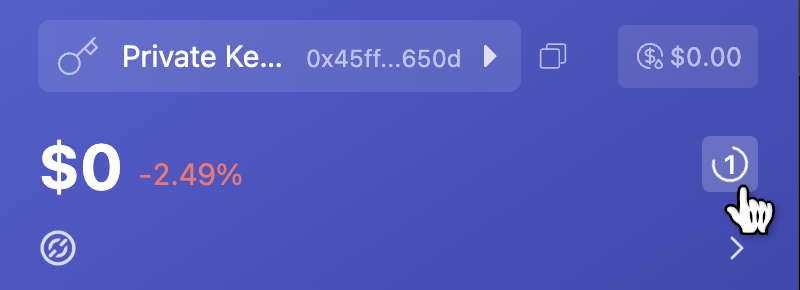 To accept larger maximum fees in order to unlock the transaction, click the pending indicator.
Rabby wallet shows the pending transactions and warnings about how long they have been pending:
To accept larger maximum fees in order to unlock the transaction, click the pending indicator.
Rabby wallet shows the pending transactions and warnings about how long they have been pending:
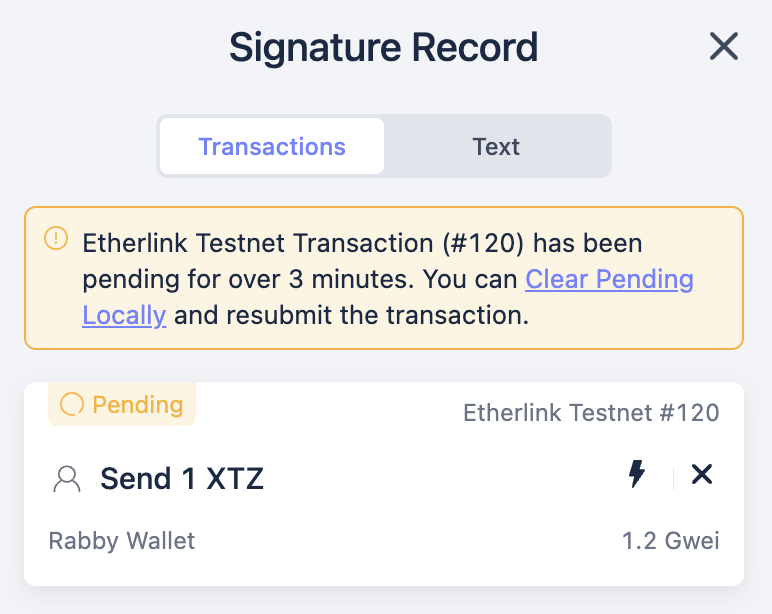 Then, click the lightning bolt icon next to the transaction:
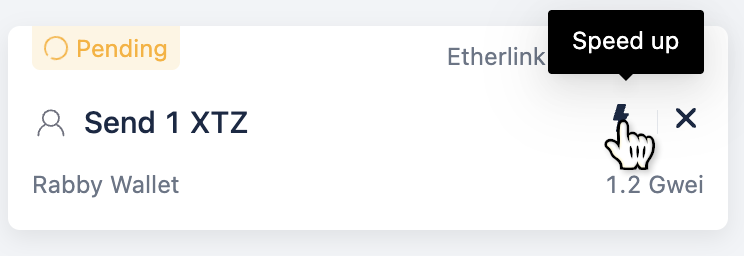 The popup window lets you set a new transaction fee as a multiple of the current gas price, not as a raw amount of XTZ.
From here, put in a higher gas limit as described in [Increasing fees for a new transaction (Rabby wallet)](#increasing-fees-for-a-new-transaction-rabby-wallet), and submit the new transaction.
The popup window lets you set a new transaction fee as a multiple of the current gas price, not as a raw amount of XTZ.
From here, put in a higher gas limit as described in [Increasing fees for a new transaction (Rabby wallet)](#increasing-fees-for-a-new-transaction-rabby-wallet), and submit the new transaction.
 The wallet sends a new transaction with the increased fee.
## Checking gas prices
As described in [Estimating fees](/evm/developing/estimating-fees), the _gas price_ is the cost per unit of computation required by a transaction.
The fee for a transaction depends on the gas price.
The Etherlink EVM gas price (and therefore the fee for a given transaction) varies based on the activity on the chain.
The default gas price is 1 gwei, or 0.000000001 XTZ, but at times of high activity it can go higher.
Here are some ways to get Etherlink EVM's gas price:
- For an average of Etherlink EVM gas prices, go to the [Gas tracker](https://explorer.etherlink.com/gas-tracker) page on the Etherlink EVM block explorer.
- For the actual gas price of the previous block, go to https://explorer.etherlink.com/blocks, click the most recent block, and check the `Base fee per gas` field.
- Developers can use the standard EVM `eth_gasPrice` endpoint, as described in [Estimating fees](/evm/developing/estimating-fees).
The actual cost of a transaction depends on the gas price and the complexity of the transaction.
Wallets show the estimated cost for a transaction before you approve the transaction.
# NAC Usage: EVM to Michelson
URL: https://docs.etherlink.com/evm/nac-usage
Cross-interface calls go through the gateway contract of the caller's interface.
This page describes how to initiate a cross-interface call from the EVM interface.
For the opposite way, see [Michelson to EVM](/michelson/nac-usage).
The EVM-to-Michelson gateway is a precompile deployed at:
```
0xff00000000000000000000000000000000000007
```
## `callMichelson`
Call a Michelson contract by providing:
| Parameter | Type | Description |
|---|---|---|
| `destination` | string | The Michelson contract address (`KT1…` base58check) |
| `entrypoint` | string | The target entrypoint name |
| `data` | bytes | Michelson-encoded parameters |
A Michelson `KT1…` address is 22 bytes in base58check form and does not fit into a 20-byte EVM `address` type. The gateway therefore takes the destination as a string and parses it on the Michelson side.
```solidity
interface INativeAtomicGateway {
function callMichelson(
string calldata destination,
string calldata entrypoint,
bytes calldata data
) external payable;
}
INativeAtomicGateway gateway = INativeAtomicGateway(
0xff00000000000000000000000000000000000007
);
gateway.callMichelson("KT1…", "default", michelsonParams);
```
The `data` parameter must be encoded in Michelson binary format. For simple types you can construct the payload inline: for example, passing a `nat` with value 42 encodes as `hex"002a"` (tag `0x00` = integer, value `0x2a` = 42). Worked Solidity examples using this pattern are available in the [`solidity_examples/` directory](https://gitlab.com/tezos/tezos/-/tree/master/etherlink/kernel_latest/solidity_examples) of the Etherlink sources. For complex types, off-line tools such as Taquito's `packData` function can compute the encoding.
A Michelson call (via `callMichelson`) has no return value.
## `callMichelsonView`
To call a read-only Michelson view and receive the result, use `callMichelsonView`:
| Parameter | Type | Description |
|---|---|---|
| `destination` | string | The Michelson contract address (`KT1…` base58check) |
| `viewName` | string | The name of the on-chain view |
| `input` | bytes | Micheline-encoded input to the view |
This entry point performs a read-only crossing (no value transfer, no state mutation) and must be invoked via `staticcall`. The gateway returns the view's Micheline response ABI-encoded as `bytes`.
```solidity
interface INativeAtomicGateway {
function callMichelsonView(
string calldata destination,
string calldata viewName,
bytes calldata input
) external view returns (bytes memory);
}
INativeAtomicGateway gateway = INativeAtomicGateway(
0xff00000000000000000000000000000000000007
);
bytes memory michelineResult = gateway.callMichelsonView(
"KT1…", // destination
"myView", // view name
hex"030b" // Micheline Unit — adjust to match the view's input type
);
```
A complete worked example (using the low-level `staticcall` pattern) is available in [`crac_michelson_view_staticcall.sol`](https://gitlab.com/tezos/tezos/-/blob/master/etherlink/kernel_latest/solidity_examples/crac_michelson_view_staticcall.sol).
## Address translation
Cross-interface calls run under the caller's alias (see [Accounts and Aliases](/overview/accounts-and-aliases)). The gateway exposes two `view` functions to translate between native addresses and aliases. Both take the address as a `string` in its printable form (`0x…` hex for the EVM interface, base58check for the Michelson interface) rather than as a Solidity `address`, and identify interfaces by a runtime id: `0` for the Michelson interface, `1` for the EVM interface.
```solidity
interface INativeAtomicGateway {
function originOf(
string calldata addr,
uint8 sourceRuntime
) external view returns (uint8 kind, uint8 homeRuntime, string memory nativeAddress);
function resolveAddress(
string calldata addr,
uint8 sourceRuntime,
uint8 targetRuntime
) external view returns (bool classified, uint8 res, string memory translated);
error InvalidRuntimeId(uint8 received);
}
```
### `originOf`
`originOf(addr, sourceRuntime)` returns how the address `addr` of the interface `sourceRuntime` is classified:
| `kind` | Meaning | `homeRuntime` | `nativeAddress` |
|---|---|---|---|
| `0` (Unknown) | The address is malformed or has not been seen by the kernel yet | `0` | `""` |
| `1` (Native) | An account native to `sourceRuntime` | `sourceRuntime` | `addr` |
| `2` (Alias) | The alias of an account native to the other interface | The interface the account is native to | The native address of that account |
The kernel records the origin of an account when it is first used: Michelson user accounts (`tz1…`, `tz2…`, `tz3…`) are always Native, Michelson smart contracts are recorded at origination, EVM accounts when they first sign a transaction or when they have code, and aliases when a cross-interface call creates them. In particular, an EVM address that has only received funds is Unknown.
For example, to check whether the caller is a Michelson account:
```solidity
(uint8 kind, , string memory native) = gateway.originOf(
Strings.toHexString(msg.sender), // OpenZeppelin helper: lowercase "0x…" string
1
);
if (kind == 2) {
// msg.sender is the alias of the Michelson account `native` (tz1… or KT1…)
}
```
### `resolveAddress`
`resolveAddress(addr, sourceRuntime, targetRuntime)` translates the address `addr` of the interface `sourceRuntime` into the corresponding address of the interface `targetRuntime`:
- If `addr` is malformed or Unknown, `classified` is `false` and the other values are zero.
- If `addr` is Native, `translated` is its alias in `targetRuntime`.
- If `addr` is an Alias, `translated` is the native address it stands for, rather than an alias of the alias.
`res` is `0` (Recorded) when the returned address already exists on chain and `1` (Derived) when it was computed with the derivation formula but no cross-interface call has created the alias yet. When `sourceRuntime` and `targetRuntime` are equal, a well-formed address is returned unchanged with `res == 0`.
```solidity
(bool classified, uint8 res, string memory evmAlias) = gateway.resolveAddress(
"tz1VSUr8wwNhLAzempoch5d6hLRiTh8Cjcjb", 0, 1
);
// classified == true; evmAlias is the "0x…" EVM alias of the Tezos account;
// res == 1 until a cross-interface call creates the alias
```
## Failure behavior
### `callMichelson`
If the Michelson callee fails for any reason — `FAILWITH`, type mismatch, non-existent contract, or forwarded gas exhaustion — the gateway precompile reverts the calling EVM transaction. There is no way to distinguish a Michelson-side revert from a Michelson-side out-of-gas at the Solidity level; both surface as an EVM revert with an error string of the form `"Cross-runtime call failed with status 4xx:
The wallet sends a new transaction with the increased fee.
## Checking gas prices
As described in [Estimating fees](/evm/developing/estimating-fees), the _gas price_ is the cost per unit of computation required by a transaction.
The fee for a transaction depends on the gas price.
The Etherlink EVM gas price (and therefore the fee for a given transaction) varies based on the activity on the chain.
The default gas price is 1 gwei, or 0.000000001 XTZ, but at times of high activity it can go higher.
Here are some ways to get Etherlink EVM's gas price:
- For an average of Etherlink EVM gas prices, go to the [Gas tracker](https://explorer.etherlink.com/gas-tracker) page on the Etherlink EVM block explorer.
- For the actual gas price of the previous block, go to https://explorer.etherlink.com/blocks, click the most recent block, and check the `Base fee per gas` field.
- Developers can use the standard EVM `eth_gasPrice` endpoint, as described in [Estimating fees](/evm/developing/estimating-fees).
The actual cost of a transaction depends on the gas price and the complexity of the transaction.
Wallets show the estimated cost for a transaction before you approve the transaction.
# NAC Usage: EVM to Michelson
URL: https://docs.etherlink.com/evm/nac-usage
Cross-interface calls go through the gateway contract of the caller's interface.
This page describes how to initiate a cross-interface call from the EVM interface.
For the opposite way, see [Michelson to EVM](/michelson/nac-usage).
The EVM-to-Michelson gateway is a precompile deployed at:
```
0xff00000000000000000000000000000000000007
```
## `callMichelson`
Call a Michelson contract by providing:
| Parameter | Type | Description |
|---|---|---|
| `destination` | string | The Michelson contract address (`KT1…` base58check) |
| `entrypoint` | string | The target entrypoint name |
| `data` | bytes | Michelson-encoded parameters |
A Michelson `KT1…` address is 22 bytes in base58check form and does not fit into a 20-byte EVM `address` type. The gateway therefore takes the destination as a string and parses it on the Michelson side.
```solidity
interface INativeAtomicGateway {
function callMichelson(
string calldata destination,
string calldata entrypoint,
bytes calldata data
) external payable;
}
INativeAtomicGateway gateway = INativeAtomicGateway(
0xff00000000000000000000000000000000000007
);
gateway.callMichelson("KT1…", "default", michelsonParams);
```
The `data` parameter must be encoded in Michelson binary format. For simple types you can construct the payload inline: for example, passing a `nat` with value 42 encodes as `hex"002a"` (tag `0x00` = integer, value `0x2a` = 42). Worked Solidity examples using this pattern are available in the [`solidity_examples/` directory](https://gitlab.com/tezos/tezos/-/tree/master/etherlink/kernel_latest/solidity_examples) of the Etherlink sources. For complex types, off-line tools such as Taquito's `packData` function can compute the encoding.
A Michelson call (via `callMichelson`) has no return value.
## `callMichelsonView`
To call a read-only Michelson view and receive the result, use `callMichelsonView`:
| Parameter | Type | Description |
|---|---|---|
| `destination` | string | The Michelson contract address (`KT1…` base58check) |
| `viewName` | string | The name of the on-chain view |
| `input` | bytes | Micheline-encoded input to the view |
This entry point performs a read-only crossing (no value transfer, no state mutation) and must be invoked via `staticcall`. The gateway returns the view's Micheline response ABI-encoded as `bytes`.
```solidity
interface INativeAtomicGateway {
function callMichelsonView(
string calldata destination,
string calldata viewName,
bytes calldata input
) external view returns (bytes memory);
}
INativeAtomicGateway gateway = INativeAtomicGateway(
0xff00000000000000000000000000000000000007
);
bytes memory michelineResult = gateway.callMichelsonView(
"KT1…", // destination
"myView", // view name
hex"030b" // Micheline Unit — adjust to match the view's input type
);
```
A complete worked example (using the low-level `staticcall` pattern) is available in [`crac_michelson_view_staticcall.sol`](https://gitlab.com/tezos/tezos/-/blob/master/etherlink/kernel_latest/solidity_examples/crac_michelson_view_staticcall.sol).
## Address translation
Cross-interface calls run under the caller's alias (see [Accounts and Aliases](/overview/accounts-and-aliases)). The gateway exposes two `view` functions to translate between native addresses and aliases. Both take the address as a `string` in its printable form (`0x…` hex for the EVM interface, base58check for the Michelson interface) rather than as a Solidity `address`, and identify interfaces by a runtime id: `0` for the Michelson interface, `1` for the EVM interface.
```solidity
interface INativeAtomicGateway {
function originOf(
string calldata addr,
uint8 sourceRuntime
) external view returns (uint8 kind, uint8 homeRuntime, string memory nativeAddress);
function resolveAddress(
string calldata addr,
uint8 sourceRuntime,
uint8 targetRuntime
) external view returns (bool classified, uint8 res, string memory translated);
error InvalidRuntimeId(uint8 received);
}
```
### `originOf`
`originOf(addr, sourceRuntime)` returns how the address `addr` of the interface `sourceRuntime` is classified:
| `kind` | Meaning | `homeRuntime` | `nativeAddress` |
|---|---|---|---|
| `0` (Unknown) | The address is malformed or has not been seen by the kernel yet | `0` | `""` |
| `1` (Native) | An account native to `sourceRuntime` | `sourceRuntime` | `addr` |
| `2` (Alias) | The alias of an account native to the other interface | The interface the account is native to | The native address of that account |
The kernel records the origin of an account when it is first used: Michelson user accounts (`tz1…`, `tz2…`, `tz3…`) are always Native, Michelson smart contracts are recorded at origination, EVM accounts when they first sign a transaction or when they have code, and aliases when a cross-interface call creates them. In particular, an EVM address that has only received funds is Unknown.
For example, to check whether the caller is a Michelson account:
```solidity
(uint8 kind, , string memory native) = gateway.originOf(
Strings.toHexString(msg.sender), // OpenZeppelin helper: lowercase "0x…" string
1
);
if (kind == 2) {
// msg.sender is the alias of the Michelson account `native` (tz1… or KT1…)
}
```
### `resolveAddress`
`resolveAddress(addr, sourceRuntime, targetRuntime)` translates the address `addr` of the interface `sourceRuntime` into the corresponding address of the interface `targetRuntime`:
- If `addr` is malformed or Unknown, `classified` is `false` and the other values are zero.
- If `addr` is Native, `translated` is its alias in `targetRuntime`.
- If `addr` is an Alias, `translated` is the native address it stands for, rather than an alias of the alias.
`res` is `0` (Recorded) when the returned address already exists on chain and `1` (Derived) when it was computed with the derivation formula but no cross-interface call has created the alias yet. When `sourceRuntime` and `targetRuntime` are equal, a well-formed address is returned unchanged with `res == 0`.
```solidity
(bool classified, uint8 res, string memory evmAlias) = gateway.resolveAddress(
"tz1VSUr8wwNhLAzempoch5d6hLRiTh8Cjcjb", 0, 1
);
// classified == true; evmAlias is the "0x…" EVM alias of the Tezos account;
// res == 1 until a cross-interface call creates the alias
```
## Failure behavior
### `callMichelson`
If the Michelson callee fails for any reason — `FAILWITH`, type mismatch, non-existent contract, or forwarded gas exhaustion — the gateway precompile reverts the calling EVM transaction. There is no way to distinguish a Michelson-side revert from a Michelson-side out-of-gas at the Solidity level; both surface as an EVM revert with an error string of the form `"Cross-runtime call failed with status 4xx: | Bridge name | Description | Mainnet link | Shadownet Testnet link |
|---|---|---|---|
| Tezos bridge | Bridges XTZ and approved FA tokens from Tezos layer 1 to Etherlink EVM and back | Mainnet | Shadownet Testnet |
| EVM bridge | Bridges assets from EVM chains to wrapped assets on Etherlink EVM and back | Mainnet | Shadownet Testnet |
| Symbol | Name | Mainnet address |
|---|---|---|
| USDC | USD Coin | |
| USDT | Tether USD | |
| WBTC | Wrapped BTC | |
| WETH | Wrapped Ether | |
| WBNB | Wrapped BNB | |
| WAVAX | Wrapped AVAX | |
| SHIB | SHIBA INU |
| Symbol | Name | Mainnet address |
|---|---|---|
| USDC | USD Coin | |
| USDT | Tether USD | |
| WBTC | Wrapped BTC | |
| WETH | Wrapped Ether | |
| SHIB | SHIBA INU |
| Name | Symbol | Mainnet address |
|---|---|---|
| USDC | USD Coin | |
| USDT | Tether USD | |
| WBTC | Wrapped BTC | |
| WETH | Wrapped Ether |
| Name | Symbol | Mainnet address |
|---|---|---|
| USDC | USD Coin | |
| WETH | Wrapped Ether |
| Name | Symbol | Mainnet address |
|---|---|---|
| USDC | USD Coin | |
| USDT | Tether USD | |
| WETH | Wrapped Ether |
| Name | Symbol | Mainnet address |
|---|---|---|
| USDC | USD Coin | |
| USDT | Tether USD | |
| WBNB | Wrapped BNB |
| Name | Symbol | Mainnet address |
|---|---|---|
| USDC | USD Coin | |
| USDT | Tether USD | |
| WAVAX | Wrapped AVAX |
| Network | Mainnet contract address |
|---|---|
| Etherlink EVM | |
| Ethereum | |
| Arbitrum One | |
| Base | |
| Optimism | |
| BNB Chain | |
| Avalanche C-Chain |
| Contract | Contract address |
|---|---|
endpointV2 |
|
sendUln302 |
|
receiveUln302 |
|
blockedMessageLib |
|
executor |
| Contract | Contract address |
|---|---|
endpointV2 |
|
sendUln302 |
|
receiveUln302 |
|
blockedMessageLib |
|
executor |
| Endpoint | Supported | Notes |
|---|---|---|
| `debug_getBadBlocks` | No | |
| `debug_getRawBlock` | No | |
| `debug_getRawHeader` | No | |
| `debug_getRawReceipts` | No | |
| `debug_getRawTransaction` | No | |
| `debug_traceBlockByNumber` | Yes | |
| `engine_exchangeCapabilities` | No | |
| `engine_exchangeTransitionConfigurationV1` | No | |
| `engine_forkchoiceUpdatedV1` | No | |
| `engine_forkchoiceUpdatedV2` | No | |
| `engine_forkchoiceUpdatedV3` | No | |
| `engine_getPayloadBodiesByHashV1` | No | |
| `engine_getPayloadBodiesByHashV2` | No | |
| `engine_getPayloadBodiesByRangeV1` | No | |
| `engine_getPayloadBodiesByRangeV2` | No | |
| `engine_getPayloadV1` | No | |
| `engine_getPayloadV2` | No | |
| `engine_getPayloadV3` | No | |
| `engine_getPayloadV4` | No | |
| `engine_newPayloadV1` | No | |
| `engine_newPayloadV2` | No | |
| `engine_newPayloadV3` | No | |
| `engine_newPayloadV4` | No | |
| `eth_accounts` | Yes | This endpoint always returns an empty list because the EVM node does not manage any addresses |
| `eth_blobBaseFee` | No | |
| `eth_blockNumber` | Yes | |
| `eth_call` | Yes | EVM nodes use the standard Ethereum version of the `eth_call` endpoint instead of the Geth version; see [Sending transactions](/evm/developing/transactions) |
| `eth_chainId` | Yes | |
| `eth_coinbase` | Yes | |
| `eth_createAccessList` | No | |
| `eth_estimateGas` | Yes | See [Sending transactions](/evm/developing/transactions) |
| `eth_feeHistory` | Yes | |
| `eth_gasPrice` | Yes | |
| `eth_getBalance` | Yes | |
| `eth_getBlockByHash` | Yes | |
| `eth_getBlockByNumber` | Yes | Note that Etherlink EVM uses a nonstandard way of computing block hashes, so you cannot use the header information from the `eth_getBlockByNumber` endpoint to compute the block hash. |
| `eth_getBlockReceipts` | Yes | |
| `eth_getBlockTransactionCountByHash` | Yes | |
| `eth_getBlockTransactionCountByNumber` | Yes | |
| `eth_getCode` | Yes | |
| `eth_getFilterChanges` | No | |
| `eth_getFilterLogs` | No | |
| `eth_getLogs` | Yes | See [Getting event logs](/evm/developing/transactions#getting-event-logs) |
| `eth_getProof` | No | |
| `eth_getStorageAt` | Yes | |
| `eth_getTransactionByBlockHashAndIndex` | Yes | |
| `eth_getTransactionByBlockNumberAndIndex` | Yes | |
| `eth_getTransactionByHash` | Yes | |
| `eth_getTransactionCount` | Yes | |
| `eth_getTransactionReceipt` | Yes | |
| `eth_getUncleByBlockHashAndIndex` | Yes | |
| `eth_getUncleByBlockNumberAndIndex` | Yes | |
| `eth_getUncleCountByBlockHash` | Yes | |
| `eth_getUncleCountByBlockNumber` | Yes | |
| `eth_hashrate` | No | |
| `eth_maxPriorityFeePerGas` | Yes | |
| `eth_mining` | No | |
| `eth_newBlockFilter` | No | |
| `eth_newFilter` | No | |
| `eth_newPendingTransactionFilter` | No | |
| `eth_protocolVersion` | No | |
| `eth_sendRawTransaction` | Yes | See [Sending transactions](/evm/developing/transactions) |
| `eth_sendTransaction` | No | |
| `eth_sign` | No | |
| `eth_signTransaction` | No | |
| `eth_subscribe` | Experimental | See Getting updates with WebSockets |
| `eth_syncing` | No | |
| `eth_uninstallFilter` | No | |
| `net_listening` | No | |
| `net_peerCount` | No | |
| `net_version` | Yes | |
| `web3_clientVersion` | Yes | |
| `web3_sha3` | Yes |
| Endpoint | Supported | Notes |
|---|---|---|
| `debug_traceCall` | Partially | Supports only callTracer and structLogger, not custom call tracers |
| `debug_traceTransaction` | Yes | |
| `eth_call` | No | EVM nodes use the standard Ethereum version of the `eth_call` endpoint instead of the Geth version; see [Sending transactions](/evm/developing/transactions) |
| `txpool_content` | Partially | Returns the transaction pool on test networks but always returns an empty pool on Mainnet |
| Method | Supported | Notes |
|---|---|---|
| [`provider.getBlock`](https://docs.ethers.org/v6/api/providers/#Provider-getBlock) | Yes | |
| [`provider.getTransactionReceipt`](https://docs.ethers.org/v6/api/providers/#Provider-getTransactionReceipt) | Yes | |
| [`provider.getBlockNumber`](https://docs.ethers.org/v6/api/providers/#Provider-getBlockNumber) | Yes | |
| [`provider.getBalance`](https://docs.ethers.org/v6/api/providers/#Provider-getBalance) | Yes | |
| [`signer.sendTransaction`](https://docs.ethers.org/v6/api/providers/#Signer-sendTransaction) | Yes |
| Comments | |
|---|---|
| EVM version | Osaka |
| Whitelisting Fireblocks IP addresses | Not Supported |
| Fee Structure | **Post London** (Fee market is not implemented yet, but the rollup supports EIP-1559 transaction types); see Fee structure |
| Token | Mainnet | Shadownet |
|---|---|---|
| Wrapped XTZ (WXTZ) (see WXTZ below) | ||
| Tether USD (USDT) | ||
| USD Coin (USDC) | ||
| Wrapped Ether (WETH) | ||
| Wrapped BTC (WBTC) | ||
| Wrapped BNB (WBNB) | ||
| Wrapped AVAX (WAVAX) | ||
| Uniswap (UNI) | ||
| SHIBA INU (SHIB) | ||
| Midas Basis Trading Token (mBASIS) | ||
| Midas US Treasury Bill Token(mTBILL) |
| Chain | Mainnet address |
|---|---|
| Etherlink EVM | |
| Ethereum | |
| Base | |
| BNB Chain | |
| Arbitrum One |
| Item | Restriction |
|---|---|
| Request rate limits | 1000 requests per minute |
| `eth_getLogs` | Block range: max 500 blocks Max number of logs returned: 5,000 |
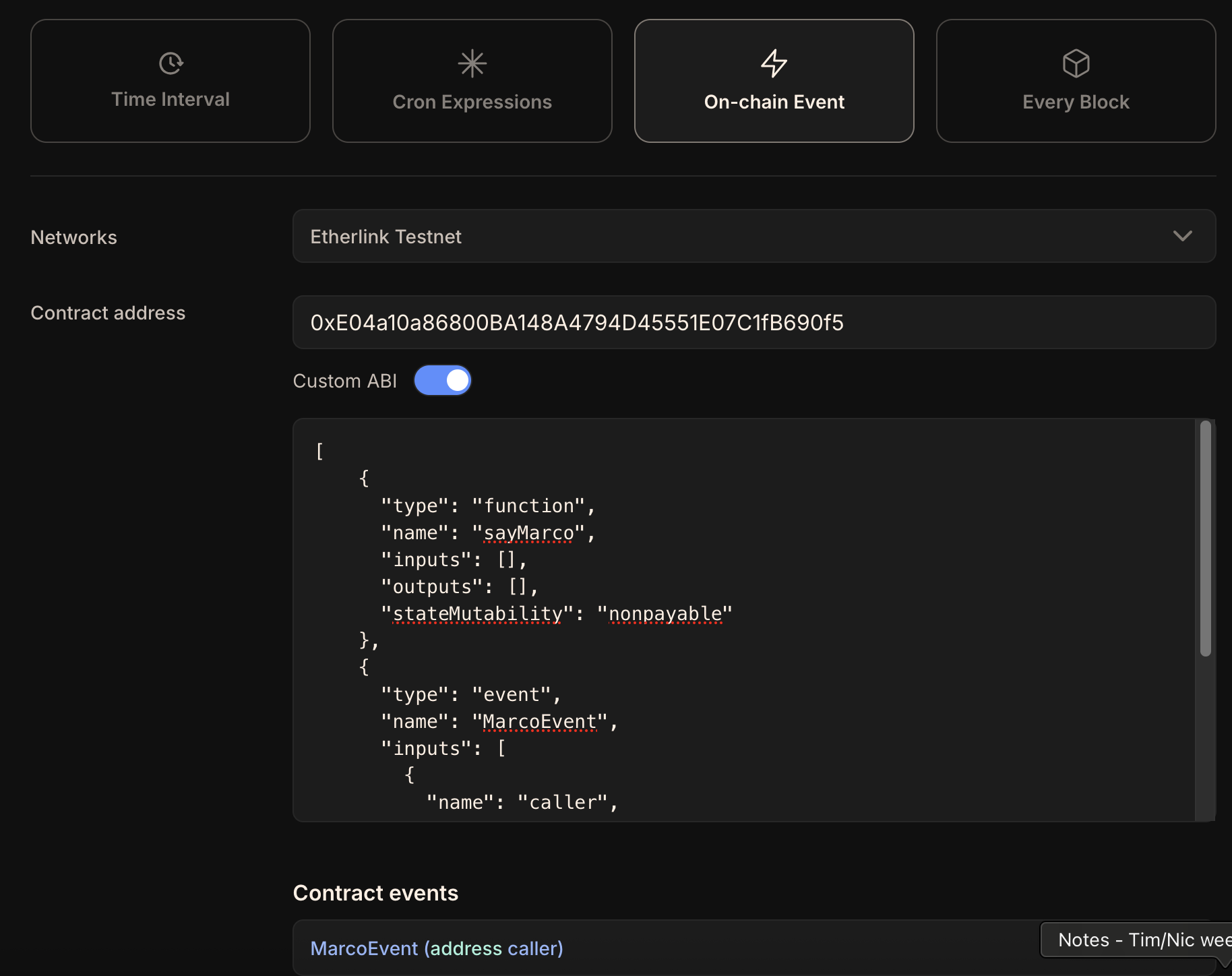 Then, further down, specify the action to run when the trigger happens.
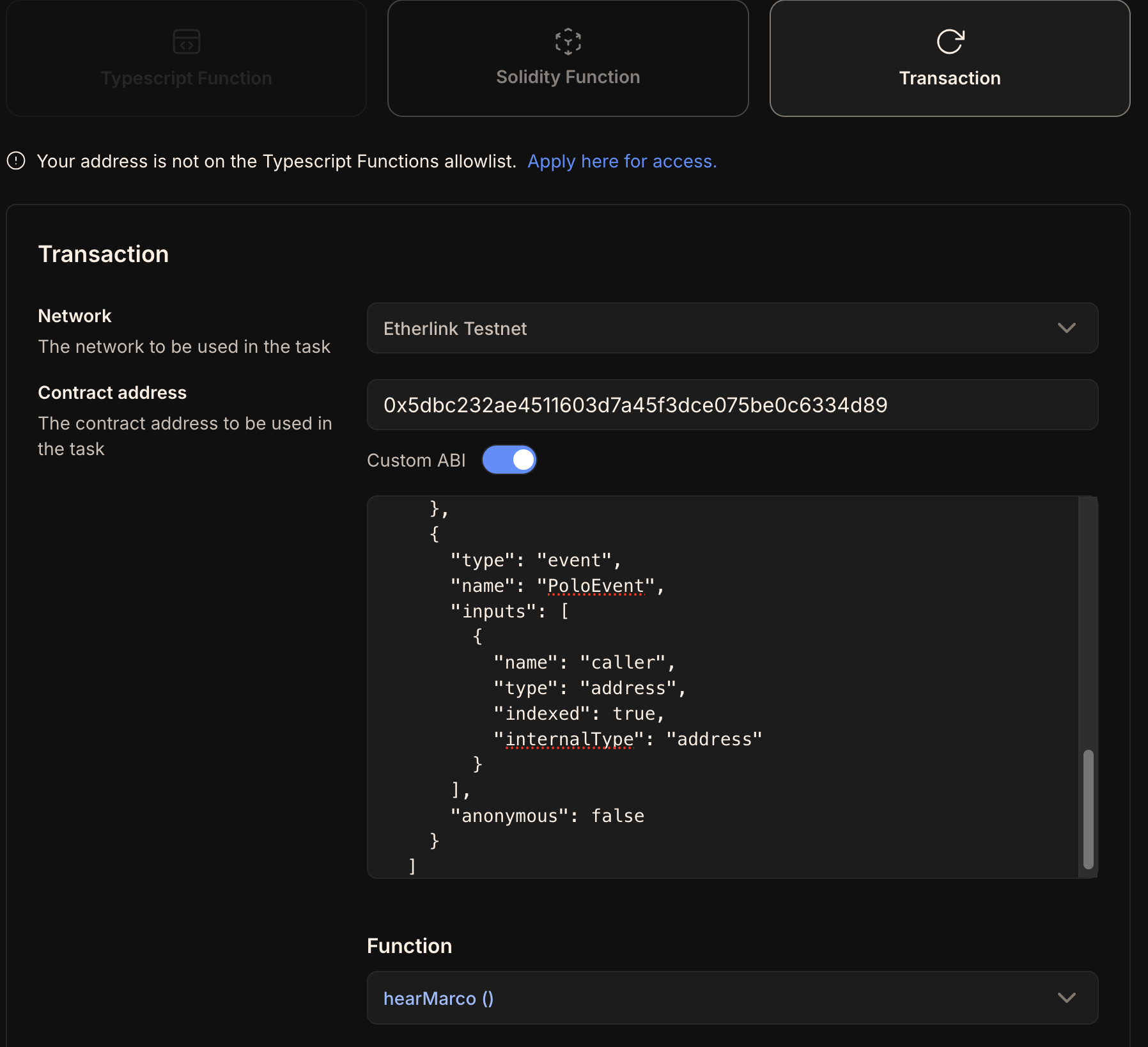
For example, to call the other contract's `hearMarco` function, click **Transaction**.
Then, select the network and specify the address, ABI, and function to call, as in this screencap:
Then, further down, specify the action to run when the trigger happens.
For example, to call the other contract's `hearMarco` function, click **Transaction**.
Then, select the network and specify the address, ABI, and function to call, as in this screencap:
 Now when the first contract emits the event, Gelato calls the second contract.
These contracts can be on the same chain or different chains.
## Fireblocks
URL: https://docs.etherlink.com/evm/tools/institutions
[Fireblocks](https://www.fireblocks.com/) provides a suite of applications to manage digital asset operations and a complete development platform to build your business on the blockchain. They offer services in:
- Treasury management
- Wallet setup and management
- Tokenization of assets
- On-chain payments
Find out more about these services [here](https://www.fireblocks.com/pricing/).
## t:connect
URL: https://docs.etherlink.com/evm/tools/communication
The t:connect SDK enables seamless interaction between Telegram Mini Apps and Etherlink EVM, Tezos, and user wallets.
It allows you to bring advanced blockchain functionality into the familiar Telegram environment.
For more information, see the [t:connect documentation](https://t-connect.gitbook.io).
# Michelson Interface
URL: https://docs.etherlink.com/michelson
The **Michelson Interface** is implemented by a Michelson runtime that behaves as closely as possible to Tezos Layer 1, allowing Tezos developers to deploy and run their existing smart contracts on Etherlink with minimal changes.
The few differences with respect to Tezos Layer 1 are detailed at [Compatibility with Tezos L1](/michelson/developing/compatibility).
## Key features
The Michelson Interface exposes a **Tezos RPC** endpoint, meaning any Tezos-compatible toolchain — wallets, indexers, SDKs, CLIs — can interact with it without modification.
It supports:
- User accounts (tz1, tz2, tz3 addresses)
- Smart contracts (KT1 addresses) written in Michelson or compiled from higher-level languages (SmartPy, LIGO, etc.)
- Standard Tezos operations: transfers, contract originations, and reveals
- FA1.2 and FA2 token standards
Cross-interface calls to and from EVM contracts are available via the [NAC gateway](./nac-usage.md).
# Getting Started with the Michelson Interface
URL: https://docs.etherlink.com/michelson/getting-started
This guide walks through connecting a Tezos wallet, obtaining tez, and interacting with the Michelson Interface on the Etherlink testnet.
## 1. Connect a wallet
Use any Tezos-compatible wallet that supports custom RPC endpoints (see [Wallet Support](./wallet-support.md)).
For network parameters and connection instructions, see [Michelson network information](/michelson/network-information).
## 2. Get tez
For testing, the fastest path is [Previewnet](/testing/previewnet), whose faucet funds Michelson-interface accounts directly.
On Mainnet, [bridge tez from Tezos layer 1](/michelson/bridging).
For the current status of the Shadownet faucet, see [Michelson network information](/michelson/network-information).
## 3. Interact with a smart contract
Once your wallet is funded, you can interact with any Michelson smart contract deployed on Etherlink. The workflow is identical to Tezos Layer 1:
- Use the Tezos RPC or a higher-level SDK such as **Taquito** to originate contracts and send transactions.
- Use LIGO, SmartPy, or any other Michelson-targeting language to write contracts. Deploy them the same way you would on Tezos L1.
- Indexer and block explorer support for the Michelson interface is in progress; see [Michelson network information](/michelson/network-information) for current status.
## 4. Try native atomic composability
To call an EVM contract from a Michelson contract, use the NAC gateway. See [NAC Usage](./nac-usage.md) for the gateway address and call conventions.
For an example of how a Michelson contract can be used from the EVM interface, check the [Cross-interface counter tutorial](/tutorials/nac-counter).
# Wallet Support
URL: https://docs.etherlink.com/michelson/wallet-support
Any Tezos-compatible wallet that supports custom RPC endpoints can be used with the Michelson Interface on Etherlink.
## Compatible wallets
| Wallet | Notes |
|---|---|
| **Temple** | Browser extension; supports custom networks |
| **Umami** | *Desktop* wallet; supports custom networks |
## Connecting to Etherlink
1. Open your wallet's network settings.
2. Add a custom network using a Michelson RPC endpoint from [Michelson network information](/michelson/network-information) (or the [Previewnet](/testing/previewnet) endpoint for testing).
3. Switch to the custom network.
Your tz address and balance will be shown as usual. Transactions are signed and submitted the same way as on Tezos Layer 1.
## Note on aliases
Your tz address has a corresponding alias address on the EVM Interface.
Tez received by that alias is forwarded automatically to your Michelson Interface balance, see [accounts and aliases](/overview/accounts-and-aliases).
This page contains information for connecting to the public Etherlink networks via the Michelson interface.
URL: https://docs.etherlink.com/michelson/network-information
For using the networks via the EVM interface, see [EVM network information](/evm/get-started/network-information).
For current and historical status information for Etherlink, see https://status.etherlink.com.
:::note
Instead of the public Michelson endpoints below serving [Michelson RPCs](/michelson/developing/rpc-reference) for Mainnet or Shadownet,
you may also [run your own EVM node](/network/evm-nodes), to get rid of any possible rate limitation.
In that case, the URL of your endpoint is `
Now when the first contract emits the event, Gelato calls the second contract.
These contracts can be on the same chain or different chains.
## Fireblocks
URL: https://docs.etherlink.com/evm/tools/institutions
[Fireblocks](https://www.fireblocks.com/) provides a suite of applications to manage digital asset operations and a complete development platform to build your business on the blockchain. They offer services in:
- Treasury management
- Wallet setup and management
- Tokenization of assets
- On-chain payments
Find out more about these services [here](https://www.fireblocks.com/pricing/).
## t:connect
URL: https://docs.etherlink.com/evm/tools/communication
The t:connect SDK enables seamless interaction between Telegram Mini Apps and Etherlink EVM, Tezos, and user wallets.
It allows you to bring advanced blockchain functionality into the familiar Telegram environment.
For more information, see the [t:connect documentation](https://t-connect.gitbook.io).
# Michelson Interface
URL: https://docs.etherlink.com/michelson
The **Michelson Interface** is implemented by a Michelson runtime that behaves as closely as possible to Tezos Layer 1, allowing Tezos developers to deploy and run their existing smart contracts on Etherlink with minimal changes.
The few differences with respect to Tezos Layer 1 are detailed at [Compatibility with Tezos L1](/michelson/developing/compatibility).
## Key features
The Michelson Interface exposes a **Tezos RPC** endpoint, meaning any Tezos-compatible toolchain — wallets, indexers, SDKs, CLIs — can interact with it without modification.
It supports:
- User accounts (tz1, tz2, tz3 addresses)
- Smart contracts (KT1 addresses) written in Michelson or compiled from higher-level languages (SmartPy, LIGO, etc.)
- Standard Tezos operations: transfers, contract originations, and reveals
- FA1.2 and FA2 token standards
Cross-interface calls to and from EVM contracts are available via the [NAC gateway](./nac-usage.md).
# Getting Started with the Michelson Interface
URL: https://docs.etherlink.com/michelson/getting-started
This guide walks through connecting a Tezos wallet, obtaining tez, and interacting with the Michelson Interface on the Etherlink testnet.
## 1. Connect a wallet
Use any Tezos-compatible wallet that supports custom RPC endpoints (see [Wallet Support](./wallet-support.md)).
For network parameters and connection instructions, see [Michelson network information](/michelson/network-information).
## 2. Get tez
For testing, the fastest path is [Previewnet](/testing/previewnet), whose faucet funds Michelson-interface accounts directly.
On Mainnet, [bridge tez from Tezos layer 1](/michelson/bridging).
For the current status of the Shadownet faucet, see [Michelson network information](/michelson/network-information).
## 3. Interact with a smart contract
Once your wallet is funded, you can interact with any Michelson smart contract deployed on Etherlink. The workflow is identical to Tezos Layer 1:
- Use the Tezos RPC or a higher-level SDK such as **Taquito** to originate contracts and send transactions.
- Use LIGO, SmartPy, or any other Michelson-targeting language to write contracts. Deploy them the same way you would on Tezos L1.
- Indexer and block explorer support for the Michelson interface is in progress; see [Michelson network information](/michelson/network-information) for current status.
## 4. Try native atomic composability
To call an EVM contract from a Michelson contract, use the NAC gateway. See [NAC Usage](./nac-usage.md) for the gateway address and call conventions.
For an example of how a Michelson contract can be used from the EVM interface, check the [Cross-interface counter tutorial](/tutorials/nac-counter).
# Wallet Support
URL: https://docs.etherlink.com/michelson/wallet-support
Any Tezos-compatible wallet that supports custom RPC endpoints can be used with the Michelson Interface on Etherlink.
## Compatible wallets
| Wallet | Notes |
|---|---|
| **Temple** | Browser extension; supports custom networks |
| **Umami** | *Desktop* wallet; supports custom networks |
## Connecting to Etherlink
1. Open your wallet's network settings.
2. Add a custom network using a Michelson RPC endpoint from [Michelson network information](/michelson/network-information) (or the [Previewnet](/testing/previewnet) endpoint for testing).
3. Switch to the custom network.
Your tz address and balance will be shown as usual. Transactions are signed and submitted the same way as on Tezos Layer 1.
## Note on aliases
Your tz address has a corresponding alias address on the EVM Interface.
Tez received by that alias is forwarded automatically to your Michelson Interface balance, see [accounts and aliases](/overview/accounts-and-aliases).
This page contains information for connecting to the public Etherlink networks via the Michelson interface.
URL: https://docs.etherlink.com/michelson/network-information
For using the networks via the EVM interface, see [EVM network information](/evm/get-started/network-information).
For current and historical status information for Etherlink, see https://status.etherlink.com.
:::note
Instead of the public Michelson endpoints below serving [Michelson RPCs](/michelson/developing/rpc-reference) for Mainnet or Shadownet,
you may also [run your own EVM node](/network/evm-nodes), to get rid of any possible rate limitation.
In that case, the URL of your endpoint is `| Network parameter | Value |
|---|---|
| Network identifier | NetXohUVN5QWR4f |
| Endpoint | |
| Indexer | TzKT: {"https://etherlink.tzkt.io"} (API: |
| Bridge | Native tez only (see Bridging); for FA tokens, bridge to the EVM interface and use them via NAC |
| Network parameter | Value |
|---|---|
| Network identifier | NetXtLrzvQDobza |
| Endpoint | |
| Indexer | TzKT: {"https://shadownet.etherlink.tzkt.io"} (API: |
| Faucet | Not yet available; in the meantime, get EVM test tokens |
| Bridge | Native tez only (see Bridging); for FA tokens, bridge to the EVM interface and use them via NAC |
| Phase | Activities | Status |
|---|---|---|
|
Phase 1 Sep-Oct 2025 |
- Sequencer & Relay nodes are set up - Etherlink Shadownet genesis takes place - Documentation for infrastructure providers issued | ✅ Complete |
|
Phase 2 Oct-Nov 2025 |
- JSON-RPC API providers & blockchain indexers nodes setup - Block Explorer - Oracles - Network public goods: deployment of tokens, utility contracts (multicall3, create3 factories etc) - Smart Rollup node snapshot service available - EVM node snapshot service available - Updates to developer SDKs (viem, chainlist, etc.) - Network monitoring infrastructure | ✅ Complete |
|
Phase 3 Nov-Dec 2025 |
- Faucet UI - Safe multisig service - Developers that have deployed apps to Ghostnet migrate them to Shadownet | ✅ Complete |
|
Phase 4 Dec 2025-Jan 2026 |
- Shadownet Tezos Bridge - EVM Bridge - Final app testing - Redirection of `testnet` URLs to Shadownet - Planned sunset of Etherlink Ghostnet Testnet, aligned with deprecation of Tezos L1 Ghostnet - Sunset of Etherlink Ghostnet ecosystem infrastructure services and dapps - Etherlink Ghostnet Testnet sequencer shut down | ✅ Complete |
| ACTION REQUIRED: 1. Set up new Shadownet EVM nodes following the instructions in [Running an Etherlink EVM node](/network/evm-nodes). 1. If you run Smart Rollup nodes, follow the instructions for setting up your [Etherlink Shadownet Smart Rollup Node](/network/smart-rollup-nodes). 1. If you run L1 Octez nodes, then follow these instructions to install [Octez](https://octez.tezos.com/docs/introduction/howtoget.html) for Tezos L1 Shadownet testnet. 1. Carry out end-to-end testing to ensure performance is in line with your Ghostnet EVM node. 1. (For commercial RPC providers) Inform your users about availability of the new nodes. |