# What is Etherlink? URL: https://docs.etherlink.com/overview Etherlink is a non-custodial execution layer for Tezos and powered by [Tezos Smart Rollup technology](https://tezos.com/developers/smart-rollups/). It enables seamless integration with existing Ethereum and Tezos tools, including wallets and indexers, and facilitates assets transfers to and from other EVM-compatible chains as well as Tezos L1 Mainnet. That is, Etherlink implements a **single blockchain** that is **addressable through two interfaces**: the **EVM interface** and the new **Michelson interface**. Built upon the secure foundation of Tezos layer 1, Etherlink delivers a *fast, fair, and (nearly) free* experience. This permissionless and censorship-resistant environment empowers developers and users to actively create and participate in the next generation of decentralized applications. ## It's fast Experience a developer-friendly environment that minimizes wait times. Etherlink provides low latency with confirmation times of around 500 ms, delivered by the sequencer. And it's getting even faster with [Instant Confirmations](/evm/developing/transactions#getting-instant-confirmations), currently an experimental feature, that provide pre-confirmations within 50ms. Leveraging the Tezos 2-block finality guarantee and the high-speed execution of Smart Rollups, Etherlink ensures your transactions are confirmed quickly and securely.
Chain Confirmation time (L2/execution layer) Settlement time (L1/consensus layer)
Etherlink ~ 500 ms
(preconfirmation: 50 ms)
~ 6 seconds
Optimism Bedrock ~ 2 seconds ~ 2 minutes
Arbitrum One ~ 300 ms ~ 2 minutes
For more information about confirmation times and finality, see [Transaction finality](/network/architecture#transaction-finality). ## It's fair Etherlink' governance is integrated with the permissionless and robust fraud-proof system of the Tezos protocol, ensuring transparency and fairness in decision making. Stakeholders can propose and vote on protocol changes, including kernel updates, security patches, and changes to the sequencer operator. To accurately reflect community consensus, all governance processes are equipped with robust safeguards. Out of the box, anyone can participate and run a node, post commitments about the current state of Etherlink, challenge other node operators' commitments, and contribute to network security. With no administrative keys or centralized bridges, users retain complete control over their assets, which helps ensure a fair environment free from exploitation. ## It's (nearly) free On Etherlink, an ERC-20 transaction costs $0.001 or less, making it nearly free to use. These minimal fees enable cost-effective transactions necessary to foster innovation and development. Security is enhanced on Etherlink in part because it is built on Tezos Smart Rollups, which are enshrined on the platform, meaning they are implemented directly in the protocol of the consensus layer. Because Smart Rollups run in separate environments, they avoid the per-transaction gas fees of the consensus layer and incur only minimal costs when publishing their state to the consensus layer. This unique architecture allows you to build and deploy applications without worrying about prohibitive transaction costs. ## First steps To learn more about the two interfaces exposed by Etherlink and how they compose, see [Etherlink's architecture](/overview/architecture). To directly start using Etherlink, proceed to [Get started](/overview/get-started). # Get Started with Etherlink URL: https://docs.etherlink.com/overview/get-started Etherlink exposes two interfaces β€” the EVM Interface and the Michelson Interface β€” each targeting a different developer ecosystem. Choose the interface that matches your background and tooling: ## EVM Interface For developers familiar with Ethereum, Solidity, and EVM tooling (MetaMask, ethers.js, Hardhat, Foundry): πŸ‘‰ [Getting Started with the EVM Interface](/evm/getting-started) ## Michelson Interface For developers familiar with Tezos, Michelson/LIGO/SmartPy, and Tezos tooling (Temple wallet, Taquito): πŸ‘‰ [Getting Started with the Michelson Interface](/michelson/getting-started) --- Both interfaces share the same underlying blockchain, so contracts deployed on one interface can interact with contracts on the other via [native atomic composability](/overview/native-atomic-composability). # Etherlink's architecture URL: https://docs.etherlink.com/overview/architecture ## Seamless integration To enable the seamless integration of the two ecosystems (EVM and Michelson) in a single blockchain, Etherlink provides **Native Atomic Composability** (sometimes shortened as NAC): smart contracts in one interface can call contracts in the other within a single atomic transaction. Thanks to the atomic composition combined with the use of the same native token, Etherlink can be seen as **a unified execution layer**, constituting a single economic space. Each interface is implemented by a dedicated runtime exposing a standard RPC endpoint. | Interface | Runtime | RPC standard | |---|---|---| | EVM | EVM runtime | Ethereum JSON-RPC | | Michelson | Michelson runtime | Tezos RPC | The goal for each interface is to stay as compatible as possible with the original ecosystem it supports β€” Ethereum for the EVM interface, and Tezos Layer 1 for the Michelson interface. Where differences exist, they are documented in the respective interface sections. ### Bridging vs. NAC When an EVM contract calls a Michelson contract on Etherlink, both execution steps happen inside the same rollup kernel, within a single block. {/* Developer tools β€” Ethereum lane (blue) and Tezos lane (green) */} ETHEREUM TOOLS MetaMask · Hardhat · Foundry … TEZOS TOOLS Temple · Taquito · TzKT … {/* Tools to interfaces connectors */} Ethereum JSON-RPC Tezos RPC {/* Etherlink chain */} ETHERLINK {/* Runtime cards, each fronted by its interface */} EVM INTERFACE EVM runtime MICHELSON INTERFACE Michelson runtime {/* NAC junction between the runtimes */} NAC cross-runtime atomic calls {/* Anchoring connector */} anchored as a Smart Rollup {/* Tezos Layer 1 */} Tezos Layer 1 This is fundamentally different from **L1↔L2 bridging** (moving assets between Tezos L1 and Etherlink) or **cross-chain bridging** (connecting two independent chains through a third-party relayer). In both bridging cases, the two sides are separate ledgers that must be reconciled across transactions. | | L1↔L2 bridge | Cross-chain bridge | NAC (intra-Etherlink) | |---|---|---|---| | Chains / layers involved | 2 | 3+ | 1 | | Number of transactions | 2+ | 4+ | 1 | | Atomic (all-or-nothing) | No | No | Yes β€” reverts entirely | | Latency | Minutes (deposits) to days (withdrawals) | Minutes to hours | Same block (~500 ms) | | Asset representation | Native tez; wrapped FA tokens | Doubly-wrapped tokens | Native tokens | | Trust assumption | Bridge operator | Multiple bridge operators | None β€” same kernel | ### NAC call sequence The diagram below shows what happens inside a single block when an EVM contract calls a Michelson contract through the gateway precompile. EVM user EVM runtime Gateway precompile Michelson runtime KT1… contract send transaction callMichelson("KT1…", "entrypoint", data) cross-runtime dispatch execute entrypoint storage updated success / revert outcome transaction receipt One atomic transaction — all or nothing Because the two runtimes share the same ledger, there are no wrapped tokens to mint or burn, no bridge relayer to trust, and no risk of one side completing while the other fails. ## Network architecture Etherlink is powered by a [Tezos Smart Rollup](https://docs.tezos.com/architecture/smart-rollups). The key components of the [Etherlink architecture](/network/architecture) are: - **Sequencer** β€” elected by Tezos Layer 1 bakers, the sequencer orders and batches operations from all interfaces into _blueprints_, which it publishes to the L1 rollup inbox. It targets a block time of around 500 ms, and offers pre-confirmations in about 50ms. - **Rollup nodes** β€” apply blueprints (including operations from all interfaces) to produce Etherlink blocks and maintain the chain state. Each rollup node derives a per-interface block from each Etherlink block. - **EVM nodes** β€” expose the two JSON-RPC APIs, backed respectively by the EVM runtime state and Michelson runtime state. The name is historical: these nodes now serve both interfaces, but the corresponding executable is still called `octez-evm-node`. - **Tezos nodes** β€” expose the Tezos Layer 1 RPC API. Operations submitted via either interface to the corresponding runtime are collected by the sequencer, interleaved in first-in-first-out order, and included in the next blueprint. # Native Atomic Composability URL: https://docs.etherlink.com/overview/native-atomic-composability Etherlink supports **native atomic composability** (NAC): a smart contract in one interface can call a contract in the other interface within a single, atomic transaction. If any part of the call chain fails, the failure propagates atomically β€” by default all effects across both interfaces are reverted (EVM callers may catch the failure; see Atomicity below). ## Gateways Each interface exposes a **gateway**: a special contract that serves as the single entry point for cross-interface calls. From a smart contract's perspective, a cross-interface call is just a call to a well-known local address β€” no special language features or compiler extensions are needed. - In the EVM interface, the gateway is [a precompile](/evm/nac-usage.md) callable at a fixed address like any other contract. - In the Michelson interface, the gateway is [an enshrined contract](/michelson/nac-usage.md) at a fixed KT1 address. Gateways are the only interface between runtimes. Everything else β€” account semantics, gas models, token standards β€” remains interface-specific. ## How a cross-interface call works 1. The calling contract sends a request to its interface's gateway, specifying a target contract address and a payload. 2. The gateway forwards the payload to the target runtime. 3. If this is the caller's first interaction with the target runtime, the target runtime creates an alias for the caller (see [Accounts and Aliases](./accounts-and-aliases.md)). 4. The target runtime executes an internal transaction using the caller's alias as the sender. 5. The result is returned to the gateway, which passes it back to the calling contract. The alias mechanism ensures that each interface only ever deals with its own native account types. No runtime needs to understand foreign address formats. ## Atomicity Cross-interface calls are **atomic**: if the callee reverts, the revert is handled according to the calling semantics of the caller interface: - In the EVM interface, the caller can choose to also revert (propagating the failure) or catch the error and continue (isolating the failure): callers can catch failures using low-level `call` and inspect the return status. - In the Michelson interface, failures are always propagated: there is no try/catch mechanism in Michelson, so a failure in an internal operation reverts the entire operation group. In particular, if a NAC fails, the entire Michelson execution context that contains it fails. If the Michelson runtime reverts (regardless if it was triggered by a NAC from EVM or not), all nested cross-interface calls it triggered are also rolled back, including any calls (or calls back) into the EVM interface. ## Re-entrancy Cross-interface calls support re-entrancy. When interface A calls interface B, interface B may itself trigger a cross-interface call back into interface A. The alias mechanism preserves correct identity at every nesting level: the callback appears as a call from interface B's alias, not the original caller. ## Resources Each runtime manages its own gas model. When a cross-interface call is made, the caller converts its remaining gas into an equivalent budget for the callee using a conversion coefficient derived from performance benchmarks. Unconsumed gas is converted back to the caller's model when the callee returns. See [Resources](./resources.md) for the conversion rules between the EVM and Michelson interfaces. ## Observability Each cross-interface call emits events from the gateway containing an identifier that can be used to correlate operations across the two runtimes. This allows indexers to reconstruct the full call graph from the per-interface blocks. The exact event schemas are described in the per-interface usage pages: [EVM](/evm/nac-usage#observability) and [Michelson](/michelson/nac-usage#observability). # Accounts and Aliases URL: https://docs.etherlink.com/overview/accounts-and-aliases ## Accounts Every account in Etherlink is **native to exactly one interface**: either the EVM interface or the Michelson interface. An interface fully owns its accounts: it defines their behaviour, manages their state, and controls how they interact with each other. This means: - An EVM account (native to the EVM interface), be it an externally owned account or smart contract, behaves exactly as it would on any other EVM-compatible chain. - A Tezos account (native to the Michelson interface) behaves exactly as it would on Tezos Layer 1. Each interface's tooling, wallets, and indexers work without modification within the boundaries of their native interface because the underlying account semantics are unchanged. ## Aliases Because accounts are interface-native, a Tezos account cannot directly hold an EVM balance, and vice versa. To bridge this gap, Etherlink introduces **aliases**: every native account is automatically assigned a corresponding address in each of the other interfaces. An alias is a regular address in the foreign interface β€” it can hold tokens, receive calls, and appear in blocks like any other account in that interface. However, even though an alias can technically hold any kind of tokens, including ERC-20 tokens, FA2 tokens, and native tez tokens, the current implementation forwards the latter (any tez tokens it receives) to the corresponding native address in the other interface via [the gateways](/overview/native-atomic-composability#gateways). The mapping from a native address to its alias is deterministic and can be computed off-chain, as explained next. ### EVM alias of a Tezos account When a Tezos account interacts with the EVM runtime for the first time, an EVM alias address is created for it. The alias is implemented using **EIP-7702 delegation**: a shared `AliasForwarder` contract is deployed at the alias address and stores the native Tezos address. Any tez received by the EVM alias is automatically forwarded back to the native Tezos account via the gateway. The EVM alias address is computed as the **first 20 bytes of the Keccak256 hash of the base58check-encoded Tezos address** (the human-readable string form, e.g. `tz1VSUr8wwNhLAzempoch5d6hLRiTh8Cjcjb`): ``` evm_alias = keccak256(utf8(tz_address_base58check))[0:20] ``` ### Michelson alias of an EVM account When an EVM account interacts with the Michelson runtime for the first time, a Michelson alias is created as a **KT1 smart contract**. This contract automatically forwards any tez it receives back to the native EVM account via the gateway. The KT1 alias address is computed by applying **BLAKE2b with a 20-byte output** to the UTF-8 bytes of the lowercase hex string including the `0x` prefix, then encoding the result as a KT1 contract hash: ``` kt1_alias = KT1(blake2b_160(utf8("0x" + lowercase_hex(evm_address)))) ``` Michelson's `SOURCE` instruction returns the null address (`tz1Ke2h7sDdakHJQh8WX4Z372du1KChsksyU`) for operations originating from cross-interface calls β€” not the actual alias address. This is because Michelson requires the source to be a user account. ### Translating addresses Off chain, EVM nodes expose two JSON-RPC methods that apply the formulas above: `tez_getTezosEthereumAddress` and `tez_getEthereumTezosAddress`. See [Alias RPCs](/michelson/developing/rpc-reference#alias-rpcs). On chain, both gateways expose `originOf` and `resolveAddress`, which consult the kernel's records rather than only applying the formulas: they tell whether an address is a native account or an alias, map an alias back to the native account it stands for, and tell whether an alias has already been created. See [NAC usage: EVM to Michelson](/evm/nac-usage#address-translation) and [NAC usage: Michelson to EVM](/michelson/nac-usage#address-translation). ## Tez precision across interfaces The two interfaces use different precision for tez: | Interface | Unit | Decimals | Example | |---|---|---|---| | Michelson | mutez | 6 | 1 tez = 1,000,000 mutez | | EVM | wei (of tez) | 18 | 1 tez = 10¹⁸ wei | When transferring tez between interfaces, amounts are scaled by a factor of **10ΒΉΒ²**. A transfer of `n` mutez from the Michelson interface corresponds to `n Γ— 10ΒΉΒ²` wei in the EVM interface. Values that are not a multiple of 10ΒΉΒ² cannot be represented precisely in mutez and will be truncated. ## Wallets and tooling A user who owns both a Tezos address and an EVM address effectively controls assets that may be spread across up to four addresses (the two native addresses and their respective aliases). Wallets and indexers that aggregate information from both interfaces can present a unified view of a user's balances. # Blocks and Blueprints URL: https://docs.etherlink.com/overview/blocks-and-blueprints ## Blueprints The sequencer collects operations submitted to all interfaces, orders them in first-in-first-out order, and bundles them into **blueprints**. A blueprint is the sequencer's signed proposal for the next batch of operations. Blueprints are published to the Tezos Layer 1 rollup inbox to be applied by rollup nodes. ## Etherlink blocks Applying a blueprint produces a **Etherlink block**. This block contains the combined effects of all operations from all interfaces processed in that batch. ## Per-interface blocks From each Etherlink block, a **per-interface block** is derived at the same level for each interface. A per-interface block only exposes effects that are internal to that interface. For example: - A transfer between two Tezos accounts appears only in the Michelson interface block, not in the EVM interface block. - A cross-runtime call from an EVM contract to a Michelson contract appears in both blocks: the initiating EVM transaction appears in the EVM block, and the resulting Michelson operation appears in the Michelson block, with an event linking the two. Because per-interface blocks are derived from Etherlink blocks, a runtime that was introduced after genesis will have its first block at a level greater than zero. ## Block format Each per-interface block follows the standard format expected by its ecosystem: - The **EVM interface** block is compatible with the Ethereum JSON-RPC specification. Cross-runtime calls that target the EVM interface are represented as transactions with internal calls, preserving compatibility with existing Ethereum explorers and indexers. - The **Michelson interface** block follows Tezos operation receipt conventions. Cross-runtime calls targeting the Michelson interface appear as internal operations. ## Block time The sequencer targets a block time of down to 500 ms under load, providing sub-second confirmation times. # Fee Structure URL: https://docs.etherlink.com/overview/fee-structure Each transaction on Etherlink incurs three categories of fees. ## Execution and storage fees Execution fees cover the computation cost of running a transaction. Storage fees compensate for permanent on-chain storage allocation: Both interfaces use gas as the unit of execution: - In the **EVM interface**, gas covers both computation and storage allocation β€” `SSTORE` operations consume gas. The fee is `gas_consumed Γ— base_fee_per_gas`. Thus, in the [EVM fees](/evm/developing/fees) there are only execution fees, and no separate storage fees. - In the **Michelson interface**, gas covers computation, while storage allocation is charged separately as a burn at a fixed rate per byte allocated: `fee = gas_consumed Γ— base_fee_per_gas + bytes_allocated Γ— cost_per_byte`. `base_fee_per_gas` is determined by the Etherlink kernel at the start of each block and adjusts dynamically based on network load. Execution and storage fees are **burnt**. ## Inclusion fees Inclusion fees cover the cost of publishing blueprints to Tezos Layer 1. All runtimes charge the same cost per byte for inclusion fees, based on transaction size. From the **Michelson interface**'s point of view, inclusion fees are **burnt**. At the Etherlink block level, the equivalent amount is credited to the **sequencer pool address on the EVM interface**, ensuring the sequencer is compensated regardless of which interface originated the transaction. ## Minimal fee Each runtime may also apply a minimum fee per transaction, which is **burnt**. # Resources Management URL: https://docs.etherlink.com/overview/resources Etherlink accounts for the following resources consumed by smart contracts, according to the [fee structure](./fee-structure.md): execution time, storage, and inclusion in L1 blocks. Inclusion fees are the same in all Etherlink interfaces, because they are related to the cost of publishing data to L1. For execution and storage resources, Etherlink preserves each interface's existing resource model. Cross-interface calls bridge these models at gateway boundaries using a **conversion coefficient** `c`, derived from performance benchmarks that measure the relative execution capacity of each interface. Note that the gas cost of the different instructions in the Michelson runtime may differ with regard to their cost in Tezos L1. ## Gas conversion Both the EVM and Michelson runtimes use gas to measure execution time, but they operate at different magnitudes. The coefficient `c` converts between them: - To convert EVM gas to Michelson gas: multiply by `c` - To convert Michelson gas to EVM gas: multiply by `1/c` The `base_fee_per_gas` of the Michelson interface is also defined relative to the EVM interface's base fee using this coefficient, ensuring costs are consistent across interfaces. ## EVM interface calling the Michelson interface When an EVM contract calls the Michelson gateway: 1. **Setting limits.** The EVM contract's remaining gas is converted to a Michelson gas limit using `c`. The Michelson storage limit is set to a generous upper bound (storage allocation in the Michelson interface is converted to gas when going back to the EVM interface). 2. **On failure.** The error is returned to the EVM caller, along with the remaining gas. The EVM caller can catch the failure and continue. Note that if the Michelson callee failed by going out of gas (OOG), the EVM caller should have reserved some gas to handle the failure, otherwise it will OOG itself and everything reverts. 3. **On success.** The Michelson storage cost is expressed as additional EVM gas units: `g_storage = storage_cost / base_fee_per_gas`. The remaining EVM gas is converted from the remaining Michelson gas minus `g_storage`. If the resulting gas is negative, the call reverts with an out-of-gas error. In the end, storage allocation in the Michelson runtime is accounted as gas in the EVM runtime, which preserves its semantics. ## Michelson interface calling the EVM interface When a Michelson contract calls the EVM gateway: 1. **Setting limits.** The Michelson contract's remaining gas is converted to an EVM gas limit using `1/c`. 2. **On failure.** Michelson semantics apply: the entire operation group reverts, including any prior state changes. 3. **On success.** The remaining EVM gas (which includes storage allocation) is converted back to Michelson gas using `c`. Execution continues in the Michelson runtime. ## Simulation Etherlink simulates transactions to estimate resource limits (storage and gas) for the top-level operation. Cross-interface calls may take different execution paths at runtime, so simulated limits may need a margin to account for variability. Simulation tools add extra gas automatically where possible. The AI-powered chatbot on this website (and a few websites in the tezos.com domain) is a conversational agent answering questions in plain English, based on the documentation (see [documentation sources](#documentation-sources)). URL: https://docs.etherlink.com/overview/chatbot You can access the chatbot with the **Ask AI** button at the center right of the page. Here are a few instructions & caveats that may help you better understand what you can expect from the chatbot (and what not to). :::note Note that the chatbot is in Beta testing. You may provide feedback on it using the thumb up/down in its box, or comments via the **Feedback** button at the bottom right of the page. ::: :::warning The answers of the chatbot may be wrong, so you should use them wisely. ::: The chatbot is **optimized for searching documentation**: searching and corroborating existing pieces of information in the documentation and pointing to the relevant sources. In this respect, it serves as a documentation search assistant, to locate relevant pages in a big information base, even if the questions may not use exactly the right terms and keywords. Note that this searching feature of the chatbot is complementary to the classic search engine that is still provided: - Classic search is meant to show you **all** the pages that contain some precise keywords (modulo some spelling variations), which is helpful when you know what terms to search for. - In comparison, the chatbot is **not** meant for exhaustive results, but is better in interpreting questions, finding related terms, and guiding you to pages with information that may be helpful. While the chatbot also attempts to answer more general questions about Tezos and the tools and processes in the ecosystem, **it may occasionally suggest incorrect commands or even explain notions that do not exist**. In particular, **the chatbot is NOT a coding assistant**. It is not recommended to ask it for code excerpts or examples. Use with caution any code suggested by it. As a rule of thumb, the chatbot is more reliable in questions of the form "**What is** X?" than "**How to** do Y" or "**Why is** Z"? While it may provide useful and valuable information for the latter forms, interpret and use the answers with care. ## Documentation sources The chatbot and AI-powered search currently use the following documentation sources: - The Etherlink documentation (https://docs.etherlink.com/) - The Tezos documentation (https://docs.tezos.com/) - The Octez & Protocol documentation (https://octez.tezos.com/) - The LIGO documentation (https://ligo.tezos.com/) - The SmartPy documentation (https://smartpy.tezos.com/) We may add later on other companion websites from the [Tezos documentation ecosystem](https://docs.tezos.com/overview/resources). # Glossary URL: https://docs.etherlink.com/overview/glossary This glossary defines the most essential terms used in Etherlink. For a wider set of terms used in the Tezos ecosystem, see the [Glossary](https://docs.tezos.com/overview/glossary) in the Tezos documentation. **ABI encoding** β€” The binary format used to encode function arguments and return values when calling EVM smart contracts. Each argument occupies a 32-byte slot: integers and addresses are left-padded with zeros; dynamic types such as `bytes` use an offset-length-data layout. ABI-encoded data is what `%call_evm` expects in its `abi_params` field and what `staticcall_evm` and `callMichelsonView` return. **Account** β€” An entity that can hold state and/or execute operations within one interface. Every account has an address and exists natively in exactly one interface. **Account state** β€” The data associated with an account (balance, storage, nonce, etc.), maintained by its native interface. **Address** β€” An identifier for an account within a specific interface. **Alias** β€” An address in a foreign interface that represents a native account from another interface. Aliases are created automatically on first interaction and forward tez received back to the native account. **Baker** - A user holding enough tez to participate in the Tezos L1 consensus PoS protocol, by staking some tez and contributing to block validation and creation. Bakers also can cast votes in the on-chain governance. They can also increase their weight in consensus and governance by allowing other users to delegate or stake with them. **Blueprint** β€” A signed batch of operations produced by the sequencer, covering all interfaces, published to the Tezos Layer 1 rollup inbox. **Etherlink kernel** β€” The orchestration layer (smart rollup kernel) that contains and coordinates all runtimes. **Etherlink block** β€” A block produced by applying a blueprint, representing the combined effects of all runtimes at a given level. **EVM runtime** β€” The runtime that implements the EVM interface, processing Ethereum-compatible transactions and executing code using the EVM. Exposes an Ethereum JSON-RPC endpoint. **Externally owned account (EOA)** β€” An account controlled by a private key (as opposed to a smart contract). **Foreign interface** β€” From an account's perspective, any interface other than its native interface. **Function selector** β€” The first 4 bytes of the Keccak256 hash of an EVM function's canonical signature (e.g. `"transfer(address,uint256)"`). EVM contracts inspect the selector at the start of a call's calldata to dispatch to the right function. The `%call_evm` gateway computes the selector automatically from the `method_signature` string (so `abi_params` must not include it); `staticcall_evm` requires the caller to prepend it manually to the `calldata` argument. **Gateway contract** β€” A special contract in each interface that acts as the single entry point for cross-interface calls. In the EVM interface, the gateway is a precompile; in the Michelson interface, it is an enshrined KT1 contract. **Michelson** is the native smart contract language on Tezos L1. Michelson smart contracts can also run on Etherlink thanks to its Michelson runtime. **Michelson entrypoints** are the callable endpoints in Michelson contracts. They take parameters and may change the contract storage, but do not return a value. Instead, they can emit new operations such as contract callbacks, that are executed after the entrypoint exits. **Michelson runtime** β€” The runtime that implements the Michelson interface, processing Tezos-compatible operations and executing code using the Michelson VM. Exposes a Tezos RPC endpoint. **Mutez** is a sub-unit of the native tez token, counting for one millionth of tez. **NAC** β€” Short for _native atomic composability_. The feature of Etherlink that enables a smart contract in one interface to call a contract in another interface within a single atomic transaction. Individual operations across interfaces are referred to as _cross-interface calls_. **Native interface** β€” From an account's perspective, the interface where its account state and cryptographic material reside. **Origination** is the operation used to deploy a Michelson smart contract. **Revert isolation** β€” A cross-interface call failure handling strategy where the caller catches the failure and continues, preserving its own state changes. **Revert propagation** β€” A cross-interface call failure handling strategy where the caller also reverts after observing a callee failure. **Runtime** β€” An environment that executes code and maintains account state. Etherlink currently includes the EVM runtime and the Michelson runtime. **Sequencer** β€” The node responsible for ordering operations and producing blueprints. Elected by Tezos Layer 1 bakers. **Smart contract** β€” An account controlled by code rather than a private key. # EVM Interface URL: https://docs.etherlink.com/evm The **EVM Interface** is implemented by an EVM runtime that is designed to be a drop-in replacement for Ethereum-compatible chains: existing Solidity contracts, wallets, SDKs, and tooling work without modification. The EVM Interface targets full compatibility with the Ethereum ecosystem, but there are a few differences from Ethereum, detailed at [Compatibility with Ethereum](/evm/developing/compatibility). ## Key features - **Native token**: tez (XTZ), with 18-decimal precision on the EVM interface (see [Accounts and Aliases](/overview/accounts-and-aliases) for precision conversion details) - **Cross-interface calls**: EVM contracts can call Michelson contracts atomically via the [NAC gateway](./nac-usage) - **Account aliases**: Every Tezos account has a deterministic EVM alias address, enabling EVM contracts to interact with Tezos accounts # Getting Started with the EVM Interface URL: https://docs.etherlink.com/evm/getting-started This guide walks through connecting an Ethereum wallet, obtaining tez, and interacting with the EVM Interface on the Etherlink testnet. ## 1. Connect a wallet Use any Ethereum-compatible wallet that supports custom networks (such as MetaMask). For detailed wallet connection instructions, see [Using your wallet](/evm/get-started/using-your-wallet). ## 2. Get tez For information on faucets and obtaining testnet tez, see [Getting Testnet tokens](/evm/get-started/getting-testnet-tokens). ## 3. Deploy and interact with a smart contract Once your wallet is funded, you can deploy and interact with Solidity contracts using standard Ethereum tooling: - Use **Hardhat** or **Foundry** to compile and deploy contracts, pointing to the Etherlink EVM RPC endpoint. - Use **ethers.js**, **viem**, or **web3.js** to interact with deployed contracts. - Use the Etherlink block explorer to inspect transactions and contract state. For information on network parameters see [Network information](/evm/get-started/network-information). For detailed guidance, refer to [Deploying smart contracts](/evm/developing/deploying-contracts) and [Sending transactions](/evm/developing/transactions). ## 4. Try native atomic composability To call a Michelson contract from a Solidity contract, use the NAC gateway. See [NAC Usage](./nac-usage.md) for the gateway address and call conventions. For a more hands-on presentation, check the [Cross-interface counter tutorial](/tutorials/nac-counter) (note however that the NAC tutorial, as presented, runs on the Tezos X Previewnet, not on Etherlink Shadownet). ## Which wallets can I use? URL: https://docs.etherlink.com/evm/get-started/using-your-wallet You can connect any wallet that supports custom EVM networks, including: - [Altme wallet](https://altme.io/) - [Coinbase Wallet](https://www.coinbase.com/en-gb/learn/wallet/How-to-add-custom-networks-Coinbase-Wallet) - [Metamask](https://support.metamask.io/networks-and-sidechains/managing-networks/how-to-add-a-custom-network-rpc/). - [Nightly wallet](https://nightly.app) - [Rabby wallet](https://rabby.io/) - [Temple wallet](https://www.templewallet.com) - [Trust Wallet](https://trustwallet.com/) You can use these buttons to connect your wallet to Etherlink EVM:
Mainnet Shadownet Testnet
Your wallet may show warnings about connecting to this documentation site because it is not a popular source of Etherlink EVM transactions and is not listed on community platforms. These warnings appear because this documentation site does not handle any transactions, only these wallet connection buttons. If you want to be sure that you are connecting to the correct network, you can connect to Etherlink EVM on another site such as these: - To connect to Etherlink Mainnet, use the [Mainnet block explorer](https://explorer.etherlink.com/) or the [bridge](https://www.etherlinkbridge.com). - To connect to Etherlink Shadownet Testnet, use the [Shadownet Testnet block explorer](https://shadownet.explorer.etherlink.com/) or the [faucet](https://shadownet.faucet.etherlink.com/). ## Connecting wallets manually To connect your wallet manually, use the parameters in [Network information](/evm/get-started/network-information). This page contains information for connecting to the public Etherlink networks via the EVM interface. URL: https://docs.etherlink.com/evm/get-started/network-information For using the networks via the Michelson interface, see [Michelson network information](/michelson/network-information). For current and historical status information for Etherlink, see https://status.etherlink.com. For every network, we provide two public EVM endpoints: a full RPC endpoint and a relay endpoint. The full RPC endpoint can be consumed by Etherlink EVM users and decentralized applications to interact with the chain. The relay endpoint exposes a restricted RPC API with only `eth_sendRawTransaction` and `eth_blockNumber` available. Use the relay endpoint when setting up a [EVM node](/network/evm-nodes). :::warning **Public RPC Endpoint Restrictions** Our full RPC endpoint is rate-limited to 1000 requests per minute, and comes with [additional limits](/evm/tools/node-providers) for certain API methods. You can [set up your own node](/network/evm-nodes) if you need an endpoint without a rate limit, or subscribe to a commercial [RPC provider](/evm/tools/node-providers) plan which offers higher limits. ::: ## Etherlink Mainnet
Parameter Value
Network Name Etherlink Mainnet
EVM version Osaka
RPC Endpoint
Block Explorer URL {"https://explorer.etherlink.com"}
Websocket Endpoint Not yet publicly available; see Getting updates with WebSockets
Relay Endpoint
Tezos Smart Rollup address
Chain ID 42793
Currency Symbol (native token) XTZ
Native token decimals 18
Governance web site {"https://governance.etherlink.com"}
Etherlink smart rollup snapshots {"https://snapshots.tzinit.org/etherlink-mainnet/"}
EVM node snapshots {"https://snapshotter-sandbox.nomadic-labs.eu/etherlink-mainnet/"}
Pre-images {"https://snapshots.tzinit.org/etherlink-mainnet/wasm_2_0_0"}
Genesis date 2 May 2024
Wallet Derivation Path m/44'/60'/0'/0
## Etherlink Shadownet Testnet This test network (sometimes abbreviated as "Shadownet Testnet" or just "Shadownet") runs on the [Shadownet](https://teztnets.com/shadownet-about) Tezos test network. Shadownet Testnet is the primary test network for Etherlink.
Parameter Value
Network Name Etherlink Shadownet Testnet
EVM version Osaka
RPC Endpoint
Block Explorer URL {"https://shadownet.explorer.etherlink.com"}
Faucet {"https://shadownet.faucet.etherlink.com/"}
Websocket Endpoint Not yet publicly available; see Getting updates with WebSockets
Relay Endpoint
Tezos Smart Rollup address
Chain ID 127823
Currency Symbol (native token) XTZ
Native token decimals 18
Etherlink smart rollup snapshots {"https://snapshots.tzinit.org/etherlink-shadownet"}
EVM node snapshots {"https://snapshotter-sandbox.nomadic-labs.eu"}
Pre-images {"https://snapshots.tzinit.org/etherlink-shadownet/wasm_2_0_0"}
Genesis date 28 August 2025
Wallet Derivation Path m/44'/60'/0'/0
## Tezos X Previewnet Testnet Tezos X Previewnet is a test network that, unlike Shadownet, may run the latest Tezos X features ahead of the other networks so that you can test them in advance. See the [Previewnet](/testing/previewnet) page for endpoints and network parameters. ## Technical information Feature | Details | --- | --- | Genesis date | 2nd May 2024 (Mainnet), 28th August 2025 (Shadownet Testnet) EVM-compatible | Yes, up to version Osaka Block speed | Variable; see [Architecture](/network/architecture) Docker image | https://hub.docker.com/r/tezos/tezos-bare images that start with `octez-evm-node` Debugging | Supported via standard [Ethereum endpoints](/evm/developing/endpoint-support) Tracing | Supported via standard [Ethereum endpoints](/evm/developing/endpoint-support) Monitoring | Supported; see [Monitoring EVM nodes](/network/monitoring) WebSockets | Supported; see [Getting updates with WebSockets](/evm/developing/websockets) Fee structure | Variable, including an execution fee and a fee for data inclusion on layer 1 but not a voluntary tip; see [Fee structure](/evm/developing/fees) ## Precompiled contracts These precompiled contracts are specific to Etherlink EVM:
Contract Mainnet Shadownet Testnet
Null/system address
XTZ bridging
FA bridging
Native Atomic Composability (NAC)
Etherlink EVM also includes these [Ethereum precompiled contracts](https://www.evm.codes/precompiled):
Contract Mainnet Shadownet Testnet
`ecrecover`
`sha256`
`ripemd160`
`identity`
`modexp`
`ecadd`
`ecmul`
`ecpairing`
`blake2f`
`kzg_point_evaluation`
`BLS12_G1ADD`
`BLS12_G1MSM`
`BLS12_G2ADD`
`BLS12_G2MSM`
`BLS12_PAIRING_CHECK`
`BLS12_MAP_FP_TO_G1`
`BLS12_MAP_FP2_TO_G2`
`secp256r1`
The native coin on Etherlink has the symbol XTZ, like the [tez tokens on Tezos layer 1](https://docs.tezos.com/architecture/tokens). URL: https://docs.etherlink.com/evm/get-started/getting-testnet-tokens For more information about that token and the tokens that are available on Etherlink EVM, see [Tokens](/evm/developing/tokens). The Etherlink test network has a faucet that provides free XTZ tokens that you can use to pay transaction fees and test applications on Etherlink EVM. To get tokens on Etherlink Shadownet Testnet, follow these steps: 1. Go to [shadownet.faucet.etherlink.com](https://shadownet.faucet.etherlink.com). 2. Connect your Ethereum wallet. 3. Under "Get testnet XTZ on Etherlink", click **Switch Network** and approve the request to add and switch networks in your wallet. 4. Solve the CAPTCHA if it appears. 5. In the table of tokens, next to the token that you want, click **Send**. 6. Wait until the button shows that the tokens have been transferred. The tokens appear in your wallet immediately. If you don't see them, you may need to click **Add to Wallet** next to the **Send** button. :::tip The faucet provides a fixed amount of tokens once every 24 hours. If you need more tokens, the [Tezos Shadownet faucet](https://faucet.shadownet.teztnets.com/) provides tez on Tezos layer 1. Then you can bridge those tez to Etherlink EVM XTZ with the bridge, as described in [Bridging tokens](/evm/bridging/). ::: The native coin on Etherlink has the symbol XTZ, similar to but separate from the [tez tokens on Tezos layer 1](https://docs.tezos.com/architecture/tokens). URL: https://docs.etherlink.com/evm/get-started/getting-mainnet-tokens For more information about that token and the tokens that are available on Etherlink EVM, see [Tokens](/evm/developing/tokens). ## Getting Mainnet XTZ To get Etherlink EVM Mainnet XTZ, you can: - Buy or swap for it on [exchanges](/evm/tools/exchanges) - Use [on-ramps](/evm/tools/onramps) to buy it with fiat currency :::note On exchanges, be sure that you are getting Etherlink EVM XTZ and not Tezos layer 1 XTZ or wrapped XTZ (WXTZ) on another platform. If you have XTZ on a different platform, you can bridge it to Etherlink EVM XTZ as described in [Bridging](/evm/bridging/). ::: ## Exchanging Mainnet XTZ When you are ready to sell tokens on Etherlink Mainnet, you have these options: - Swap or sell Etherlink EVM XTZ on [exchanges](/evm/tools/exchanges) - Use [off-ramps](/evm/tools/onramps) to sell XTZ for fiat currency - Bridge XTZ to other chains as described in [Bridging](/evm/bridging/) Sending a transaction on Etherlink EVM is similar to sending a transaction on any other EVM-compatible chain. URL: https://docs.etherlink.com/evm/get-started/sending-transactions Etherlink EVM is compatible with EVM wallets that support custom EVM networks, including Metamask, Coinbase Wallet, Trust Wallet, Altme wallet, and Rabby wallet, as described in [Using your wallet](/evm/get-started/using-your-wallet). Therefore, proceed like on other EVM chains: connect your wallet to a dApp, usually on a web page, and the dApp will send the transactions to your wallet for you to approve and sign. ## Why is my transaction still pending? Etherlink transactions are typically finalized by the sequencer in a few seconds, which allows your wallet to show that the transaction is complete. However, if the fee that your wallet included is insufficient to pay the transaction fee, Etherlink drops the transaction, but the wallet may show the transaction in a pending state for a long time. The amount of time depends on the wallet and its settings. During this time, the wallet continues to try to send the transaction, and you can wait for it to complete, cancel it, or increase the transaction fee to unlock it. Wallets can submit transactions with insufficient fees if the necessary fee changes dynamically or if they have cached an older, lower price for transactions. ## How does Etherlink EVM calculate transaction fees? Etherlink EVM calculates transaction fees based on a value known as the _gas price_ or the _base fee per gas_. This gas price is the cost per unit of computation required by a transaction. The total fee for a transaction is the gas price multiplied by the units of computation required. Simple transactions like transfers of XTZ have lower transaction fees and more complicated transactions have higher transaction fees. :::important Because Etherlink EVM calculates transaction fees based on the gas price, most wallets show transaction fees not as a raw amount of XTZ but as a multiple of the current gas price. To change the maximum transaction fee, you set a new multiple of the gas price to specify the maximum transaction fee that you are willing to accept. For example, if you set the multiple to 3, the wallet creates a transaction that allows Etherlink EVM to use up to three times the transaction fee as calculated by the current gas price. ::: ## Unlocking transactions Most wallets include options to increase the transaction fee by enough to get the transaction finalized. You can increase the fee at the time you send the transaction or increase the fee on a previously sent transaction. :::note Etherlink EVM takes only the fee that is necessary to include the transaction at the current gas cost, not the maximum that you set for the transaction. ::: :::note Etherlink EVM does not use a priority fee (also called a tip) to speed up transactions, so you can ignore the Priority fee field if it is shown. Also, options for "Slow/Fast/Instant/etc" transactions in certain wallets are meaningless on Etherlink EVM, except for increasing the maximum allowed fee, as shown in this page. ::: ### Increasing fees for a new transaction (Metamask) In the Metamask web browser extension, when you are sending a transaction you can click the edit button next to the **Network fee** field and change the amount, as shown in this picture: Clicking the Network fee field while signing a Metamask transaction From here, click **Advanced** to set a custom transaction fee: Clicking Advanced to set a custom transaction fee Then, increase the base fee in the **Max base fee (gwei)** field, not the Priority fee field, as in the following picture, which shows a base fee of 3 gwei, which is 3 times the default. The resulting transaction fee is 0.0018713 XTZ. Setting the maximum base fee Now you can send the transaction as usual and accept a higher fee if it is necessary based on the network's base fee. ### Increasing fees for a new transaction (Rabby wallet) To change the fees in the Rabby wallet browser extension, start a transaction as usual and click the transaction speed button next to the transaction fee, as in this picture: Selecting the speed for the transaction The popup window shows the transaction fees as a multiple of the current gas price, not as a raw amount of XTZ. In the popup window, in the **Custom** field, set a new gas price multiple. For example, if you enter 2, the transaction fee can be up to twice the estimate based on the current gas price, as in this picture: Setting the maximum gas price for the transaction Now you can send the transaction as usual and accept a higher fee if it is necessary based on the network's base fee. ### Increasing the fees on a pending transaction (Metamask) This Metamask transaction is shown as pending because it did not include enough transaction fees. Etherlink has dropped the transaction but the wallet has not updated its status yet: A pending transaction in Metamask To increase the maximum fees in order to unlock the transaction, click **Speed up** and provide a larger transaction fee. Note that this is only useful when the network is congested and the current base fee per gas increases beyond the value initially put in the transaction Then you can set a new fee, as shown in this picture: Setting a new fee for a new transaction The wallet sends a new transaction with the increased fee. ### Increasing the fees on a pending transaction (Rabby wallet) Rabby wallet shows a spinning indicator with a number to indicate pending transactions. In this picture, one transaction is shown as pending because it did not include enough transaction fees. Etherlink has dropped the transaction but the wallet has not updated its status yet: A pending transaction in Rabby wallet To accept larger maximum fees in order to unlock the transaction, click the pending indicator. Rabby wallet shows the pending transactions and warnings about how long they have been pending: The list of pending transactions and warnings about the delay Then, click the lightning bolt icon next to the transaction: Clicking the lightning bolt next to a pending transaction The popup window lets you set a new transaction fee as a multiple of the current gas price, not as a raw amount of XTZ. From here, put in a higher gas limit as described in [Increasing fees for a new transaction (Rabby wallet)](#increasing-fees-for-a-new-transaction-rabby-wallet), and submit the new transaction. Setting a new fee for a pending transaction The wallet sends a new transaction with the increased fee. ## Checking gas prices As described in [Estimating fees](/evm/developing/estimating-fees), the _gas price_ is the cost per unit of computation required by a transaction. The fee for a transaction depends on the gas price. The Etherlink EVM gas price (and therefore the fee for a given transaction) varies based on the activity on the chain. The default gas price is 1 gwei, or 0.000000001 XTZ, but at times of high activity it can go higher. Here are some ways to get Etherlink EVM's gas price: - For an average of Etherlink EVM gas prices, go to the [Gas tracker](https://explorer.etherlink.com/gas-tracker) page on the Etherlink EVM block explorer. - For the actual gas price of the previous block, go to https://explorer.etherlink.com/blocks, click the most recent block, and check the `Base fee per gas` field. - Developers can use the standard EVM `eth_gasPrice` endpoint, as described in [Estimating fees](/evm/developing/estimating-fees). The actual cost of a transaction depends on the gas price and the complexity of the transaction. Wallets show the estimated cost for a transaction before you approve the transaction. # NAC Usage: EVM to Michelson URL: https://docs.etherlink.com/evm/nac-usage Cross-interface calls go through the gateway contract of the caller's interface. This page describes how to initiate a cross-interface call from the EVM interface. For the opposite way, see [Michelson to EVM](/michelson/nac-usage). The EVM-to-Michelson gateway is a precompile deployed at: ``` 0xff00000000000000000000000000000000000007 ``` ## `callMichelson` Call a Michelson contract by providing: | Parameter | Type | Description | |---|---|---| | `destination` | string | The Michelson contract address (`KT1…` base58check) | | `entrypoint` | string | The target entrypoint name | | `data` | bytes | Michelson-encoded parameters | A Michelson `KT1…` address is 22 bytes in base58check form and does not fit into a 20-byte EVM `address` type. The gateway therefore takes the destination as a string and parses it on the Michelson side. ```solidity interface INativeAtomicGateway { function callMichelson( string calldata destination, string calldata entrypoint, bytes calldata data ) external payable; } INativeAtomicGateway gateway = INativeAtomicGateway( 0xff00000000000000000000000000000000000007 ); gateway.callMichelson("KT1…", "default", michelsonParams); ``` The `data` parameter must be encoded in Michelson binary format. For simple types you can construct the payload inline: for example, passing a `nat` with value 42 encodes as `hex"002a"` (tag `0x00` = integer, value `0x2a` = 42). Worked Solidity examples using this pattern are available in the [`solidity_examples/` directory](https://gitlab.com/tezos/tezos/-/tree/master/etherlink/kernel_latest/solidity_examples) of the Etherlink sources. For complex types, off-line tools such as Taquito's `packData` function can compute the encoding. A Michelson call (via `callMichelson`) has no return value. ## `callMichelsonView` To call a read-only Michelson view and receive the result, use `callMichelsonView`: | Parameter | Type | Description | |---|---|---| | `destination` | string | The Michelson contract address (`KT1…` base58check) | | `viewName` | string | The name of the on-chain view | | `input` | bytes | Micheline-encoded input to the view | This entry point performs a read-only crossing (no value transfer, no state mutation) and must be invoked via `staticcall`. The gateway returns the view's Micheline response ABI-encoded as `bytes`. ```solidity interface INativeAtomicGateway { function callMichelsonView( string calldata destination, string calldata viewName, bytes calldata input ) external view returns (bytes memory); } INativeAtomicGateway gateway = INativeAtomicGateway( 0xff00000000000000000000000000000000000007 ); bytes memory michelineResult = gateway.callMichelsonView( "KT1…", // destination "myView", // view name hex"030b" // Micheline Unit β€” adjust to match the view's input type ); ``` A complete worked example (using the low-level `staticcall` pattern) is available in [`crac_michelson_view_staticcall.sol`](https://gitlab.com/tezos/tezos/-/blob/master/etherlink/kernel_latest/solidity_examples/crac_michelson_view_staticcall.sol). ## Address translation Cross-interface calls run under the caller's alias (see [Accounts and Aliases](/overview/accounts-and-aliases)). The gateway exposes two `view` functions to translate between native addresses and aliases. Both take the address as a `string` in its printable form (`0x…` hex for the EVM interface, base58check for the Michelson interface) rather than as a Solidity `address`, and identify interfaces by a runtime id: `0` for the Michelson interface, `1` for the EVM interface. ```solidity interface INativeAtomicGateway { function originOf( string calldata addr, uint8 sourceRuntime ) external view returns (uint8 kind, uint8 homeRuntime, string memory nativeAddress); function resolveAddress( string calldata addr, uint8 sourceRuntime, uint8 targetRuntime ) external view returns (bool classified, uint8 res, string memory translated); error InvalidRuntimeId(uint8 received); } ``` ### `originOf` `originOf(addr, sourceRuntime)` returns how the address `addr` of the interface `sourceRuntime` is classified: | `kind` | Meaning | `homeRuntime` | `nativeAddress` | |---|---|---|---| | `0` (Unknown) | The address is malformed or has not been seen by the kernel yet | `0` | `""` | | `1` (Native) | An account native to `sourceRuntime` | `sourceRuntime` | `addr` | | `2` (Alias) | The alias of an account native to the other interface | The interface the account is native to | The native address of that account | The kernel records the origin of an account when it is first used: Michelson user accounts (`tz1…`, `tz2…`, `tz3…`) are always Native, Michelson smart contracts are recorded at origination, EVM accounts when they first sign a transaction or when they have code, and aliases when a cross-interface call creates them. In particular, an EVM address that has only received funds is Unknown. For example, to check whether the caller is a Michelson account: ```solidity (uint8 kind, , string memory native) = gateway.originOf( Strings.toHexString(msg.sender), // OpenZeppelin helper: lowercase "0x…" string 1 ); if (kind == 2) { // msg.sender is the alias of the Michelson account `native` (tz1… or KT1…) } ``` ### `resolveAddress` `resolveAddress(addr, sourceRuntime, targetRuntime)` translates the address `addr` of the interface `sourceRuntime` into the corresponding address of the interface `targetRuntime`: - If `addr` is malformed or Unknown, `classified` is `false` and the other values are zero. - If `addr` is Native, `translated` is its alias in `targetRuntime`. - If `addr` is an Alias, `translated` is the native address it stands for, rather than an alias of the alias. `res` is `0` (Recorded) when the returned address already exists on chain and `1` (Derived) when it was computed with the derivation formula but no cross-interface call has created the alias yet. When `sourceRuntime` and `targetRuntime` are equal, a well-formed address is returned unchanged with `res == 0`. ```solidity (bool classified, uint8 res, string memory evmAlias) = gateway.resolveAddress( "tz1VSUr8wwNhLAzempoch5d6hLRiTh8Cjcjb", 0, 1 ); // classified == true; evmAlias is the "0x…" EVM alias of the Tezos account; // res == 1 until a cross-interface call creates the alias ``` ## Failure behavior ### `callMichelson` If the Michelson callee fails for any reason β€” `FAILWITH`, type mismatch, non-existent contract, or forwarded gas exhaustion β€” the gateway precompile reverts the calling EVM transaction. There is no way to distinguish a Michelson-side revert from a Michelson-side out-of-gas at the Solidity level; both surface as an EVM revert with an error string of the form `"Cross-runtime call failed with status 4xx: "`. Because `callMichelson` is declared `external payable` (no return value), the revert propagates unconditionally to the EVM caller. To catch it without reverting your own transaction, call the precompile via a low-level `call`: ```solidity (bool success, ) = address(gateway).call{value: ...}( abi.encodeWithSelector( INativeAtomicGateway.callMichelson.selector, destination, entrypoint, data ) ); // success == false if Michelson reverted ``` Note that for the specific case when the Michelson callee fails by going out of gas (OOG), it is wise to reserve some gas to handle the failure, otherwise you would OOG yourself and everything would revert. See an examples of limiting the gas for the call in the [NAC walkthrough](/tutorials/nac-counter/). ### `callMichelsonView` `callMichelsonView` follows the same failure model. Any of the following causes a revert that propagates to the EVM caller: | Cause | EVM outcome | |---|---| | Michelson view fails (`FAILWITH`, etc.) | Revert | | View name does not exist on the contract | Revert | | Type mismatch on input | Revert | | Forwarded gas exhausted in the Michelson view | Revert (not out-of-gas β€” catchable) | Because `callMichelsonView` must be invoked via `staticcall`, catch failures with low-level `staticcall`: ```solidity (bool success, bytes memory result) = address(gateway).staticcall( abi.encodeWithSelector( INativeAtomicGateway.callMichelsonView.selector, destination, viewName, input ) ); // success == false if the Michelson view reverted or was not found ``` ### `originOf` and `resolveAddress` Malformed addresses never revert: they are reported as Unknown (`kind == 0`) or unclassified (`classified == false`). Both functions revert with the custom error `InvalidRuntimeId(uint8)` when a runtime id is neither `0` nor `1`. ### Infrastructure failures A 5xx response from the Michelson runtime indicates a kernel-internal error (storage I/O failure, host fault). This is treated as a block-level abort rather than a catchable revert, meaning the entire block is rolled back. These failures are not caused by contract logic and are not catchable by EVM code. ## Observability The EVM gateway precompile emits two events for cross-runtime calls involving the EVM interface. Both are emitted at the gateway precompile address and carry a `crossRuntimeCallId` field that correlates with the Michelson-side markers described in the [Michelson nac-usage](/michelson/nac-usage#observability) page. ### `CrossRuntimeCallSent` Emitted on every outgoing call (EVM β†’ other runtime), before execution: | Field | Type | Description | |---|---|---| | `crossRuntimeCallId` | `string` | Unique identifier for this call | | `targetRuntime` | `string` | Name of the target runtime (e.g. `"tezos"`) | | `targetAddress` | `string` | Address of the target contract | | `amount` | `uint256` | Amount of tez forwarded with the call | ### `CrossRuntimeCallReceived` Emitted on every incoming call (other runtime β†’ EVM), before execution: | Field | Type | Description | |---|---|---| | `crossRuntimeCallId` | `string` | Unique identifier for this call | | `sourceRuntime` | `string` | Native runtime of the originating address (follows the transitive origin on nested calls, e.g. `"ethereum"` for an EVM β†’ Michelson β†’ EVM chain) | | `senderAddress` | `string` | Immediate caller β€” the EVM alias of the Michelson sender | | `sourceAddress` | `string` | Transitive origin β€” the original address at the start of the cross-runtime chain | | `targetAddress` | `string` | Address of the called EVM contract | | `amount` | `uint256` | Amount of tez forwarded with the call | You can move tokens in and out of Etherlink EVM through a process called _bridging_. URL: https://docs.etherlink.com/evm/bridging/bridging See these related pages for more information: - [Bridging XTZ between Tezos layer 1 and Etherlink EVM](/evm/bridging/bridging-tezos) - [Bridging FA tokens between Tezos layer 1 and Etherlink EVM](/evm/bridging/bridging-fa) - [Bridging tokens between Etherlink EVM and other EVM networks](/evm/bridging/bridging-evm) ## Explorer The explorer at https://bridge.explorer.etherlink.com shows bridging transactions between Tezos Mainnet and Etherlink Mainnet. ## Native bridges Etherlink developers have created web-based bridges for different situations. These bridges are permissionless; anyone can use them without restrictions or the intervention of a third party.
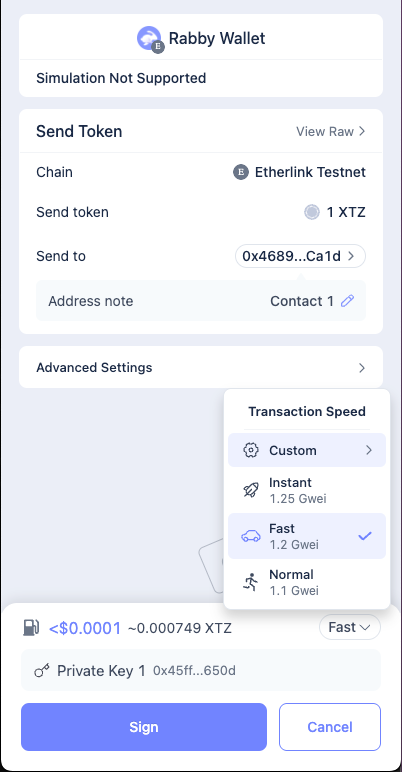
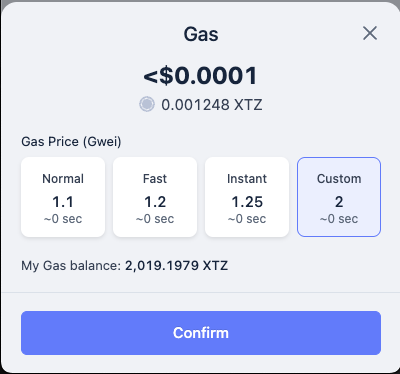
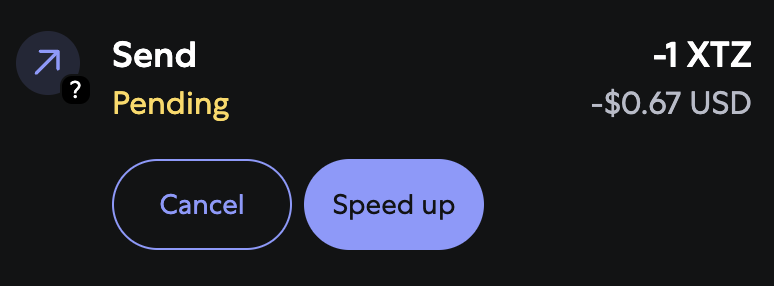
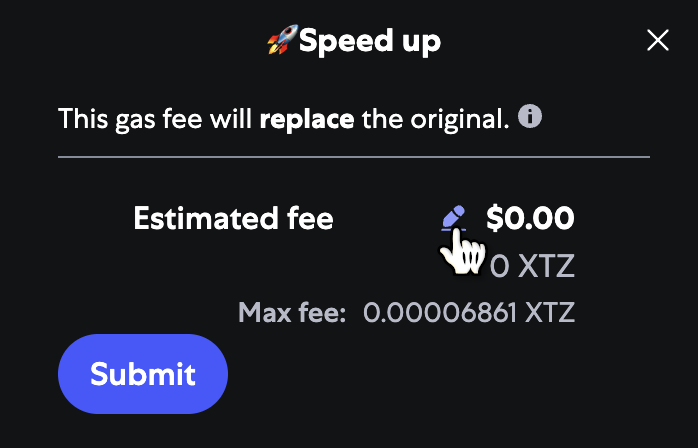
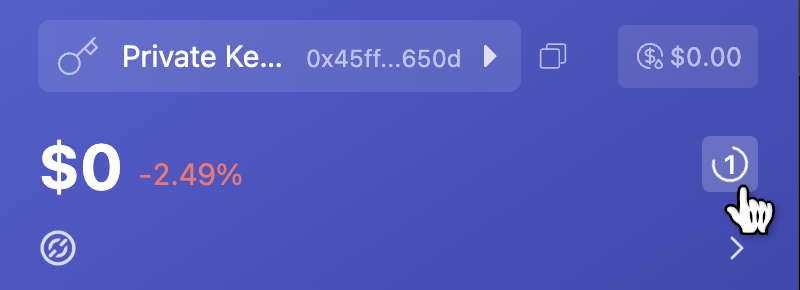
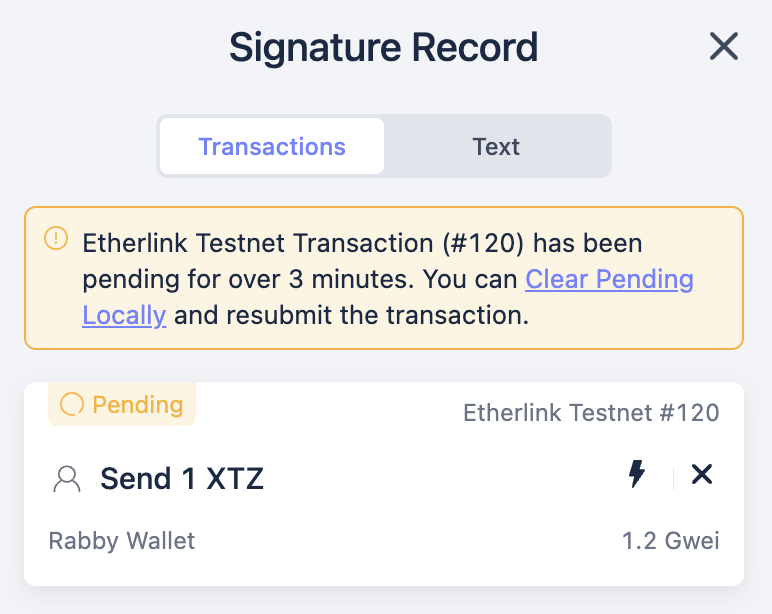
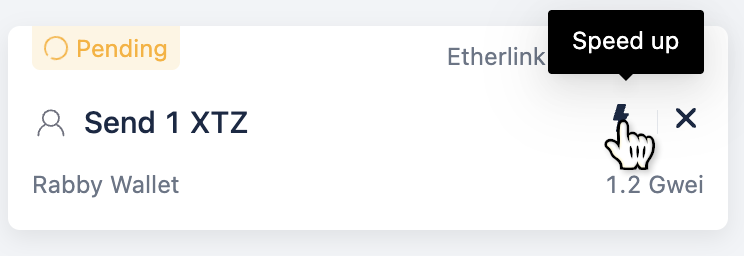
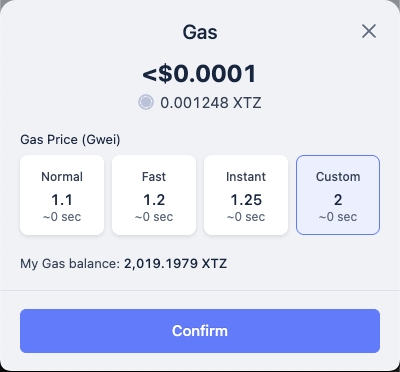
Bridge name Description Mainnet link Shadownet Testnet link
Tezos bridge Bridges XTZ and approved FA tokens from Tezos layer 1 to Etherlink EVM and back Mainnet Shadownet Testnet
EVM bridge Bridges assets from EVM chains to wrapped assets on Etherlink EVM and back Mainnet Shadownet Testnet
## Third-party bridges These third-party bridges are also available: - [Stargate](https://stargate.finance/bridge?dstChain=etherlink) [The Etherlink EVM bridge](https://bridge.etherlink.com/evm) is a web application that allows you to transfer wrapped tokens between Etherlink EVM and several other EVM-compatible blockchain networks. URL: https://docs.etherlink.com/evm/bridging/bridging-evm The EVM bridge supports connections from Etherlink EVM to these networks: - Ethereum - Avalanche C-Chain - Arbitrum One - Optimism - Base - BNB Chain It allows users to transfer several wrapped tokens, including: - USDT - USDC - WBTC - WETH - WAVAX - WBNB - SHIB For the Etherlink EVM addresses of these tokens, see [Token addresses](#token-addresses). Etherlink EVM's LayerZero bridge infrastructure also supports a number of tokens that meet their [Omnichain Fungible Token (OFT)](https://docs.layerzero.network/v2/developers/evm/oft/quickstart) standard. The token addresses for OFTs that can be transferred between Etherlink EVM and other networks (including WXTZ) can be retrieved from the [LayerZero API](https://docs.layerzero.network/v2/tools/api/oft), or are listed [here](#token-addresses). ## Bridge security The bridge uses the decentralized smart contracts of [LayerZero](https://layerzero.network/) that are deployed on the supported EVM networks without the intervention of a third party. It also relies on the EVM node and sequencer operators that secure Etherlink itself; these operators are listed in [Network operators](/network/operators). ## Using the EVM bridge For a video walkthrough of the bridge, see [this video](https://www.loom.com/share/6a1bb548a5c7439fafdb328b4785adca). ![Overview of the EVM bridge](/img/wab-details.png) 1. Go to the Etherlink EVM bridge at https://bridge.etherlink.com/evm. 1. Click the **Connect** button and connect your EVM wallet. 1. Select the source network from which to bridge tokens to Etherlink EVM, or select Etherlink EVM as the source network to bridge tokens out of Etherlink EVM. 1. Next to the source network, click the source token and select the token to transfer from the source network. The interface shows all bridgeable tokens across all available networks and your token balances. 1. Enter the number of tokens to bridge out of the source network. 1. Select the target network and token. The page shows the amount of tokens that you will receive on the target chain and the fees for the token transfer in the native gas token of the source chain. **You must ensure that you have enough tokens on the source chain to pay the fees.** 1. Set the other parameters for the transfer, including the **Gas on destination** and **Slippage tolerance** fields. :::note[Gas on destination] Interacting with Etherlink EVM requires XTZ (its native token) to pay for gas fees. As part of your bridging transaction, you can choose to send up to 0.1 XTZ to your Etherlink EVM wallet address to pay for fees for later transactions and interact with the Etherlink EVM ecosystem. The cost of this XTZ is added to the fees that you pay for the transfer. By default, the bridge adds 0.1 XTZ if the destination account has no XTZ. ::: 1. To make the transfer, click **Transfer** and confirm the transfer in your wallet. The bridge shows a popup with a link to [LayerZero Scan](https://layerzeroscan.com/) where you can observe the progress of the bridge transaction and see an estimated time to completion. When the status changes to "completed" (or "delivered") the tokens are in your EVM account. If you don't see the tokens, you may need to import the token into your wallet on the destination network. For that, in the LayerZero page for your transaction, note the address of the "Destination Omnichain Application". Then in your Temple wallet: - Enable the target chain if needed, from the wallet Settings, section Networks. - Click on the Settings icon right above the list of tokens you own, then choose "Add token" and enter the token address you noted. ## Troubleshooting The transfer button can show these errors: - **Insufficient Balance** You entered a higher amount of tokens than you hold in your account. Reduce the amount you want to transfer or add more tokens to your wallet. - **Not Enough Native for Gas** You must own more gas on the source chain to pay the required fees. Send more of the source chain's native gas token to your wallet. - **Select Different Chain** The source and destination chains are not compatible. This bridge is for moving tokens in and out of Etherlink EVM, not for moving tokens between other networks. - **Transfer Cap Reached** The bridge cannot transfer the amount of tokens that you have selected. Select a smaller amount to transfer. This error can occur for bridgeable tokens that exist on multiple networks (ETH/WETH, USDT and USDC). For example, if the bridge contract on Avalanche has 100 USDT, you can transfer no more than 100 USDT from Etherlink EVM to Avalanche. For further support, visit the [LayerZero Discord](https://discord.gg/ktbvm8Nkcr). If you have general questions about Etherlink, we welcome you to join the [Etherlink Discord Community](https://discord.com/invite/etherlink). ## Token addresses :::note Not all Etherlink EVM tokens can be bridged to and from other chains. See the bridge UI for the tokens that the bridge supports for each chain. ::: ### Etherlink EVM This table shows the Etherlink EVM address of some of the tokens you can bridge between Etherlink EVM and certain other chains:
Symbol Name Mainnet address
USDC USD Coin
USDT Tether USD
WBTC Wrapped BTC
WETH Wrapped Ether
WBNB Wrapped BNB
WAVAX Wrapped AVAX
SHIB SHIBA INU
### Other networks These tables show the addresses of the equivalent tokens on other networks:
Symbol Name Mainnet address
USDC USD Coin
USDT Tether USD
WBTC Wrapped BTC
WETH Wrapped Ether
SHIB SHIBA INU
Name Symbol Mainnet address
USDC USD Coin
USDT Tether USD
WBTC Wrapped BTC
WETH Wrapped Ether
Name Symbol Mainnet address
USDC USD Coin
WETH Wrapped Ether
Name Symbol Mainnet address
USDC USD Coin
USDT Tether USD
WETH Wrapped Ether
Name Symbol Mainnet address
USDC USD Coin
USDT Tether USD
WBNB Wrapped BNB
Name Symbol Mainnet address
USDC USD Coin
USDT Tether USD
WAVAX Wrapped AVAX
## How bridging wrapped assets works The Etherlink EVM bridge uses a [wrapped asset bridge](https://github.com/LayerZero-Labs/wrapped-asset-bridge) created by [LayerZero](https://layerzero.network/). It works by maintaining liquidity pools on other networks and minting equivalent tokens on Etherlink EVM. When you bridge tokens from other networks to Etherlink EVM, the bridge contracts lock the tokens in a liquidity pool on the source network, send a message over LayerZero's software to Etherlink EVM, and mint tokens on Etherlink EVM. When you bridge tokens out of Etherlink EVM, the contracts burn the tokens on Etherlink EVM and unlock them in the liquidity pool on the target network. Therefore, bridging tokens out of Etherlink EVM is dependent on the liquidity pool on the target chain. LayerZero also maintains EVM nodes to verify that the transactions complete on Etherlink EVM. This diagram shows how the EVM bridge works: CLIENTS User's EVM wallet Wrapped asset bridge web app OTHER EVM CHAINS Wrapped asset bridge contracts LAYERZERO LayerZero relayer HIGH-LATENCY NODE Etherlink EVM node Etherlink Smart Rollup node ETHERLINK Wrapped asset bridge contracts use app, sign txs tokens transactions tokens transactions transactions transactions verify L1 finality trusts only layer-1-final state {/* https://lucid.app/lucidchart/cac80916-85c8-455d-b50b-f265057dcc1b/edit */} For more information, see the repository for the bridge: https://github.com/LayerZero-Labs/wrapped-asset-bridge. ## Bridge contract addresses The verified contract code, ABI and historic transactions for the wrapped asset bridge on each supported network can be viewed at the following links. Developers can integrate these contracts into their own cross-chain bridge if required.
Network Mainnet contract address
Etherlink EVM
Ethereum
Arbitrum One
Base
Optimism
BNB Chain
Avalanche C-Chain
## LayerZero endpoints for OFTs LayerZero uses these contracts to connect Etherlink EVM to its network for tokens that meet their Omnichain Fungible Token (OFT) standard. For more information, see [Deployed Endpoints, Message Libraries, and Executors](https://docs.layerzero.network/v2/deployments/deployed-contracts?chains=etherlink).
Contract Contract address
endpointV2
sendUln302
receiveUln302
blockedMessageLib
executor
Contract Contract address
endpointV2
sendUln302
receiveUln302
blockedMessageLib
executor
## Related tools and information - For information about pending transactions, see the [LayerZero Cross Chain Explorer](https://layerzeroscan.com/). - For information about Etherlink EVM transactions, see the [Etherlink EVM block explorer](https://explorer.etherlink.com/). - More Information about the LayerZero protocol is available in their [official documentation](https://docs.layerzero.network/). - The audit reports of the LayerZero protocol are available in this [LayerZero GitHub Repository](https://github.com/LayerZero-Labs/LayerZero/tree/main/audit). - To review the open source code of the EVM bridge, visit the [LayerZero Github Repository](https://github.com/LayerZero-Labs/wrapped-asset-bridge). You can bridge XTZ tokens from Tezos layer 1 to Etherlink EVM and back. URL: https://docs.etherlink.com/evm/bridging/bridging-tezos XTZ is the native token on Etherlink EVM and Tezos, which is called tez and shown on price tickers with the symbol [XTZ](https://coinmarketcap.com/currencies/tezos/). Two bridging operations are available: - Bridging tokens from Tezos layer 1 to Etherlink EVM is referred to as _depositing_ tokens. - Bridging tokens from Etherlink EVM to Tezos layer 1 is referred to as _withdrawing_ tokens. Both operations rely on automated, transparent, and audited smart contracts installed on Etherlink EVM and Tezos. These bridges are permissionless, meaning that anyone can use them without restrictions or the intervention of a third party. They are also trustless, meaning that they rely on automated, transparent, and audited smart contracts installed on Etherlink and Tezos. - [Mainnet XTZ bridge](https://bridge.etherlink.com/tezos) - [Shadownet Testnet XTZ bridge](https://shadownet.bridge.etherlink.com/tezos) The explorer at https://bridge.explorer.etherlink.com shows bridging transactions between Tezos Mainnet and Etherlink Mainnet. ## Using the bridge To use the bridge, follow these general steps: 1. Go to the bridge at https://bridge.etherlink.com/tezos for Mainnet or https://shadownet.bridge.etherlink.com/tezos for Shadownet Testnet. 1. Connect your Tezos and Etherlink EVM-compatible wallets. 1. At the top of the page, select the source token and network. 1. Below the source token, select the target token and network. 1. Enter the amount of tokens to transfer. 1. For withdrawals, select whether to use fast withdrawals for an additional fee. For more information about fast withdrawals, see [Fast withdrawals](#fast-withdrawals). 1. Click **Transfer**. ## How bridging XTZ works The process of bridging XTZ between Etherlink EVM and Tezos layer 1 uses two contracts on Tezos layer 1: - A bridge contract that accepts deposits and sends them to be exchanged. This bridge contract is not a fundamental part of the bridge; it is a helper contract that avoids limitations around tickets by forwarding them to the Etherlink Smart Rollup on behalf of user accounts. - The source code of this contract is in [`evm_bridge.mligo`](https://gitlab.com/tezos/tezos/-/blob/master/etherlink/tezos_contracts/evm_bridge.mligo). - This contract is deployed to Shadownet Testnet at [`KT19aBsSWvWtvEkbiqReJnD8UzQMWcD8SHUD`](https://shadownet.tzkt.io/KT19aBsSWvWtvEkbiqReJnD8UzQMWcD8SHUD/). - This contract is deployed to Mainnet at [`KT1Wj8SUGmnEPFqyahHAcjcNQwe6YGhEXJb5`](https://tzkt.io/KT1Wj8SUGmnEPFqyahHAcjcNQwe6YGhEXJb5/). - An exchanger contract that stores the tokens and issues tickets that represent those tokens. This contract is a fundamental part of the bridging process because Etherlink EVM accepts tickets from only this contract for the purpose of bridging XTZ. - The source code of this contract is in [`exchanger.mligo`](https://gitlab.com/tezos/tezos/-/blob/master/etherlink/tezos_contracts/exchanger.mligo). - This contract is deployed to Shadownet Testnet at [`KT1JYZsawXmeArts18nn4uT79tUJc4AGTYgc`](https://shadownet.tzkt.io/KT1JYZsawXmeArts18nn4uT79tUJc4AGTYgc/). - This contract is deployed to Mainnet at [`KT1CeFqjJRJPNVvhvznQrWfHad2jCiDZ6Lyj`](https://tzkt.io/KT1CeFqjJRJPNVvhvznQrWfHad2jCiDZ6Lyj/). ### Deposit process The deposit process (moving tez from layer 1 to Etherlink EVM) follows these general steps: 1. A Tezos user sends a request to the layer 1 bridge contract's `deposit` entrypoint. The request includes the tez to bridge, the address of the Etherlink Smart Rollup, and the user's Etherlink EVM wallet address. 1. The bridge contract stores the address of the Etherlink Smart Rollup temporarily. 1. It sends the tez in a transaction to the exchanger contract's `mint` entrypoint. 1. The exchanger contract stores the tez and creates a [ticket](https://docs.tezos.com/smart-contracts/data-types/complex-data-types#tickets) that represents the receipt of the tokens. 1. The exchanger contract sends the ticket to the bridge contract's `callback` entrypoint. 1. The bridge contract forwards the ticket to the Smart Rollup inbox and clears its storage for the next transfer. 1. Etherlink Smart Rollup nodes receive the deposit transaction from the Smart Rollup inbox. 1. The Smart Rollup nodes put the deposit transaction in the delayed inbox. 1. The sequencer requests the state of Etherlink from a Smart Rollup node and receives the delayed inbox. 1. The sequencer creates a corresponding transaction on Etherlink EVM to transfer XTZ from the [null address](https://explorer.etherlink.com/address/0x0000000000000000000000000000000000000000) to the user's address. 1. Depending on the target account, the sequencer handles the deposit in different ways: - If the target account is a user account (also known as an externally owned account), the sequencer creates a transaction that calls the [XTZ bridge precompiled contract](https://explorer.etherlink.com/address/0xff00000000000000000000000000000000000001) (`0xff0...0001`) that transfers the XTZ to the user account. - If the target account is a smart contract or EIP-7702 smart account, the sequencer calls the XTZ bridge precompiled contract to queue but not execute a transaction to transfer the XTZ. Then, any user can call the `claim` function to execute the transaction and send the XTZ to the smart contract or smart account and call its code. An automated system run by Optimistic Labs monitors the queued transactions and calls the `claim` function on behalf of depositors, so the process is transparent to bridge users. This diagram is an overview of the deposit process: CLIENTS User's Tezos wallet User's EVM wallet TEZOS LAYER 1 Bridge contract Exchanger contract ETHERLINK Kernel 1 send transaction: - amount of tez - user's Etherlink address - Smart Rollup address 2 send tez 3 lock tez, create ticket 4 send ticket 5 send via the Smart Rollup inbox: - ticket - user's Etherlink address 6 send tez on Etherlink ### Withdrawal process The withdrawal process (moving XTZ from Etherlink EVM to tez on Tezos layer 1) follows these general steps: 1. An Etherlink EVM user sends XTZ and their layer 1 address to the [XTZ precompiled contract](https://explorer.etherlink.com/address/0xff00000000000000000000000000000000000001) in the Etherlink Smart Rollup via an EVM node. 1. The contract locks the XTZ. 1. The contract creates a transaction to the exchanger contract's `burn` entrypoint and puts this transaction in the Smart Rollup outbox. This outbox message becomes part of Etherlink's commitment to its state. 1. When the commitment that contains the transaction is cemented on layer 1, anyone can run the transaction by running the Octez client `execute outbox message` command. 1. The exchanger contract receives the ticket, burns it, and sends the equivalent amount of tez to the user's layer 1 address. This diagram is an overview of the withdrawal process: CLIENTS User's Tezos wallet Octez client anyone can run it User's EVM wallet TEZOS LAYER 1 Exchanger contract Smart Rollup outbox ETHERLINK Withdrawal precompile 0xff00…0001 1 send transaction: - amount of tez - user's layer 1 address 2 store tez, create ticket 3 include in commitment: (ticket, user's layer 1 address) 4 trigger outbox message after the commitment is cemented (~2 weeks) 5 call burn entrypoint: (ticket, layer 1 address) 6 unlock tez, destroy ticket 7 send tez ### Fast withdrawals As described above, normal withdrawals from Etherlink EVM to Tezos take about 15 days. You can receive your XTZ faster by selecting the fast withdrawal option on the bridge. In this case, you receive your XTZ within 1 minute, minus a percentage as a fee. Fast withdrawals build on the standard withdrawal process between Etherlink EVM and Tezos, using built-in protocol support and smart contracts on both networks without requiring third-party services. Internally, when you make a fast withdrawal, a liquidity provider on Tezos layer 1 sends you the XTZ that you are withdrawing minus the fee. The liquidity provider receives your withdrawn XTZ after the usual 15-day delay. The liquidity provider gets to keep the fee in exchange for the expenses of providing your funds earlier, running systems to watch for fast withdrawal requests, and taking the risk of providing your funds when the commitment that includes the withdrawal is not cemented yet. They can use the bridge to verify that they will receive the withdrawn funds when the commitment containing that transaction state has been cemented on Tezos. ### Fast withdrawal process The process for fast withdrawals is different than for standard withdrawals: 1. An Etherlink EVM user submits a withdrawal transaction to the fast withdrawal precompiled contract instead of the standard withdrawal precompiled contract. 1. As in the standard withdrawal process, the fast withdrawal precompiled contract locks the Etherlink EVM XTZ and puts a message in the Smart Rollup outbox that represents those tokens. However, instead of sending the withdrawn tokens directly to the user's Tezos layer 1 account, it sends them to a fast withdrawal contract on layer 1. 1. Liquidity providers monitor the Smart Rollup outbox and when they detect fast withdrawal requests with favorable rates, they call the layer 1 contract to claim the fast withdrawal. This request includes information from the event and the withdrawn tez minus the fee. 1. The fast withdrawal contract forwards the withdrawn tez to the user's account and marks the fast withdrawal fulfilled. 1. When the commitment that includes the withdrawn tokens is cemented, the fast withdrawal contract sends the withdrawn tez to the liquidity provider. Liquidity providers usually claim the fast withdrawal within 1 minute. However, if no liquidity providers claim the fast withdrawal within 1 day, the fast withdrawal expires and no liquidity providers can claim it. In this case, the fast withdrawal contract waits until the commitment is cemented and sends the withdrawn tokens to the user account without deducting a fee. You can bridge FA standards-compliant tokens in and out of Etherlink EVM by deploying contracts that move the tokens. URL: https://docs.etherlink.com/evm/bridging/bridging-fa Then you can create dApps that use these contracts to move tokens or send a request to the Etherlink team to add your tokens to the bridge at https://bridge.etherlink.com/tezos. The Tezos FA standards are token standards like the Ethereum ERC-20, ERC-721, and ERC-1155 standards. For more information about the FA standards, see [Token standards](https://docs.tezos.com/architecture/tokens#token-standards) on docs.tezos.com. Two bridging operations are available: - Bridging tokens from Tezos layer 1 to Etherlink EVM is referred to as _depositing_ tokens. Depositing an FA token locks it in a contract on layer 1 and mints an equivalent ERC-20 token on Etherlink EVM. - Bridging tokens from Etherlink EVM to Tezos layer 1 is referred to as _withdrawing_ tokens. Withdrawing an FA token burns the ERC-20 token on Etherlink EVM and unlocks the equivalent token on Tezos layer 1. Like the bridge that transfers XTZ tokens (see [Bridging XTZ between Tezos layer 1 and Etherlink EVM](/evm/bridging/bridging-tezos)), the FA bridge is permissionless, meaning that anyone can use it without restrictions or the intervention of a third party. It is also trustless, meaning that it relies on automated, transparent, and audited smart contracts installed on Etherlink EVM and Tezos. The explorer at https://bridge.explorer.etherlink.com shows bridging transactions between Tezos Mainnet and Etherlink Mainnet. For information about how FA token bridging works, see [How bridging FA tokens works](/evm/bridging/bridging-fa-how). ## Configuring a token for bridging You can configure any FA1.2 or FA2 token for bridging by deploying the necessary contracts. You can use this tool to simplify the process by deploying the contracts for a single token: https://github.com/baking-bad/etherlink-bridge. Setting up a token for bridging in this way does not make it appear on the Etherlink EVM bridge web site. You must deploy and operate the FA bridge contracts yourself as described in [Sending FA bridging transactions](/evm/bridging/bridging-fa-transactions). ## Adding an FA token to the bridge UI You can set up your own UI to call the bridging contracts using any Tezos and EVM clients. You can also send a request to the Etherlink team to add your token to the bridge UI at https://bridge.etherlink.com/tezos. To request that your FA token be added to the bridge UI, fill out this request form: https://tt-tezos.typeform.com/to/qHTs7IUD. The form requires information about the token and the bridging contracts: - The address of the FA token contract on Tezos - The address of the ticketer contract on Tezos - The address of the token bridge helper contract on Tezos - The address of the ERC-20 proxy contract on Etherlink EVM - CoinMarketCap URL for the token - The name of the token - The ticker symbol for the token - The number of decimal places used in the token quantity - An icon for the token - The Twitter user name of the token creator - A contact email address for follow-up questions You can get information about the bridging contracts from the response messages from the [bridging tool](https://github.com/baking-bad/etherlink-bridge) and from block explorers. After you submit the form, the team that manages the Etherlink EVM bridge UI reviews it and adds it to the UI if they approve it. The token must be listed at CoinMarketCap as an additional condition of approval. The process of bridging FA tokens is similar to the process of bridging tez. URL: https://docs.etherlink.com/evm/bridging/bridging-fa-how In short, the bridge uses tickets to send tokens from the source network to the target network. ## Contracts The bridging process relies on smart contracts that convert tokens to [tickets](https://docs.tezos.com/smart-contracts/data-types/complex-data-types#tickets) and transfer the tickets between Tezos and Etherlink EVM. These contracts are an implementation of the [TZIP-029](https://gitlab.com/baking-bad/tzip/-/blob/wip/029-etherlink-token-bridge/drafts/current/draft-etherlink-token-bridge/etherlink-token-bridge.md) standard for bridging between Tezos and Etherlink EVM. Each FA token needs its own copy of these contracts to be able to bridge the token: - **Ticketer contract**: Stores tokens and issues tickets that represent them - **Token bridge helper contract**: Accepts requests to bridge tokens on layer 1, uses the ticketer contract to get tickets for them, and sends the tickets to Etherlink EVM - **ERC-20 proxy contract**: Stores tickets and mints ERC-20 tokens that are equivalent to the FA tokens in layer 1 You can run these transactions using the bridge, as described in [Bridging FA tokens between Tezos layer 1 and Etherlink EVM](/evm/bridging/bridging-fa). For information about how to run these transactions without using the bridge, see [Sending FA bridging transactions](/evm/bridging/bridging-fa-transactions). Examples of these contracts and tools to deploy them are available in the repository https://github.com/baking-bad/etherlink-bridge. ## Depositing tokens from layer 1 to Etherlink EVM The process of bridging FA-compatible tokens from layer 1 to Etherlink EVM (also known as depositing tokens) follows these general steps: 1. A Tezos user gives the token bridge helper contract access to their tokens. - For FA1.2 tokens, the user gives the helper contract an allowance of tokens. - For FA2 tokens, the user makes the helper contract an operator of their tokens. For information about token access control, see [Token standards](https://docs.tezos.com/architecture/tokens#token-standards) on docs.tezos.com. 1. The user calls the helper contract's `deposit` entrypoint. The request includes the amount of tokens to bridge, the address of the Etherlink Smart Rollup, and the user's Etherlink EVM wallet address, but not the tokens themselves. 1. The token bridge helper contract stores the address of the Etherlink Smart Rollup and the user's Etherlink EVM address temporarily. 1. The helper contract (as an operator of the user's tokens or with an allowance of the user's tokens) calls the token contract to transfer the tokens from the user's account to its account. 1. The helper contract calls the ticketer contract's `deposit` entrypoint and includes the tokens. 1. The ticketer contract stores the tokens and creates a [ticket](https://docs.tezos.com/smart-contracts/data-types/complex-data-types#tickets) that represents the receipt of the tokens. 1. The ticketer contract sends the ticket back to the helper contract. 1. The helper contract forwards the ticket to the Smart Rollup inbox and clears its storage for the next transfer. 1. The Etherlink Smart Rollup kernel receives the ticket and puts it and information about it (including the addresses of the proxy contract and the user's Etherlink EVM wallet address) in the delayed inbox. 1. The sequencer reads the ticket and information about it from the delayed inbox, leaves the ticket in control of the Smart Rollup itself, and calls the null address precompiled contract (`0x000...000`) with the information. 1. The null address precompile sends the information about the deposit to the FA bridging precompiled contract (`0xff0...0002`), which then emits a `QueuedDeposit` event which contains the `depositId` information needed to complete the transfer. 1. Any user can call the FA bridging precompiled contract's `claim` function, which causes the contract to call the ERC-20 proxy contract. For tokens supported by the bridge, an automated program calls the `claim` function for you. 1. The ERC-20 proxy contract mints the equivalent tokens and sends them to the user's Etherlink EVM account. This diagram is an overview of the process of bridging tokens from layer 1 to Etherlink EVM: CLIENTS User's Tezos wallet Any user User's EVM wallet TEZOS LAYER 1 FA token contract Ticketer contract Token bridge helper contract Smart Rollup inbox Delayed inbox forced inclusion ETHERLINK Sequencer Null precompile 0x0000…0000 FA bridging precompile 0xff00…0002 ERC-20 proxy contract 1 allow access 2 send transaction: - amount to bridge - user's Etherlink address - Smart Rollup address 3 transfer tokens 4 send tokens 5 send ticket lock tokens, create ticket 6 ticket + data 7 receive information 8 send info 9 claim tokens 10 send info mint 11 send tokens ## Withdrawing tokens from Etherlink EVM to layer 1 The process of bridging FA-compatible tokens from Etherlink EVM to layer 1 (also known as withdrawing tokens) follows these general steps: 1. The user calls the FA bridging precompiled contract on Etherlink EVM and includes this information: - The address of the ERC-20 proxy contract that manages the tokens - The user's layer 1 address or the address of a contract to send the tokens to - The amount of tokens to bridge - The address of the ticketer contract on layer 1 - The content of the ticket to remove from the proxy contract (not the ticket itself) 1. The precompiled contract calls the withdrawal endpoint of the ERC-20 proxy contract. 1. The proxy contract sends the information about the withdrawal to the helper contract by putting it in a transaction in the Smart Rollup outbox. This transaction includes the target layer 1 address. This outbox message becomes part of Etherlink's commitment to its state. 1. When the commitment that contains the transaction is cemented on layer 1, anyone can run the transaction by running the Octez client `execute outbox message` command. 1. The helper contract receives the ticket and the target layer 1 address from the outbox message and forwards them, unchanged, to the ticketer contract's `withdraw` entrypoint. 1. The ticketer contract verifies and burns the ticket and sends the tokens directly to the target layer 1 address. This diagram is an overview of the process of bridging tokens from Etherlink EVM to layer 1: CLIENTS User's Tezos wallet Any user via an Octez client User's EVM wallet TEZOS LAYER 1 Ticketer contract Token bridge helper contract Smart Rollup outbox ETHERLINK FA bridging precompile 0xff00…0002 ERC-20 proxy contract 1 send transaction: - amount - layer 1 address - ticket & contract info 2 burn tokens 3 queue outbox message 4 trigger outbox message after the commitment is cemented (~2 weeks) 5 send ticket 6 forward ticket burn ticket, unlock tokens 7 send tokens Because the contracts that control bridging FA tokens follow the [TZIP-029](https://gitlab.com/baking-bad/tzip/-/blob/wip/029-etherlink-token-bridge/drafts/current/draft-etherlink-token-bridge/etherlink-token-bridge.md) standard, the transactions to bridge tokens are the same for any token. URL: https://docs.etherlink.com/evm/bridging/bridging-fa-transactions ## Depositing FA tokens from layer 1 to Etherlink EVM It takes a few transactions to bridge a token from layer 1 to Etherlink EVM: - A transaction to give the token bridge helper contract access to the tokens - A transaction to initiate the deposit - A transaction to claim the tokens on Etherlink EVM This process is similar to the process of depositing XTZ tokens, as described in [Bridging to Tezos](/evm/bridging/bridging-tezos). Follow these steps to deposit FA-compliant tokens from layer 1 to Etherlink EVM: 1. Give the token bridge helper contract access to the tokens, depending on the type of token: - For FA1.2 tokens, give the token bridge helper contract an allowance for the number of tokens to deposit. You can submit this transaction with any Tezos client. For example, this Octez client command sets the contract's allowance to 5 tokens: ```bash octez-client --wait none transfer 0 from my_wallet \ to KT1SekNYSaT3sWp55nhmratovWN4Mvfc6cfQ \ --entrypoint "approve" \ --arg "Pair \"KT1K8od35rJtmQuTUeWbWMa9ciHGTpKjPaqx\" 5" \ --burn-cap 0.1 ``` In this example, `KT1SekNYSaT3sWp55nhmratovWN4Mvfc6cfQ` is the address of the token contract and `KT1K8od35rJtmQuTUeWbWMa9ciHGTpKjPaqx` is the address of the token bridge helper contract. - For FA2 tokens, make the token bridge helper contract an operator of the token to deposit. You can submit this transaction with any Tezos client, including on many block explorers. For example, this Octez client command makes the token bridge helper contract `KT1PaqqmLgyUKyrWQG9tP57rt6tag8nGSrMh` an operator of the token with the ID 0 on the FA2 contract `KT1N5CWnvabCM71eBmzEhotnQX3eciLLyv8v`: ```bash octez-client --wait none transfer 0 from my_wallet \ to KT1N5CWnvabCM71eBmzEhotnQX3eciLLyv8v \ --entrypoint "update_operators" \ --arg "{ Left (Pair \"tz1QCVQinE8iVj1H2fckqx6oiM85CNJSK9Sx\" (Pair \"KT1PaqqmLgyUKyrWQG9tP57rt6tag8nGSrMh\" 0)) }" \ --burn-cap 0.1 ``` 1. Call the token bridge helper's `deposit` entrypoint and pass the address of the Etherlink Smart Rollup and the address of the Etherlink EVM account to send the tokens to, as in this example: ```bash octez-client --wait none transfer 0 from my_wallet \ to KT1K8od35rJtmQuTUeWbWMa9ciHGTpKjPaqx \ --entrypoint "deposit" \ --arg "Pair \"sr18wx6ezkeRjt1SZSeZ2UQzQN3Uc3YLMLqg\" (Pair 0x45Ff91b4bF16aC9907CF4A11436f9Ce61BE0650d 2)" \ --burn-cap 0.1 ``` The token bridge helper contract sends the tokens to the ticketer contract, which issues a ticket that represents the tokens. The token bridge helper contract sends that ticket to Etherlink EVM. 1. When the deposit is in an Etherlink EVM block, call the FA bridging precompiled contract contract's `claim` function to cause the ERC-20 proxy contract to mint the tokens. The address of the precompiled contract is `0xff00000000000000000000000000000000000002` and to call the function you can use the ABI `claim(uint256 depositId)`, where `depositId` matches the `depositId` that was emitted in a previous event for this transfer by the precompile (`QueuedDeposit(uint256 depositId, address recipient, uint256 amount, uint256 timelock, uint256 depositCount)`). As a reference, here is an [example of the sequencer injecting a deposit](https://explorer.etherlink.com/tx/0x5a06fe64e880d6d1f53c243477cd5656204712f1543b607340996ad246158669) and here is an [example of the corresponding claim transaction](https://explorer.etherlink.com/tx/0xe017665cd7bfdef375a863114ac9f7ed2538da4d8584b0f1e0aa71ce96342aee). The precompiled contract sends information about the deposit to the ERC-20 proxy contract, which mints the tokens and sends them to the Etherlink EVM account. :::note An automated system run by Optimistic Labs calls the `claim` function on behalf of depositors of XTZ and FA tokens that are supported by the FA bridge. If that system is down or does not call the `claim` function for your deposit, you may need to do it yourself. ::: To see the tokens in your Etherlink EVM wallet, look up the ERC-20 proxy contract in a block explorer or use its address to manually add the tokens to your wallet. Because the Etherlink EVM tokens are compatible with the ERC-20 standard, EVM-compatible wallets should be able to display them. ## Withdrawing FA tokens from Etherlink EVM to layer 1 It takes two transactions to withdraw an FA token back to layer 1: one to initiate the withdrawal and another to run the outbox transaction on Tezos layer 1. As described in [Bridging FA tokens](/evm/bridging/bridging-fa), you must wait for the two-week Smart Rollup refutation period before running the outbox transaction (withdrawals complete in about 15 days end to end). Normally, an automated system run by Optimistic Labs runs these outbox transactions as soon as the refutation period is over, which sends the withdrawn tez to the layer 1 account. However, pending outbox transactions expire after a period equal to the refutation period. Therefore, if the system that runs these outbox transactions is down for two weeks after the refutation period ends, the transactions may be lost. Neither of these transactions are easy to do by yourself. Initiating the withdrawal requires sending complex information about the ticket and contracts to the FA2 withdrawal precompile on Etherlink EVM. Running the outbox transaction requires you to know the level of the Etherlink commitment that contains it in order to get its proof and commitment, and there is no easy way to get that information without using an indexer to check each level for the transaction. The command-line tool at https://github.com/baking-bad/etherlink-bridge provides commands that can help with the withdrawal transactions. # Compatibility with Ethereum URL: https://docs.etherlink.com/evm/developing/compatibility The EVM Interface targets compatibility with the Ethereum ecosystem: - Supports the **Ethereum JSON-RPC** standard - Supports standard EVM opcodes and precompiles - Compatible with tooling such as MetaMask, ethers.js, viem, Hardhat, and Foundry ## Differences between Etherlink EVM and Ethereum While Etherlink EVM is intended to be fully EVM-compatible, it differs in some ways: - As described in [Ethereum endpoint support](/evm/developing/endpoint-support), Etherlink EVM does not support all EVM RPC endpoints. - Etherlink EVM calculates gas fees differently; see [Fee structure](/evm/developing/fees). - Etherlink EVM computes the state world hash with a different function than Ethereum uses. Therefore it is not compatible with EVM "light clients" that compute states in the way that Ethereum does, with the `Keccak-256` hash function. Therefore, Etherlink EVM is not compatible with EVM light-client implementations that use this hash function, such as Geth's light client and OpenEthereum. - Etherlink EVM computes block hashes in a custom way, not including every header field. Therefore, you cannot compute Etherlink EVM block hashes with tools such as Geth. EVM nodes use [Geth](https://geth.ethereum.org/) to provide access to both standard Ethereum RPC endpoints and Geth-specific RPC endpoints. URL: https://docs.etherlink.com/evm/developing/endpoint-support These tables list these endpoints and whether Etherlink EVM supports them: ## Standard Ethereum endpoints For information about these endpoints, see [JSON-RPC API](https://ethereum.org/en/developers/docs/apis/json-rpc) and the [Ethereum JSON-RPC Specification](https://ethereum.github.io/execution-apis/) in the Ethereum documentation.
Endpoint Supported Notes
`debug_getBadBlocks` No
`debug_getRawBlock` No
`debug_getRawHeader` No
`debug_getRawReceipts` No
`debug_getRawTransaction` No
`debug_traceBlockByNumber` Yes
`engine_exchangeCapabilities` No
`engine_exchangeTransitionConfigurationV1` No
`engine_forkchoiceUpdatedV1` No
`engine_forkchoiceUpdatedV2` No
`engine_forkchoiceUpdatedV3` No
`engine_getPayloadBodiesByHashV1` No
`engine_getPayloadBodiesByHashV2` No
`engine_getPayloadBodiesByRangeV1` No
`engine_getPayloadBodiesByRangeV2` No
`engine_getPayloadV1` No
`engine_getPayloadV2` No
`engine_getPayloadV3` No
`engine_getPayloadV4` No
`engine_newPayloadV1` No
`engine_newPayloadV2` No
`engine_newPayloadV3` No
`engine_newPayloadV4` No
`eth_accounts` Yes This endpoint always returns an empty list because the EVM node does not manage any addresses
`eth_blobBaseFee` No
`eth_blockNumber` Yes
`eth_call` Yes EVM nodes use the standard Ethereum version of the `eth_call` endpoint instead of the Geth version; see [Sending transactions](/evm/developing/transactions)
`eth_chainId` Yes
`eth_coinbase` Yes
`eth_createAccessList` No
`eth_estimateGas` Yes See [Sending transactions](/evm/developing/transactions)
`eth_feeHistory` Yes
`eth_gasPrice` Yes
`eth_getBalance` Yes
`eth_getBlockByHash` Yes
`eth_getBlockByNumber` Yes Note that Etherlink EVM uses a nonstandard way of computing block hashes, so you cannot use the header information from the `eth_getBlockByNumber` endpoint to compute the block hash.
`eth_getBlockReceipts` Yes
`eth_getBlockTransactionCountByHash` Yes
`eth_getBlockTransactionCountByNumber` Yes
`eth_getCode` Yes
`eth_getFilterChanges` No
`eth_getFilterLogs` No
`eth_getLogs` Yes See [Getting event logs](/evm/developing/transactions#getting-event-logs)
`eth_getProof` No
`eth_getStorageAt` Yes
`eth_getTransactionByBlockHashAndIndex` Yes
`eth_getTransactionByBlockNumberAndIndex` Yes
`eth_getTransactionByHash` Yes
`eth_getTransactionCount` Yes
`eth_getTransactionReceipt` Yes
`eth_getUncleByBlockHashAndIndex` Yes
`eth_getUncleByBlockNumberAndIndex` Yes
`eth_getUncleCountByBlockHash` Yes
`eth_getUncleCountByBlockNumber` Yes
`eth_hashrate` No
`eth_maxPriorityFeePerGas` Yes
`eth_mining` No
`eth_newBlockFilter` No
`eth_newFilter` No
`eth_newPendingTransactionFilter` No
`eth_protocolVersion` No
`eth_sendRawTransaction` Yes See [Sending transactions](/evm/developing/transactions)
`eth_sendTransaction` No
`eth_sign` No
`eth_signTransaction` No
`eth_subscribe` Experimental See Getting updates with WebSockets
`eth_syncing` No
`eth_uninstallFilter` No
`net_listening` No
`net_peerCount` No
`net_version` Yes
`web3_clientVersion` Yes
`web3_sha3` Yes
## Geth-specific endpoints This table shows the Geth endpoints that EVM nodes support. All other Geth endpoints are not supported. For information about these endpoints, see the Geth documentation at https://geth.ethereum.org/docs.
Endpoint Supported Notes
`debug_traceCall` Partially Supports only callTracer and structLogger, not custom call tracers
`debug_traceTransaction` Yes
`eth_call` No EVM nodes use the standard Ethereum version of the `eth_call` endpoint instead of the Geth version; see [Sending transactions](/evm/developing/transactions)
`txpool_content` Partially Returns the transaction pool on test networks but always returns an empty pool on Mainnet
## ethers.js SDK methods The EVM node supports these [ethers.js](https://docs.ethers.org/v6/) methods:
Method Supported Notes
[`provider.getBlock`](https://docs.ethers.org/v6/api/providers/#Provider-getBlock) Yes
[`provider.getTransactionReceipt`](https://docs.ethers.org/v6/api/providers/#Provider-getTransactionReceipt) Yes
[`provider.getBlockNumber`](https://docs.ethers.org/v6/api/providers/#Provider-getBlockNumber) Yes
[`provider.getBalance`](https://docs.ethers.org/v6/api/providers/#Provider-getBalance) Yes
[`signer.sendTransaction`](https://docs.ethers.org/v6/api/providers/#Signer-sendTransaction) Yes
For examples of using these ethers.js methods, see [Using ethers.js](/evm/developing/information). ## Additional information
Comments
EVM version Osaka
Whitelisting Fireblocks IP addresses Not Supported
Fee Structure **Post London** (Fee market is not implemented yet, but the rollup supports EIP-1559 transaction types); see Fee structure
The EVM interface supports standard EVM endpoints that allow you to get information about the Etherlink network and its accounts, including user accounts and smart contract accounts. URL: https://docs.etherlink.com/evm/developing/information - For a list of endpoints that the EVM interface supports, see [Ethereum endpoint support](/evm/developing/endpoint-support) - For more information about the endpoints on this page, see the reference for the Ethereum [JSON-RPC API](https://ethereum.org/en/developers/docs/apis/json-rpc). ## Getting the balance of accounts To get the balance of a user account or smart contract, pass the account address to the [`eth_getBalance`](https://ethereum.org/en/developers/docs/apis/json-rpc/#eth-getbalance) endpoint, as in this example: ```bash curl --request POST \ --url https://node.mainnet.etherlink.com \ --header 'accept: application/json' \ --header 'content-type: application/json' \ --data '{"jsonrpc": "2.0", "params": ["0x45Ff91b4bF16aC9907CF4A11436f9Ce61BE0650d", "latest" ], "method": "eth_getBalance"}' ``` The response includes the balance in XTZ in hexadecimal: ```json { "jsonrpc": "2.0", "result": "0x6dc7654b7f612a7608" } ``` ## Getting the chain ID Etherlink EVM supports the standard EVM [`eth_chainId`](https://ethereum.org/en/developers/docs/apis/json-rpc/#eth-chainid) and [`net_version`](https://ethereum.org/en/developers/docs/apis/json-rpc/#net-version) endpoints to get the ID of the current network. The `eth_chainId` endpoint returns the chain ID in hexadecimal and the `net_version` endpoint returns it in decimal, as in this example: ```bash curl --request POST \ --url https://node.mainnet.etherlink.com \ --header 'accept: application/json' \ --header 'content-type: application/json' \ --data '{"jsonrpc": "2.0", "method": "net_version"}' ``` ## Getting information about smart contracts Etherlink EVM supports the standard EVM [`eth_getCode`](https://ethereum.org/en/developers/docs/apis/json-rpc/#eth-getcode) and [`eth_getStorageAt`](https://ethereum.org/en/developers/docs/apis/json-rpc/#eth-getstorageat) endpoints to get the code of a contract and its storage in hexadecimal, as in this example: ```bash curl --request POST \ --url https://node.mainnet.etherlink.com \ --header 'accept: application/json' \ --header 'content-type: application/json' \ --data '{"jsonrpc": "2.0", "params": ["0xe92c00BC72dD12e26E61212c04E8D93aa09624F2", "0x0", "latest" ], "method": "eth_getStorageAt"}' ``` ## Getting information about transactions Etherlink EVM supports several standard Ethereum endpoints to get information about transactions: - [`eth_getTransactionByBlockNumberAndIndex`](https://ethereum.org/en/developers/docs/apis/json-rpc/#eth-gettransactionbyblocknumberandindex) - [`eth_getTransactionByBlockHashAndIndex`](https://ethereum.org/en/developers/docs/apis/json-rpc/#eth-gettransactionbyblockhashandindex) - [`eth_getTransactionByHash`](https://ethereum.org/en/developers/docs/apis/json-rpc/#eth-gettransactionbyhash) - [`eth_getTransactionReceipt`](https://ethereum.org/en/developers/docs/apis/json-rpc/#eth-gettransactionreceipt) - [`eth_getTransactionCount`](https://ethereum.org/en/developers/docs/apis/json-rpc/#eth-gettransactioncount) - [`eth_getTransactionByHash`](https://ethereum.org/en/developers/docs/apis/json-rpc/#eth-gettransactionbyhash) For example, you can get information about a transaction by passing its hash to the `eth_getTransactionByHash` or `eth_getTransactionReceipt` endpoints, as in this example: ```bash curl --request POST \ --url https://node.mainnet.etherlink.com \ --header 'accept: application/json' \ --header 'content-type: application/json' \ --data '{"jsonrpc": "2.0", "params": ["0xe017665cd7bfdef375a863114ac9f7ed2538da4d8584b0f1e0aa71ce96342aee"], "method": "eth_getTransactionByHash"}' ``` The response includes the amount of XTZ in the transaction, the to and from addresses, and other information, as in this example: ```json { "id": null, "jsonrpc": "2.0", "result": { "type": "0x2", "chainId": "0xa729", "hash": "0xe017665cd7bfdef375a863114ac9f7ed2538da4d8584b0f1e0aa71ce96342aee", "nonce": "0x18f", "blockHash": "0x45b2e97b0fd5b64a70f107091f013112b88804e76d7556d9922c8c0cfadc5c89", "blockNumber": "0x1737185", "transactionIndex": "0x2", "from": "0xc63c1a772a8b089d011ac224639bb1c25b032793", "to": "0xff00000000000000000000000000000000000002", "value": "0x0", "gas": "0xf4240", "maxFeePerGas": "0x174876e800", "maxPriorityFeePerGas": "0x174876e801", "gasPrice": "0x174876e800", "accessList": [], "input": "0x379607f50000000000000000000000000000000000000000000000000000000000003225", "v": "0x0", "r": "0x5c77847528151c2be044f1836b3b5056d83ac483676a5748e0a7b7d62a5f002", "s": "0x534cdd8c3a70757f9a3ce9a490ef311ba60c69d1e7e210c2d87baebf3a900810" } } ``` You can also get transactions by block number or hash and the index of the transaction in the block, as in these examples: ```bash curl --request POST \ --url https://node.mainnet.etherlink.com \ --header 'accept: application/json' \ --header 'content-type: application/json' \ --data '{"jsonrpc": "2.0", "params": ["0x118f087", "0x0"], "method": "eth_getTransactionByBlockNumberAndIndex"}' ``` ```bash curl --request POST \ --url https://node.mainnet.etherlink.com \ --header 'accept: application/json' \ --header 'content-type: application/json' \ --data '{"jsonrpc": "2.0", "params": ["0x45b2e97b0fd5b64a70f107091f013112b88804e76d7556d9922c8c0cfadc5c89", "0x0"], "method": "eth_getTransactionByBlockHashAndIndex"}' ``` For even more information about transactions and blocks, see [Tracing transactions](/evm/developing/transactions#tracing-transactions). ## Using ethers.js Similarly, you can use [ethers.js](https://docs.ethers.org/v6/) to get information about Etherlink EVM. This example uses ethers.js to get information about Etherlink EVM, including the current block number, an account balance, and information about a block and a transaction: ```javascript const { ethers } = require("ethers"); // Define the provider by its RPC address const provider = new ethers.JsonRpcProvider("https://node.mainnet.etherlink.com"); // Sender's private key const privateKey = process.env.ETHERLINK_PRIVATE_KEY; const wallet = new ethers.Wallet(privateKey, provider); async function getInfo() { // Get the current block number console.log(await provider.getBlockNumber()); // Get account balance in XTZ const rawBalance = await provider.getBalance(wallet.address); console.log(ethers.formatUnits(rawBalance, 18)); // Get a block by its hash const block = await provider.getBlock("0x45b2e97b0fd5b64a70f107091f013112b88804e76d7556d9922c8c0cfadc5c89"); console.log(block.number); // Get information about a transaction by its hash const receipt = await provider.getTransactionReceipt("0xe017665cd7bfdef375a863114ac9f7ed2538da4d8584b0f1e0aa71ce96342aee"); console.log(receipt.blockNumber); } getInfo(); ``` The Etherlink EVM gas price (and therefore the fee for a given transaction) varies based on the activity on the chain. URL: https://docs.etherlink.com/evm/developing/fees As activity increases, fees increase, and vice versa. For information about estimating fees, see [Estimating fees](/evm/developing/estimating-fees). Etherlink EVM fees accounts for the cost of running the transaction, called the _execution fee_, sometimes known as the _gas fee_. It changes depending on Etherlink EVM throughput over time; at times of high demand for Etherlink EVM transactions, the gas fee rises. This fee is burned. As explained in [Fee structure](/overview/fee-structure), the Etherlink kernel also requires some fees accounting for the cost of writing the transaction to layer 1. These _inclusion fee_ are added to execution fees in the total cost of a transaction. Keep in mind that transactions that use more data pay a higher inclusion fee. The base fee of the transaction (in the Ethereum `max_fee_per_gas` [EIP-1559](https://github.com/ethereum/EIPs/blob/master/EIPS/eip-1559.md) field) must be enough to cover all these Etherlink fees. :::note Unlike some other chains, Etherlink EVM does not use a voluntary gas fee, also known as a tip or priority fee, to encourage block producers to include transactions more quickly. Because the Etherlink sequencer orders transactions in first-come-first-served order, there is no need to offer higher fees for faster inclusion. For this reason, Etherlink EVM ignores priority fees offered with transactions in the `max_priority_fee_per_gas` field and deducts only the execution fee and the inclusion fee. If the transaction's base fee is not enough to cover Etherlink EVM's fees, the transaction fails, even if the amount of the priority fee would be enough to cover the fee. ::: ## Execution fee The execution fee changes based on the transaction throughput over time. Etherlink EVM measures throughput in terms of the amount of execution gas (that is, the units of computation used to execute transactions) used over time. As demand increases and more execution gas is used in a shorter time, Etherlink EVM increases the gas price to increase the execution fee. Etherlink EVM has a target amount of execution gas to use per second, referred to as the _speed limit_ or _target_. The speed limit is currently set to 13.5 million gas units per second, exactly half of Etherlink EVM's capacity of 27 million gas units per second. To calculate the throughput, Etherlink EVM records the total execution gas used and subtracts the speed limit every second. The remaining execution gas amount is known as the _backlog_. In this way, if the execution gas used per second exceeds the speed limit for a certain amount of time, the backlog increases and the execution fee can go up. If the gas used per second is below the speed limit, the backlog decreases or reaches zero and the execution fee decreases or reaches a base amount. The backlog never goes below zero and the execution fee never goes below the base amount. The execution fee depends on these parameters: - `minimum_base_fee_per_gas`: The base fee for Etherlink EVM transactions, which is 1 gwei - `speed_limit`: The target amount of execution gas used per second - `backlog`: A measure of the amount of execution gas used in excess of the speed limit; Etherlink EVM deducts the speed limit from the backlog every second - `tolerance`: The size the backlog is allowed to grow to before the execution fee increases, which is 135 million gas units - `alpha`: A scaling factor, currently 9.9 * 10-10 If the backlog is less than the tolerance, the execution fee for a transaction is `minimum_base_fee_per_gas`. If the backlog is greater than the tolerance, Etherlink EVM calculates the execution fee with this equation: ``` execution_fee = minimum_base_fee_per_gas * e^(alpha * (backlog - tolerance)) ``` In other words, the execution fee is the minimum fee times the exponential function of the alpha scaling factor times the backlog in excess of the tolerance. For example, if the backlog reaches 270 million gas units (twice the tolerance), the gas price is: ``` 1 gwei * e^((9.9 * 10^-10) * (270,000,000 - 135,000,000)) = 1.14 gwei ``` Here is a table of gas prices at different backlog levels: Backlog amount (in gas units) | Backlog amount relative to tolerance | Gas price (gwei) --- | --- | --- 135,000,000 or less | Less than or equal to the tolerance | 1 200,000,000 | 150% of the tolerance | 1.07 270,000,000 | 200% of the tolerance | 1.14 520,000,000 | 400% of the tolerance | 1.46 1,040,000,000 | 800% of the tolerance | 2.45 1,620,000,000 | 1200% of the tolerance | 4.34 2,080,000,000 | 1600% of the tolerance | 6.85 ## Inclusion fee The inclusion fee, also called the _data availability fee_, helps Etherlink EVM cover the cost of posting data to layer 1. The amount of the fee depends on the size of the data in the transaction (as provided by `tx.data.size()`) and the size of the access list (i.e., the total number of bytes for representing it), a list of addresses and storage keys that a transaction intends to access (as provided by `tx.access_list.size()`). Etherlink EVM calculates the inclusion fee with this equation: ``` inclusion_fee = 0.000004 XTZ * (150 + tx.data.size() + tx.access_list.size()) ``` For EIP-7702 transactions, there is an additional term: the size of the authorization list (125 bytes per authorization). ## Gas limit The transaction gas limit, or the maximum amount of execution fees in a single Etherlink EVM transaction, is 30 million gas units (i.e. excluding inclusion fees). Transactions that require a higher execution fee fail. There is no straightforward way of determining the execution fee for a transaction in advance, because the `eth_estimateGas` endpoint returns the sum of the execution fee and the inclusion fee as a single amount. For this reason, some large transactions with a total estimated fee higher than the gas limit may succeed because the execution fee is still less than the gas limit. The Etherlink EVM gas price (and therefore the fee for a given transaction) varies based on the activity on the chain. URL: https://docs.etherlink.com/evm/developing/estimating-fees As activity increases, fees increase, and vice versa. As described in [Fee structure](/evm/developing/fees), Etherlink EVM fees include the cost of running the transaction and writing the transaction to layer 1 but not a voluntary tip. :::tip You can use libraries such as [ethers.js](https://docs.ethers.org/v6/) to estimate transaction fees. For an example, see [Sending transactions](/evm/developing/transactions). ::: Etherlink EVM supports the standard EVM `eth_gasPrice` endpoint to provide the current gas price, as in this example: ```bash curl --request POST \ --url https://node.mainnet.etherlink.com \ --header 'accept: application/json' \ --header 'content-type: application/json' \ --data ' { "id": 1, "jsonrpc": "2.0", "method": "eth_gasPrice" } ' ``` It returns the gas price plus a safety margin as a hexadecimal number, as in this example: ```json {"jsonrpc": "2.0", "result": "0x3b9aca00", "id": 1} ``` In this response, the hex number `0x3b9aca00` corresponds to the decimal number 1,000,000,000. The gas price is given in units that are equivalent to wei on Ethereum, or 1-18 XTZ, which means that the current gas price is 1-9 XTZ, or 0.000000001 XTZ (equivalent to 1 gwei in Ethereum terms). This gas price is the cost per unit of computation required by a transaction. To calculate the fee estimate for a given transaction, you can send the transaction to the `eth_estimateGas` endpoint to obtain the estimated gas usage for the transaction (as in this example), and then calculate the total expected gas fee: ```bash curl --request POST \ --url https://node.mainnet.etherlink.com \ --header 'accept: application/json' \ --header 'content-type: application/json' \ --data ' { "id": 1, "jsonrpc": "2.0", "method": "eth_estimateGas", "params": [ { "to": "0x46899d4FA5Ba90E3ef3B7aE8aae053C662c1Ca1d", "gas": "0x0", "gasPrice": "0x3b9aca00", "value": "0xde0b6b3a7640000", "data": "0x" } ] } ' ``` The response is the estimated gas units consumed by the transaction in hexadecimal format, as in this example: ```json { "jsonrpc": "2.0", "result": "0x98496", "id": 1 } ``` In this case, the estimated gas usage for the transaction is 623766 gas units. To get the total fee, multiply the gas price by this gas usage estimate. If the gas price is 1 gwei, the total fee estimate is 1-9 x 623766, or 0.000623766 XTZ. This fee includes all fees described in [Fee structure](/evm/developing/fees), but you can set a higher amount for the transaction's gas consumption as a safety margin (sometimes known as setting the gas limit) to ensure that if the transaction requires more gas, it can use it. You can also set a maximum base gas price for the transaction when submitting the transaction to increase the chances that it will be included in a block or to make it fail if the gas price goes up. The example in [Sending XTZ](/evm/developing/transactions#sending-xtz) sets a maximum gas price by setting the `maxFeePerGas` field on the transaction object. Etherlink EVM supports the standard Ethereum `eth_call` and `eth_sendRawTransaction` RPC endpoints for calling smart contracts and sending transactions. URL: https://docs.etherlink.com/evm/developing/transactions - For a list of endpoints that Etherlink EVM supports, see [Ethereum endpoint support](/evm/developing/endpoint-support) - For more information about the endpoints on this page, see the reference for the Ethereum [JSON-RPC API](https://ethereum.org/en/developers/docs/apis/json-rpc). ## Calling read-only entrypoints You can use the `eth_call` endpoint to call read-only smart contract functions. These functions do not require you to create a transaction. For example, this command calls the ERC-20 contract at the address `0xb4cB11018194D60B452CAF92a4A656A99E7D0145` and gets the balance of tokens for the address `0x45Ff91b4bF16aC9907CF4A11436f9Ce61BE0650d`. ```bash curl --request POST \ --url https://node.shadownet.etherlink.com \ --header 'accept: application/json' \ --header 'content-type: application/json' \ --data ' { "id": 1, "jsonrpc": "2.0", "method": "eth_call", "params": [ { "to": "0xb4cB11018194D60B452CAF92a4A656A99E7D0145", "data": "0x70a0823100000000000000000000000045Ff91b4bF16aC9907CF4A11436f9Ce61BE0650d" } ] } ' ``` In this case, the `to` parameter is the address of the contract and the `data` parameter is assembled from the hash of the `balanceOf()` function, 24 zeroes for padding, and the address of the account minus its `0x` prefix. For more information about assembling the `data` parameter, see the Ethereum ABI specification: https://docs.soliditylang.org/en/v0.7.0/abi-spec.html. The response includes the number of tokens that the account has, in hexadecimal format: ```json { "jsonrpc":"2.0", "result":"0x0000000000000000000000000000000000000000000000000de0b6b3a7640000", "id":1 } ``` You can use a hex to decimal converter to get the value of the response in decimal. Similarly, you can use [ethers.js](https://docs.ethers.org/v6/) to get information from smart contracts. This example calls two read-only entrypoints on an ERC-20 contract: ```javascript const { ethers } = require("ethers"); const fullABI = []; // Add complete ABI here // Define the provider by its RPC address const provider = new ethers.JsonRpcProvider("https://node.shadownet.etherlink.com"); // Sender's private key const privateKey = process.env.ETHERLINK_PRIVATE_KEY; const wallet = new ethers.Wallet(privateKey, provider); // ERC-20 contract const contractAddress = "0xb4cB11018194D60B452CAF92a4A656A99E7D0145"; const acct1 = "0x45Ff91b4bF16aC9907CF4A11436f9Ce61BE0650d"; const acct2 = "0x46899d4FA5Ba90E3ef3B7aE8aae053C662c1Ca1d"; const accounts = [ { name: "Account 1", address: acct1 }, { name: "Account 2", address: acct2 }, ]; async function getBalances() { const tokenContract = new ethers.Contract(contractAddress, fullABI, wallet); await Promise.all(accounts.map(async ({ name, address }) => { // Call balanceOf entrypoint const rawBalance = await tokenContract.balanceOf(address); // Call decimals entrypoint const decimals = await tokenContract.decimals(); const formattedBalance = ethers.formatUnits(rawBalance, decimals); console.log(name, "has", formattedBalance, "tokens."); })); } getBalances(); ``` The output includes information about the tokens that the specified accounts own: ``` Account 1 has 10.0 tokens. Account 2 has 6.0 tokens. ``` ## Sending XTZ To send a XTZ in a transaction, you can call the `eth_sendRawTransaction` RPC endpoint with a signed transaction. Etherlink EVM does not support the `eth_sendTransaction` endpoint. You must sign the data for the transaction and pass it as the `data` parameter, as in this example: ```bash curl --request POST \ --url https://node.shadownet.etherlink.com \ --header 'accept: application/json' \ --header 'content-type: application/json' \ --data ' { "id": 1, "jsonrpc": "2.0", "params": [ "0x88a747dbc7f84e8416dc4be31ddef0" ], "method": "eth_sendRawTransaction" } ' ``` To sign the transaction data, most applications use a library such as [ethers.js](https://docs.ethers.org/v6/). For example, this JavaScript program signs a transaction that sends 0.1 XTZ to an account and sends it to the network: ```javascript const { ethers } = require("ethers"); // Define the provider by its RPC address const provider = new ethers.JsonRpcProvider("https://node.shadownet.etherlink.com"); // Sender's private key const privateKey = process.env.ETHERLINK_PRIVATE_KEY; const wallet = new ethers.Wallet(privateKey, provider); async function sendTransaction() { // Create the transaction const estimateTx = { to: "0x46899d4FA5Ba90E3ef3B7aE8aae053C662c1Ca1d", value: ethers.parseEther("0.1"), // Sending 0.1 XTZ gasLimit: 21000, // Replace with an estimate later maxFeePerGas: ethers.parseUnits("1", "gwei"), // Limit transaction to gas price of 1 gwei nonce: await provider.getTransactionCount(wallet.address, "latest"), chainId: (await provider.getNetwork()).chainId.toString(), }; // Estimate the gas const estimatedGas = await provider.estimateGas(estimateTx); // Update the transaction with the estimated gas const tx = { ...estimateTx, gasLimit: estimatedGas }; // Sign the transaction const signedTx = await wallet.signTransaction(tx); console.log("Signed Transaction:", signedTx); // Send the transaction const txResponse = await provider.broadcastTransaction(signedTx); console.log("Transaction Hash:", txResponse.hash); } sendTransaction(); ``` The previous example uses ethers.js methods for getting the nonce, estimated gas, and chain ID. You can also use the equivalent RPC endpoints `eth_getTransactionCount`, `eth_estimateGas`, and `net_version`. For example, if you use `eth_getGasPrice` and it returns `0x3b9aca00`, you can estimate the gas for the transaction with this command: ```bash curl --request POST \ --url https://node.shadownet.etherlink.com \ --header 'accept: application/json' \ --header 'content-type: application/json' \ --data ' { "id": 1, "jsonrpc": "2.0", "method": "eth_estimateGas", "params": [ { "to": "0x46899d4FA5Ba90E3ef3B7aE8aae053C662c1Ca1d", "gas": "0x0", "gasPrice": "0x3b9aca00", "value": "0xde0b6b3a7640000", "data": "0x" } ] } ' ``` The response is the estimated transaction gas usage in hexadecimal format, as in this example: ```json { "jsonrpc": "2.0", "result": "0x98496", "id": 1 } ``` You can multiply the estimated gas usage by the current gas price to estimate the total fee. For more information, see [Estimating fees](/evm/developing/estimating-fees). ## Calling smart contracts Calling an Etherlink EVM smart contract is just like calling any other EVM smart contract. For example, this Solidity contract stores an integer and lets callers change it: ```solidity // SPDX-License-Identifier: MIT pragma solidity ^0.8.24; contract SimpleStorage { uint storedData; function set(uint x) public { storedData = x; } function get() public view returns (uint) { return storedData; } } ``` This program uses ethers.js to call the deployed contract: ```javascript const { ethers } = require("ethers"); const fullABI = [{"inputs":[],"name":"get","outputs":[{"internalType":"uint256","name":"","type":"uint256"}],"stateMutability":"view","type":"function"},{"inputs":[{"internalType":"uint256","name":"x","type":"uint256"}],"name":"set","outputs":[],"stateMutability":"nonpayable","type":"function"}]; // Define the provider by its RPC address const provider = new ethers.JsonRpcProvider("https://node.shadownet.etherlink.com"); // Sender's private key const privateKey = process.env.ETHERLINK_PRIVATE_KEY; const wallet = new ethers.Wallet(privateKey, provider); const contractAddress = "0x5F333531402b97ae46a0B6F3E8BC35Ac5A76Ead4"; const simpleContract = new ethers.Contract(contractAddress, fullABI, wallet); const getValue = async () => { console.log("Value:", await simpleContract.get()); } async function sendTransaction() { // Send the transaction const simpleTransaction = await simpleContract.set(5); console.log("Transaction Hash:", simpleTransaction.hash); // Wait for the transaction to be confirmed await simpleTransaction.wait(); console.log("Transaction Confirmed!"); } const run = async () => { await getValue(); await sendTransaction(); await getValue(); } run(); ``` ## Getting Instant Confirmations :::note Instant Confirmations are an experimental feature. As such, it has to be enabled by adding to the node configuration file: ```json "experimental_features": { "preconfirmation_stream_enabled": true } ``` ::: Beginning with EVM node 0.52 and the version 6.0 upgrade, Etherlink supports Instant Confirmations. You can send a transaction to a node with the `eth_sendRawTransactionSync` method and receive an instant confirmation from the node that the sequencer intends to put the transaction in the next block. This confirmation includes a transaction receipt that provides information about the transaction, such as the status, hash, gas used, and index of the transaction in the next block. The only information missing from the receipt is the hash of the next block, because it has not been created yet. :::note To receive Instant Confirmations with the lowest possible latency, use an EVM node as close as possible to the sequencer, which is deployed to a data center in Tokyo, Japan. ::: Sending the transaction with the `eth_sendRawTransactionSync` method is done the same way as with the `eth_sendRawTransaction` method: you sign the transaction and include it in the `data` parameter plus the optional `pending` value, as in this example: ```bash curl --request POST \ --url https://node.shadownet.etherlink.com \ --header 'accept: application/json' \ --header 'content-type: application/json' \ --data ' { "id": 1, "jsonrpc": "2.0", "params": [ "0x88a747dbc7f84e8416dc4be31ddef0", "pending" ], "method": "eth_sendRawTransactionSync" } ' ``` If you pass `latest` instead of `pending`, the node waits until the transaction is in a block to send the confirmation. Etherlink EVM supports this `pending` value only on the `eth_sendRawTransactionSync` method, not on any other methods. When the sequencer enqueues the transaction for the next block, it notifies the nodes of the transaction and the nodes return a receipt for the transaction that includes information such as its gas price and gas cost. This receipt matches the specification for the [`eth_getTransactionReceipt`](https://ethereum.org/en/developers/docs/apis/json-rpc/#eth-gettransactionreceipt) endpoint except that the `blockHash` field is always `0x000...` because the block has not been created yet. You can take this response as a confirmation that the sequencer will put the transaction in the next block. If the sequencer does not intend to put the transaction in the next block (such as if the block is nearly complete or the transaction volume is high), the nodes wait to provide the receipt until the transaction will be in the next block. The following JSON code is an example response from the `eth_sendRawTransactionSync` for an ERC-20 token transfer: ```json { "jsonrpc": "2.0", "result": { "transactionHash": "0xa428415e77f1b5328023e1980ebd7474fc215acb0ec803b56f991866921ec6eb", "transactionIndex": "0x1", "blockHash": "0x0000000000000000000000000000000000000000000000000000000000000000", "blockNumber": "0x2c5349", "from": "0x45ff91b4bf16ac9907cf4a11436f9ce61be0650d", "to": "0x03ff3337af6d6ed88c72df7bef31162edddb51ba", "cumulativeGasUsed": "0xb5e6", "effectiveGasPrice": "0x3b9aca00", "gasUsed": "0xb5e6", "logs": [ { "address": "0x03ff3337af6d6ed88c72df7bef31162edddb51ba", "topics": [ "0xddf252ad1be2c89b69c2b068fc378daa952ba7f163c4a11628f55a4df523b3ef", "0x00000000000000000000000045ff91b4bf16ac9907cf4a11436f9ce61be0650d", "0x00000000000000000000000046899d4fa5ba90e3ef3b7ae8aae053c662c1ca1d" ], "data": "0x0000000000000000000000000000000000000000000000000000000000000001", "blockNumber": "0x2c5349", "transactionHash": "0xa428415e77f1b5328023e1980ebd7474fc215acb0ec803b56f991866921ec6eb", "transactionIndex": "0x1", "blockHash": "0x0000000000000000000000000000000000000000000000000000000000000000", "logIndex": "0x1", "removed": false } ], "logsBloom": "0x00000000000000000020000000000000000000000000100000000000000000000000000000000020000000000000000000000000000000000000000000000000000000000000000010000008000000000000000000000000000000000000000000000000000000000000000000000000000000000000000000000010000000000000000000000000000000000000000000000000000000000000000000000000000000000000000000000000000000082000000000000000000000000000000000000002000000200000000008000000000000000004000000000000000000000000000000000000000000000000000000000000000000000000000000000000", "type": "0x2", "status": "0x1", "contractAddress": null }, "id": 1 } ``` :::note For even faster confirmations, you can use WebSockets to subscribe to the `tez_newIncludedTransactions` or `tez_newPreconfirmedReceipts` events. These events provide confirmations of transactions that are ready to be executed and transactions that have been executed but not yet included in a block, respectively. See [Subscribing to Instant Confirmations](/evm/developing/websockets#subscribing-to-instant-confirmations). ::: ## Transferring ERC-20 tokens To transfer ERC-20 tokens, you can use the standard `transfer` entrypoint, as in this example: ```javascript const { ethers } = require("ethers"); // Define the provider by its RPC address const provider = new ethers.JsonRpcProvider("https://node.shadownet.etherlink.com"); // Sender's private key const privateKey = process.env.ETHERLINK_PRIVATE_KEY; const wallet = new ethers.Wallet(privateKey, provider); async function sendTransaction() { const contractAddress = "0xb4cB11018194D60B452CAF92a4A656A99E7D0145"; // Standard transfer ABI for ERC-20 contracts const erc20Abi = [ "function transfer(address to, uint256 amount) public returns (bool)" ]; const tokenContract = new ethers.Contract(contractAddress, erc20Abi, wallet); const targetAddress = "0x46899d4FA5Ba90E3ef3B7aE8aae053C662c1Ca1d"; const amountToTransfer = ethers.parseUnits("1", 18); // Send the transaction const ercTx = await tokenContract.transfer(targetAddress, amountToTransfer); console.log("Transaction Hash:", ercTx.hash); // Wait for the transaction to be confirmed await ercTx.wait(); console.log("Transaction Confirmed!"); } sendTransaction(); ``` If you have the full ABI for the contract you can use other entrypoints to do things like get the account's current balance and the number of decimals that the account uses in its ledger of tokens, as in this example: ```javascript const { ethers } = require("ethers"); const fullABI = []; // Add complete ABI here // Define the provider by its RPC address const provider = new ethers.JsonRpcProvider("https://node.shadownet.etherlink.com"); // Sender's private key const privateKey = process.env.ETHERLINK_PRIVATE_KEY; const wallet = new ethers.Wallet(privateKey, provider); async function sendTransaction() { const contractAddress = "0xb4cB11018194D60B452CAF92a4A656A99E7D0145"; const tokenContract = new ethers.Contract(contractAddress, erc20Abi, wallet); const targetAddress = "0x46899d4FA5Ba90E3ef3B7aE8aae053C662c1Ca1d"; const rawBalance = await tokenContract.balanceOf(wallet.address); // Get token decimals and format balance const decimals = await tokenContract.decimals(); const formattedBalance = ethers.formatUnits(rawBalance, decimals); console.log("Account has", formattedBalance, "tokens."); // Transfer 1 token, formatted for number of decimals the token uses const amountToTransfer = ethers.parseUnits("1", decimals); // Send the transaction const ercTx = await tokenContract.transfer(targetAddress, amountToTransfer); console.log("Transaction Hash:", ercTx.hash); // Wait for the transaction to be confirmed await ercTx.wait(); console.log("Transaction Confirmed!"); // Check balance after the transaction const updatedBalance = await tokenContract.balanceOf(wallet.address); const formattedUpdatedBalance = ethers.formatUnits(updatedBalance, decimals); console.log("Account now has", formattedUpdatedBalance, "tokens remaining."); } sendTransaction(); ``` ## Batching transactions Because the sequencer orders transactions in the order that it receives them, you cannot expect transactions that you submit to run sequentially, even if you submit them quickly. To ensure that your transactions run in the same block or sequence, you can submit them in a batch by signing them all first and submitting them at the same time. The following example uses the [`viem`](https://viem.sh/) SDK to create five transactions that send XTZ to an account and submit them in a batch. It configures the Viem client to send transactions as a batch, signs multiple transactions, and submits them all at once so Viem uses [Batch JSON-RPC](https://viem.sh/docs/clients/transports/http#batch-json-rpc) to send them as a batch. Note that the code submits the transaction to the relay endpoint, not the usual RPC endpoint, because the public RPC node has a load balancer that splits transactions into single RPC requests. However, the relay endpoint accepts transactions only via the `eth_sendRawTransaction` endpoint, so the code uses the `sendRawTransaction` method to send transactions to this endpoint. Other EVM clients may not use this endpoint to send transactions and therefore cannot use the relay endpoint. In this case, you can set up your own EVM node and send batched transactions to it. ```javascript const etherlinkShadownet = { "id": 127823, "name": "Etherlink Shadownet", "nativeCurrency": { "decimals": 18, "name": "Tez", "symbol": "XTZ" }, "rpcUrls": { "default": { "http": [ "https://node.shadownet.etherlink.com" ] } }, "blockExplorers": { "default": { "name": "Etherlink Shadownet", "url": "https://shadownet.explorer.etherlink.com" } }, "testnet": true } async function main() { const client = createWalletClient({ chain: etherlinkShadownet, transport: http() }); const publicClient = createPublicClient({ chain: etherlinkShadownet, transport: http() }); // Relay supports eth_blockNumber & eth_sendRawTransaction only const publicRelayClient = createPublicClient({ transport: http('https://relay.shadownet.etherlink.com', { batch: true }), }); // Add the sender's private key const account = privateKeyToAccount(''); const startingNonce = await publicClient.getTransactionCount({ address: account.address }); const signedTransactions = []; // Create an array of signed transactions for (let i = 0; i < 5; i++) { const requestData = { account, to: '0x45Ff91b4bF16aC9907CF4A11436f9Ce61BE0650d', value: parseEther('0.001'), nonce: startingNonce + i }; const request = await client.prepareTransactionRequest(requestData); const signedTx = await client.signTransaction(request); signedTransactions.push(signedTx); } // Batch send raw transactions const transactionHashes = await Promise.all( signedTransactions.map((serializedTransaction) => publicRelayClient.sendRawTransaction({ serializedTransaction }) ) ); console.log('Signed transactions:', JSON.stringify(signedTransactions, null, 2)); console.log('Transaction hashes:', transactionHashes); } main().catch((error) => { console.error('Unhandled error:', error); process.exit(1); }); ``` ## Getting event logs Etherlink EVM does not support listening for smart contract events with endpoints such as `eth_newFilter` and `eth_getFilterChanges`. You can't use the standard ethers.js `contract.on` or `contract.addListener` functions to add a listener to a contract because they use these entrypoints. To get updates about activity on Etherlink EVM via WebSockets, see [Subscribing to events](/evm/developing/websockets#subscribing-to-events). You can look up event logs with the `eth_getLogs` endpoint, which accepts different filters. For example, this command returns the event logs from the specified contract from block 1070486 to the current state: ```bash curl --request POST \ --url https://node.shadownet.etherlink.com \ --header 'accept: application/json' \ --header 'content-type: application/json' \ --data '{"jsonrpc":"2.0","method":"eth_getLogs","params":[{"fromBlock":"1070486", "toBlock":"latest", "address": "0xb4cB11018194D60B452CAF92a4A656A99E7D0145"}],"id":1}' ``` The response includes information about the matching events: ```json { "jsonrpc": "2.0", "result": [ { "address": "0xb4cb11018194d60b452caf92a4a656a99e7d0145", "topics": [ "0xddf252ad1be2c89b69c2b068fc378daa952ba7f163c4a11628f55a4df523b3ef", "0x00000000000000000000000045ff91b4bf16ac9907cf4a11436f9ce61be0650d", "0x000000000000000000000000ae96b26f0f9fd52ddd07227e0b73dfc58a1531ec" ], "data": "0x0000000000000000000000000000000000000000000000000de0b6b3a7640000", "blockNumber": "0x105644", "transactionHash": "0x0af4bb32a0efb716e676d896e94a370e2ebdc13e5ca57243c8cd2921e19e1277", "transactionIndex": "0x0", "blockHash": "0xdb8433b5c7a9ee4cabf7cc5349184d213cae2711fe611f783eb34688752b4198", "logIndex": "0x0", "removed": false }, { "address": "0xb4cb11018194d60b452caf92a4a656a99e7d0145", "topics": [ "0xddf252ad1be2c89b69c2b068fc378daa952ba7f163c4a11628f55a4df523b3ef", "0x0000000000000000000000000000000000000000000000000000000000000000", "0x00000000000000000000000045ff91b4bf16ac9907cf4a11436f9ce61be0650d" ], "data": "0x0000000000000000000000000000000000000000000000000de0b6b3a7640000", "blockNumber": "0x10566c", "transactionHash": "0xe375b5bab21dee63c222f4b7dd0e0ac46c0f4bb1bd64aafbb41c064de25b1dd2", "transactionIndex": "0x0", "blockHash": "0x7cf111722ce93d3a744f08caa5639d9426d2dbf16cd34522d39712bb82706020", "logIndex": "0x0", "removed": false } ], "id": 1 } ``` For other filters, see [`eth_getLogs`](https://ethereum.org/en/developers/docs/apis/json-rpc/#eth-getstorageat) in the Ethereum JSON-RPC API reference. ## Tracing transactions Etherlink EVM supports the `debug_traceTransaction` and `debug_traceBlockByNumber` RPC endpoints, which provide debugging information about transactions and blocks. Note that the `debug_traceTransaction` endpoint supports only the `structLogger` and `callTracer` tracers. For more information about tracers, see [Built-in tracers](https://geth.ethereum.org/docs/developers/evm-tracing/built-in-tracers) in the Geth documentation. To get debugging information about a transaction with `debug_traceTransaction`, pass the hash of the transaction, as in this example: ```bash curl --request POST \ --url https://node.shadownet.etherlink.com \ --header 'accept: application/json' \ --header 'content-type: application/json' \ --data ' { "id": 1, "jsonrpc": "2.0", "method": "debug_traceTransaction", "params": [ "0x76fd76c5443deebcf179fa1bc3d407750329fa47414300e2d8f89b93fd6751f9" ] } ' ``` The response includes data about the transaction, including its status, gas cost, and return value. It also includes the structured logs from the EVM execution of the transaction. You can also get this information via ethers.js, as in this example: ```javascript async function sendTransaction() { // Send the transaction const simpleTransaction = await simpleContract.set(5); console.log("Transaction hash:", simpleTransaction.hash); // Wait for the transaction to be confirmed await simpleTransaction.wait(); console.log("Transaction confirmed!"); // Get trace information and print the top level of data const trace = await provider.send("debug_traceTransaction", [simpleTransaction.hash]); console.log("Transaction trace output:"); console.dir(trace, { depth: 2 }); } ``` The result looks like this: ``` Transaction hash: 0x37eb2986adf5ca31afe17bb00f79ad62cdf229757edd87b7ae900b747741575d Transaction confirmed! Transaction trace output: { gas: '23796', failed: false, returnValue: '0x', structLogs: [ { pc: 0, op: 'PUSH1', gas: 5414, gasCost: 3, memory: null, memSize: null, stack: [], returnData: null, storage: [], depth: 1, refund: 0, error: null }, // Omitted for length ] } ``` Similarly, you can use the `debug_traceBlockByNumber` endpoint to get information about a block by passing its number in hexadecimal, as in the following example: ```bash curl --request POST \ --url https://node.shadownet.etherlink.com \ --header 'accept: application/json' \ --header 'content-type: application/json' \ --data ' { "id": 1, "jsonrpc": "2.0", "method": "debug_traceBlockByNumber", "params": [ "0x1056F9", {"tracer": "callTracer"} ] } ' ``` :::note Etherlink EVM supports only the `callTracer` tracer for this endpoint, and only for blocks after the Bifrâst upgrade. Calling this endpoint on blocks prior to Bifrâst returns empty data. Bifrâst was activated on block 10,758,937 on Ghostnet Testnet, block 1 on Shadownet Testnet, and block 4,162,673 on Mainnet. ::: The response includes information about the transactions in that block, as in this example: ```json { "id": 1, "jsonrpc": "2.0", "result": [ { "txHash": "0x37eb2986adf5ca31afe17bb00f79ad62cdf229757edd87b7ae900b747741575d", "result": { "type": "CALL", "from": "0x45ff91b4bf16ac9907cf4a11436f9ce61be0650d", "to": "0x5f333531402b97ae46a0b6f3e8bc35ac5a76ead4", "value": "0x00", "gas": "0x67fa", "gasUsed": "0x5cf4", "input": "0x60fe47b10000000000000000000000000000000000000000000000000000000000000005", "output": "0x", "logs": [], "calls": [] } } ] } ``` You can also use ethers.js, as in this example: ```javascript async function sendTransaction() { // Send the transaction const simpleTransaction = await simpleContract.set(5); console.log("Transaction hash:", simpleTransaction.hash); // Wait for the transaction to be confirmed const receipt = await simpleTransaction.wait(); console.log("Transaction included in block:", receipt.blockNumber); const hexBlockNumber = ethers.toBeHex(receipt.blockNumber); // Get information about the block const traceBlock = await provider.send("debug_traceBlockByNumber", [hexBlockNumber, {"tracer": "callTracer"}]); console.log("Block trace output:"); console.dir(traceBlock, { depth: null }); } ``` ## Sending transactions to the delayed inbox As described in [Delayed inbox transaction processing](/network/architecture#delayed-inbox-transaction-processing), the delayed inbox provides an alternative mechanism to add a transaction to Etherlink. If the sequencer is not operating normally, sending transactions to the delayed inbox is a way to force Etherlink to include them. When you submit a transaction to the delayed inbox, you encode and sign it as an Etherlink EVM transaction but submit it to the delayed bridge contract on Tezos layer 1. Under normal circumstances, the sequencer receives the transaction and runs it as usual, but if the sequencer is not working for any reason and the transaction has not been run after a certain amount of time, the Etherlink Smart Rollup nodes run the transaction themselves. In this way, you can submit emergency transactions to the delayed inbox when the sequencer is not working. Delayed inbox transactions cost 1 tez (on Tezos, charged to the account that submits it) in addition to the normal Etherlink EVM execution fee. However, delayed inbox transactions do not require an inclusion fee as described in [Fee structure](/evm/developing/fees). Therefore, you can calculate the execution fee as on any other Ethereum transaction and use that as the execution fee. This transaction fee is deducted from the Etherlink EVM account that signed the transaction. The general steps for submitting a transaction to the delayed inbox are: 1. Encode and sign the Etherlink EVM transaction as usual with a library such as ethers.js. 1. Send the transaction to the delayed inbox contract as in an ordinary Tezos transaction, with a library such as [Taquito](https://taquito.io/). The delayed inbox transaction requires 1 tez and these parameters: - `evm_rollup`: The address of the Etherlink Smart Rollup, which you can get from [Network information](/evm/get-started/network-information) - `transaction`: The signed transaction to run on Etherlink EVM The addresses of the delayed inbox smart contracts are: - Shadownet Testnet: `KT18tqoSSpiMy6sizSMx9kQCe29EQfGq9wWv` - Mainnet: `KT1Vocor3bL5ZSgsYH9ztt42LNhqFK64soR4` This example signs an Etherlink EVM transaction that transfers 1 XTZ and submits it to the delayed inbox on Shadownet Testnet: ```javascript const { ethers } = require("ethers"); const { TezosToolkit } = require("@taquito/taquito"); const { InMemorySigner } = require('@taquito/signer'); // Define the provider by its RPC address const provider = new ethers.JsonRpcProvider("https://node.shadownet.etherlink.com"); // Sender's private key const privateKey = process.env.ETHERLINK_PRIVATE_KEY; const etherlinkWallet = new ethers.Wallet(privateKey, provider); // Sign and return Etherlink transaction const signEtherlinkTransaction = async () => { // Create the transaction const estimateTx = { // Send XTZ to this address to: "0x46899d4FA5Ba90E3ef3B7aE8aae053C662c1Ca1d", value: ethers.parseEther("0.1"), // Sending 0.1 XTZ gasLimit: 21000, // Replace with an estimate later maxFeePerGas: ethers.parseUnits("1", "gwei"), // Limit transaction to gas price of 1 gwei nonce: await provider.getTransactionCount(etherlinkWallet.address, "latest"), chainId: (await provider.getNetwork()).chainId.toString(), }; // Estimate the gas const estimatedGas = await provider.estimateGas(estimateTx); // Update the transaction with the estimated gas const tx = { ...estimateTx, gasLimit: estimatedGas }; // Sign the transaction const signedTx = await etherlinkWallet.signTransaction(tx); console.log("Signed Transaction:", signedTx); return signedTx; } // Set up Taquito const rpcUrl = 'https://rpc.shadownet.teztnets.com'; const Tezos = new TezosToolkit(rpcUrl); Tezos.setProvider({ signer: new InMemorySigner(process.env.TEZOS_PRIVATE_KEY) }) const delayedInboxContractAddress = "KT18tqoSSpiMy6sizSMx9kQCe29EQfGq9wWv"; // Shadownet const rollupAddress = 'sr19fMYrr5C4qqvQqQrDSjtP31GcrWjodzvg'; // Shadownet // Send the transaction to the delayed inbox const sendDelayedInboxTransaction = async (etherlinkTransaction) => { const delayedInboxContract = await Tezos.wallet.at(delayedInboxContractAddress); try { const op = await delayedInboxContract.methodsObject.default({ evm_rollup: rollupAddress, transaction: etherlinkTransaction.slice(2), // removes the 0x prefix }).send({ amount: 1 }); // Include 1 tez console.log(`Waiting for ${op.opHash} to be confirmed...`); await op.confirmation(2); } catch (error) { console.log(`Error: ${JSON.stringify(error, null, 2)}`); } } signEtherlinkTransaction() .then(sendDelayedInboxTransaction); ``` Similarly, this example signs a call to a smart contract and submits it to the delayed inbox: ```javascript const { ethers } = require("ethers"); const { TezosToolkit } = require("@taquito/taquito"); const { InMemorySigner } = require('@taquito/signer'); const fullABI = [{"inputs":[],"name":"get","outputs":[{"internalType":"uint256","name":"","type":"uint256"}],"stateMutability":"view","type":"function"},{"inputs":[{"internalType":"uint256","name":"x","type":"uint256"}],"name":"set","outputs":[],"stateMutability":"nonpayable","type":"function"}]; // Define the provider by its RPC address const provider = new ethers.JsonRpcProvider("https://node.shadownet.etherlink.com"); // Sender's private key const privateKey = process.env.ETHERLINK_PRIVATE_KEY; const etherlinkWallet = new ethers.Wallet(privateKey, provider); const contractAddress = "0x5F333531402b97ae46a0B6F3E8BC35Ac5A76Ead4"; // Sign and return Etherlink smart contract call const signEtherlinkSmartContractCall = async () => { const contractInterface = new ethers.Interface(fullABI); const data = contractInterface.encodeFunctionData("set", [11]); // Create the transaction const estimateTx = { to: contractAddress, value: 0, data: data, gasLimit: 41000, // Replace with an estimate later maxFeePerGas: ethers.parseUnits("1", "gwei"), // Limit transaction to gas price of 1 gwei nonce: await provider.getTransactionCount(etherlinkWallet.address, "latest"), chainId: (await provider.getNetwork()).chainId.toString(), }; // Estimate the gas const estimatedGas = await provider.estimateGas(estimateTx); console.log("Estimated gas:", estimatedGas); // Update the transaction with the estimated gas const tx = { ...estimateTx, gasLimit: estimatedGas }; // Sign the transaction const signedTx = await etherlinkWallet.signTransaction(tx); console.log("Signed Transaction:", signedTx); return signedTx; } // Set up Taquito const Tezos = new TezosToolkit('https://rpc.shadownet.teztnets.com'); Tezos.setProvider({ signer: new InMemorySigner(process.env.TEZOS_PRIVATE_KEY) }) const delayedInboxContractAddress = "KT18tqoSSpiMy6sizSMx9kQCe29EQfGq9wWv"; // Shadownet const rollupAddress = 'sr19fMYrr5C4qqvQqQrDSjtP31GcrWjodzvg'; // Shadownet // Send the transaction to the delayed inbox const sendDelayedInboxTransaction = async (etherlinkTransaction) => { const delayedInboxContract = await Tezos.wallet.at(delayedInboxContractAddress); try { const op = await delayedInboxContract.methodsObject.default({ evm_rollup: rollupAddress, transaction: etherlinkTransaction.slice(2), // removes the 0x prefix }).send({ amount: 1 }); // Include 1 tez console.log(`Waiting for ${op.opHash} to be confirmed...`); await op.confirmation(2); } catch (error) { console.log(`Error: ${JSON.stringify(error, null, 2)}`); } } signEtherlinkSmartContractCall() .then(sendDelayedInboxTransaction); ``` As an EVM-compatible chain, Etherlink EVM runs Solidity contracts. URL: https://docs.etherlink.com/evm/developing/deploying-contracts You can deploy Solidity smart contracts in any way that you would deploy them to an EVM-compatible chain. :::note Etherlink EVM supports Solidity versions up to and including 0.8.24. ::: You can use any of the toolkits in [Development toolkits](/evm/developing/development-toolkits) to deploy to Etherlink EVM, as well as standard tools such as the [Remix Ethereum IDE](https://remix.ethereum.org/). To call the contract after you deploy it, see [Sending transactions](/evm/developing/transactions). ## Deploying with Remix The Remix online IDE lets you code, compile, and deploy contracts to EVM chains, including Etherlink EVM 1. Connect your wallet to Etherlink Shadownet Testnet as described in [Using your wallet](/evm/get-started/using-your-wallet). 1. Get some Etherlink EVM tokens as described in [Getting Testnet tokens](/evm/get-started/getting-testnet-tokens). 1. Open the Remix IDE at https://remix.ethereum.org. 1. In the **contracts** section of the IDE, create a contract. For example, you can create a contract named `4_HelloTezosEVM.sol` and use this contract from the [Solidity by Example](https://solidity-by-example.org/hello-world/): ```solidity // SPDX-License-Identifier: MIT // compiler version must be greater than or equal to 0.8.24 and less than 0.9.0 pragma solidity ^0.8.24; contract HelloTezosEVM { string public greet = "Hello Etherlink EVM!"; } ``` The IDE looks like this, with your contract in the file explorer: ![The Remix IDE, showing the new contract in the file explorer and the code of the contract in the editor](/img/remix-new-solidity-contract.png) 1. On the **Compiler** tab, select compiler version 0.8.24, as shown in this picture: ![Selecting the Solidity version to use](/img/remix-select-version.png) 1. Compile the contract. 1. On the **Deploy and Run Transactions** tab, in the **Environment** list, select **Browser extension > Injected Provider - MetaMask**. Your MetaMask wallet opens to confirm the network connection. 1. In MetaMask, confirm the connection and select the account to use. 1. In the IDE, verify that the **Account** field shows your account and the tokens in it, as in this picture: ![The connected account in the IDE](/img/remix-connected-account.png) 1. Click **Deploy** and confirm the transaction in MetaMask. 1. Call the contract by clicking the button for its entrypoint in the **Deployed/Unpinned Contracts** section. If you used the example contract above, you can call the `greet` entrypoint and see the result underneath the button: ![The result of calling the `greet` entrypoint in the example contract](/img/remix-call-contract.png) Now the contract is deployed on Etherlink EVM. You can look it up on the [Shadownet block explorer](https://shadownet.explorer.etherlink.com/). ## Deploying with ethers.js If you have the compiled bytecode of the Solidity contract, you can use [ethers.js](https://docs.ethers.org/v6/) to deploy it. For example, this program uses ethers.js to deploy a contract: ```javascript const { ethers } = require("ethers"); const fullABI = []; // Add complete ABI here const contractByteCode = "0x..."; // Add compiled bytecode here // Define the provider by its RPC address const provider = new ethers.JsonRpcProvider("https://node.shadownet.etherlink.com"); // Sender's private key const privateKey = process.env.ETHERLINK_PRIVATE_KEY; const wallet = new ethers.Wallet(privateKey, provider); async function deployContract() { // Create contract factory const factory = new ethers.ContractFactory(fullABI, contractByteCode, wallet); console.log("Deploying contract..."); const contract = await factory.deploy(); // Wait for deployment confirmation await contract.deploymentTransaction().wait(); console.log("Contract deployed at:", contract.target); } deployContract(); ``` Verifying a smart contract provides a link to its source code and attests that the source code matches the deployed bytecode. URL: https://docs.etherlink.com/evm/developing/verifying-contracts Follow these steps to verify a contract on the Etherlink EVM block explorer: 1. Find the deployed contract on https://explorer.etherlink.com/, https://testnet.explorer.etherlink.com/, or https://shadownet.explorer.etherlink.com/. 1. On the **Contract** tab, click **Verify & publish**. 1. In the **New smart contract verification** window, select the license and verification method. In most cases, use the **Solidity (Single file)** verification method. 1. Under "Contract verification via Solidity (flattened source code)", in the **Compiler** field, select the same compiler version that you used to compile the contract. 1. In the **EVM version** field, select the same EVM version that you used to compile the contract. 1. If your compiler optimized the contract source code, select the **Optimization enabled** check box. This setting must match your compiler's setting. 1. Paste the source code of the contract in the **Contract code** field. The page looks like this: ![Verifying the source code](/img/verify-source.png) 1. Click **Verify & publish**. Now the block explorer shows the source code and ABI of the contract on the **Contract** tab. Getting historical data on a smart contract can be frustrating when building a dApp. [The Graph](https://thegraph.com/) provides an easy way to query smart contract data through APIs known as subgraphs. The Graph's infrastructure relies on a decentralized network of indexers, enabling your dApp to become truly decentralized. URL: https://docs.etherlink.com/evm/developing/indexing-graph Both Etherlink Mainnet and Shadownet Testnet are supported by The Graph. ## Quick start These subgraphs only take a few minutes to set up. To get started, follow these three steps: - Initialize your subgraph project - Deploy & publish - Query from your dApp Here's a step by step walk through: ## Initialize your subgraph project 1. Create a subgraph on Subgraph Studio⁠ Go to the [Subgraph Studio](https://thegraph.com/studio/) and connect your wallet. Once your wallet is connected, you can begin by clicking "Create a Subgraph". When choosing a name, it is recommended to use Title Case: "Subgraph Name Chain Name." ![Create a Subgraph](/img/thegraph-studio-create-subgraph.png) You will then land on your subgraph's page. All the CLI commands you need will be visible on the right side of the page: ![CLI commands](/img/thegraph-studio-cli-commands.png) 2. Install the Graph-CLI⁠ On your local machine run the following: ``` npm install -g @graphprotocol/graph-cli ``` 3. Initialize your subgraph⁠ You can copy this directly from your subgraph page to include your specific subgraph slug: ``` graph init ``` You'll be prompted to provide some info on your subgraph like this: ![cli sample](/img/thegraph-thegraph-cli-initialize-output.png) Simply have your contract [verified on the block explorer](/evm/developing/verifying-contracts) and the CLI will automatically obtain the ABI and set up your subgraph. The default settings will generate an entity for each event. ## Deploy & publish 1. Deploy to Subgraph Studio⁠ First run these commands: ```bash $ graph codegen $ graph build ``` Then run these to authenticate and deploy your subgraph. You can copy these commands directly from your subgraph's page in Studio to include your specific deploy key and subgraph slug: ```bash $ graph auth $ graph deploy ``` You will be asked for a version label. You can enter something like v0.0.1, but you're free to choose the format. 2. Test your subgraph⁠ You can test your subgraph by making a sample query in the playground section. The Details tab will show you an API endpoint. You can use that endpoint to test from your dApp. ![Playground](/img/thegraph-studio-playground.png) 3. Publish Your subgraph to The Graph's decentralized network Once your subgraph is ready to be put into production, you can publish it to the decentralized network. On your subgraph's page in Subgraph Studio, click on the Publish button: ![publish button](/img/thegraph-studio-publish-button.png) Before you can query your subgraph, Indexers need to begin serving queries on it. In order to streamline this process, you can curate your own subgraph using GRT, The Graph's token. When publishing, you'll see the option to curate your subgraph. As of May 2024, it is recommended that you curate your own subgraph with at least 3,000 GRT to ensure that it is indexed and available for querying as soon as possible. ![Publish screen](/img/thegraph-studio-publish-modal.png) > **Note:** The Graph's smart contracts are all on Arbitrum One, even though your subgraph is indexing data from Etherlink EVM, Ethereum or any other [supported chain](https://thegraph.com/docs/en/developing/supported-networks/). ## Query your subgraph Congratulations! You can now query your subgraph on the decentralized network! For any subgraph on the decentralized network, you can start querying it by passing a GraphQL query into the subgraph's query URL which can be found at the top of its Explorer page. Here's an example from the [CryptoPunks Ethereum subgraph](https://thegraph.com/explorer/subgraphs/HdVdERFUe8h61vm2fDyycHgxjsde5PbB832NHgJfZNqK) by Messari: ![Query URL](/img/thegraph-query-url.png) The query URL for this subgraph is: `https://gateway-arbitrum.network.thegraph.com/api/`**[api-key]**`/subgraphs/id/HdVdERFUe8h61vm2fDyycgxjsde5PbB832NHgJfZNqK` Now, you simply need to fill in your own API Key to start sending GraphQL queries to this endpoint. - Getting your own API key ![API keys](/img/thegraph-query-api-key.png) In Subgraph Studio, you'll see the "API Keys" menu at the top of the page. Here you can create API Keys. ## Appendix ### Sample query This query shows the most expensive CryptoPunks sold. ```graphql { trades(orderBy: priceETH, orderDirection: desc) { priceETH tokenId } } ``` Passing this into the query URL returns this result: ``` { "data": { "trades": [ { "priceETH": "124457.067524886018255505", "tokenId": "9998" }, { "priceETH": "8000", "tokenId": "5822" }, // ... ``` ### Sample code ```jsx const axios = require('axios'); const graphqlQuery = `{ trades(orderBy: priceETH, orderDirection: desc) { priceETH tokenId } }`; const queryUrl = 'https://gateway-arbitrum.network.thegraph.com/api/[api-key]/subgraphs/id/HdVdERFUe8h61vm2fDyycHgxjsde5PbB832NHgJfZNqK' const graphQLRequest = { method: 'post', url: queryUrl, data: { query: graphqlQuery, }, }; // Send the GraphQL query axios(graphQLRequest) .then((response) => { // Handle the response here const data = response.data.data console.log(data) }) .catch((error) => { // Handle any errors console.error(error); }); ``` ### Additional resources: - To explore all the ways you can optimize & customize your subgraph for a better performance, read more about [creating a subgraph here](https://thegraph.com/docs/en/developing/creating-a-subgraph/). - For more information about querying data from your subgraph, read more [here](https://thegraph.com/docs/en/querying/querying-the-graph/). [Envio](https://envio.dev/) HyperIndex is an indexing framework that turns smart contract events into a GraphQL API. URL: https://docs.etherlink.com/evm/developing/indexing-envio You describe the contracts and events to index, write handlers that store the data you need, and query the results with GraphQL. HyperIndex can generate a working indexer from a contract that is [verified on the block explorer](/evm/developing/verifying-contracts). Etherlink Mainnet (chain ID `42793`) is on the list of [HyperSync supported networks](https://docs.envio.dev/docs/HyperSync/hypersync-supported-networks), so HyperIndex reads Etherlink Mainnet data through HyperSync by default. Shadownet Testnet is not on that list. To index a network that HyperSync does not support, see [RPC as a data source](https://docs.envio.dev/docs/HyperIndex/rpc-sync) in the Envio documentation. This guide builds an indexer for the Wrapped XTZ (WXTZ) token on Etherlink Mainnet at address `0xc9B53AB2679f573e480d01e0f49e2B5CFB7a3EAb`. You can follow the same steps with any verified contract. ## Quick start To get started, follow these three steps: - Initialize your indexer project - Run the indexer locally - Query the indexed data ## Prerequisites - [Node.js](https://nodejs.org/en/download) version 22 or later - [pnpm](https://pnpm.io/installation) - [Docker Desktop](https://www.docker.com/products/docker-desktop/), which HyperIndex uses to run its local database and GraphQL server - An Envio HyperSync API token, which you can create for free on the **HyperSync tokens** page at https://envio.dev/app/api-tokens. HyperRPC tokens are a separate product and are not needed for this guide. For the steps, see [API tokens for HyperSync](https://docs.envio.dev/docs/HyperSync/api-tokens) in the Envio documentation. ## Initialize your indexer project 1. Run the Envio CLI In an empty folder, run this command: ```bash pnpx envio init ``` The CLI asks a series of questions to set up the project. 1. Answer the prompts Give the project a folder name, then choose these options: - For the blockchain ecosystem, select `Evm`. - For the initialization option, select `From Address - Lookup ABI from block explorer`. - For the blockchain, type `etherlink` to filter the list and select `etherlink`. - For the contract address, enter the address of your contract, such as `0xc9B53AB2679f573e480d01e0f49e2B5CFB7a3EAb` for WXTZ. The CLI fetches the contract ABI from the Etherlink EVM block explorer and lists the events in the contract. All events are selected by default. Press the left arrow key to clear the selection, then use the arrow keys and space bar to select the events you want. For this guide, select `Approval`, `Deposit`, `Transfer`, and `Withdrawal`, then press Enter: ``` > Which events would you like to index? Approval(address indexed owner, address indexed spender, uint256 value), Deposit(address indexed dst, uint256 wad), Transfer(address indexed from, address indexed to, uint256 value), Withdrawal(address indexed src, uint256 wad) ``` When the CLI asks whether you want to add another contract, select `I'm finished`. If the `ENVIO_API_TOKEN` environment variable is not set, the CLI asks you to create a new API token or add an existing one to the project's `.env` file. The CLI generates the project, runs code generation and installs the dependencies: ``` Your indexer is ready! Pick how you'd like to run it: 1. cd etherlink-wxtz-indexer && pnpm test # run the tests (recommended for AI) 2. cd etherlink-wxtz-indexer && pnpm dev # run locally 3. cd etherlink-wxtz-indexer && pnpm start # run in production ``` 1. Review the generated files The project contains these main files: - `config.yaml`: The chain, contract address and events to index - `schema.graphql`: The entities that the indexer stores, one for each selected event - `src/handlers/WXTZ.ts`: The handler functions that turn each event into an entity - `.env`: Your Envio API token The generated `config.yaml` file looks like this: ```yaml # yaml-language-server: $schema=./node_modules/envio/evm.schema.json name: etherlink-wxtz-indexer disable_default_cross_chain: true chains: - id: 42793 start_block: 0 contracts: - name: WXTZ address: - "0xc9B53AB2679f573e480d01e0f49e2B5CFB7a3EAb" events: - event: Approval(address indexed owner, address indexed spender, uint256 value) - event: Deposit(address indexed dst, uint256 wad) - event: Transfer(address indexed from, address indexed to, uint256 value) - event: Withdrawal(address indexed src, uint256 wad) ``` The `id` field is the Etherlink Mainnet chain ID. Each handler stores the event parameters in an entity with an ID in the format `__`, as in this generated handler for the `Deposit` event (within file `src/handlers/WXTZ.ts` in our example): ```typescript indexer.onEvent({ contract: "WXTZ", event: "Deposit" }, async ({ event, context }) => { const entity: WXTZ_Deposit = { id: `${event.chainId}_${event.block.number}_${event.logIndex}`, dst: event.params.dst, wad: event.params.wad, }; context.WXTZ_Deposit.set(entity); }); ``` You can edit the schema and handlers to store the data your application needs. For more information, see [Configuration file](https://docs.envio.dev/docs/HyperIndex/configuration-file), [Schema](https://docs.envio.dev/docs/HyperIndex/schema) and [Event handlers](https://docs.envio.dev/docs/HyperIndex/event-handlers) in the Envio documentation. ## Run the indexer locally 1. Run the tests The generated project includes tests for the handlers. Run them from the project folder: ```bash cd etherlink-wxtz-indexer pnpm test ``` The output shows the result of each test: ``` Test Files 1 passed (1) Tests 2 passed (2) ``` 1. Start the indexer Make sure that Docker is running, then run this command: ```bash pnpm dev ``` The indexer starts a Postgres database and a Hasura GraphQL server in Docker, then starts indexing: ``` Connected to Docker via default socket Started envio-postgres Started envio-hasura Waiting for Postgres...Waiting for Hasura... ready (0.0s) ... ready (3.0s) [17:30:03.036] INFO: Initializing the indexer storage... [17:30:03.075] INFO: No cache found to upload. [17:30:03.094] INFO: Tracking tables in Hasura [17:30:03.421] INFO: Hasura configuration completed [17:30:03.421] INFO: The indexer storage is ready. Starting indexing! ``` The indexer will take a long time to complete, but you don't have to wait for it to go further with this tutorial. 1. Check the indexing status The Hasura console is available at http://localhost:8080. When it asks for the admin secret, enter `testing`. To see how far the indexer has synced, run the `_meta` query, either in the **API** tab of the Hasura console or from the command line in another terminal: ```bash curl -s http://localhost:8080/v1/graphql \ -H "Content-Type: application/json" \ -d '{"query": "{ _meta { chainId progressBlock sourceBlock isReady } }"}' ``` The response shows the last block that the indexer processed (`progressBlock`) and the latest block on the chain (`sourceBlock`). The `isReady` field is `false` while the indexer is still catching up with the chain: ```json {"data":{"_meta":[{"chainId":42793,"progressBlock":8573209,"sourceBlock":54162031,"isReady":false}]}} ``` ## Query the indexed data You can query the indexed data from the GraphQL endpoint at `http://localhost:8080/v1/graphql` while the indexer is running. Each entity in `schema.graphql` has a query with the same name, such as `WXTZ_Deposit`, and a `_by_pk` query that returns one entity by its chain ID and ID. Alternatively, you can run this query for example in a terminal, which returns the WXTZ deposit with log index 1 in block 659864: ```bash curl -s http://localhost:8080/v1/graphql \ -H "Content-Type: application/json" \ -d '{"query": "{ WXTZ_Deposit_by_pk(chainId: 42793, id: \"42793_659864_1\") { id dst wad } }"}' ``` The response contains the account that received the WXTZ and the amount, in the token's smallest unit: ```json {"data":{"WXTZ_Deposit_by_pk":{"id":"42793_659864_1","dst":"0x21c79736B62A0C9a1c843D9F99049Bac391B9A05","wad":"100000000000000"}}} ``` You can compare this result with [the transaction on the block explorer](https://explorer.etherlink.com/tx/0xc87dfdc37cf52b65d0313a2cb9a08cef577ed2c4dbdfad1e26adf350a6ae08b3). To stop the local environment and delete the local database, stop the indexer with Ctrl+C if it is still running, then run `pnpm envio stop` in the project folder. ## Deploy your indexer The local setup is for development. To run the indexer in production, you can deploy it to Envio Cloud, which hosts the indexer and gives it a GraphQL endpoint, or host it on your own infrastructure. For more information, see [Envio Cloud](https://docs.envio.dev/docs/HyperIndex/hosted-service), [Deploying your indexer](https://docs.envio.dev/docs/HyperIndex/hosted-service-deployment) and [Self-hosting](https://docs.envio.dev/docs/HyperIndex/self-hosting) in the Envio documentation. ## Appendix ### Sample query This query returns the three largest WXTZ deposits that the indexer has processed: ```graphql { WXTZ_Deposit(limit: 3, order_by: {wad: desc}) { id dst wad } } ``` The results depend on how far the indexer has synced. This is an example of the result: ```json { "WXTZ_Deposit": [ { "id": "42793_7883592_3", "dst": "0x0D1C515CCb1B723eCBA2Cbb14c458168078529DA", "wad": "500000000000000000000000" }, { "id": "42793_3199737_1", "dst": "0x34f957BCD46A9B0f8fCCdcc945004cE03ac6bDb5", "wad": "478216070729682252095318" }, { "id": "42793_8077778_1", "dst": "0xA237E96Abc3180AF377EcF22aE590C02991f9b1F", "wad": "370000000000000000000000" } ] } ``` ### Sample code This Node.js script sends the sample query to the local GraphQL endpoint and prints the result. Save it as `query.mjs` and run it with `node query.mjs`: ```javascript const query = `{ WXTZ_Deposit(limit: 3, order_by: {wad: desc}) { id dst wad } }`; const response = await fetch("http://localhost:8080/v1/graphql", { method: "POST", headers: { "Content-Type": "application/json" }, body: JSON.stringify({ query }), }); const { data } = await response.json(); console.log(JSON.stringify(data, null, 2)); ``` ### Additional resources - For more ways to set up an indexer, see the [HyperIndex quickstart](https://docs.envio.dev/docs/HyperIndex/quickstart). - For the commands that the Envio CLI provides, see [CLI commands](https://docs.envio.dev/docs/HyperIndex/cli-commands). - For more information about the Hasura console, see [Navigating Hasura](https://docs.envio.dev/docs/HyperIndex/navigating-hasura). The EVM node supports requests over WebSockets. URL: https://docs.etherlink.com/evm/developing/websockets The WebSocket protocol provides bidirectional, real-time, and persistent communication between a client and server over a single, long-lived TCP connection. WebSockets provide faster and more efficient data transfer than calling the node's REST HTTP endpoints, avoiding the overhead of repeatedly opening and closing connections with the server and performing TLS handshakes. Another advantage of using WebSockets on Etherlink EVM is support for the `eth_subscribe` method. This method allows clients to subscribe to Etherlink EVM events and receive notifications when these events happen, such as new blocks, transactions in the pool, and smart contract event logs. The node sends these notifications to the client in real time without the need for continuous polling. In this way, WebSockets enable use cases that need blockchain analytics and monitoring with real-time updates from the network. You can use any WebSocket framework to connect to EVM nodes. :::note Using WebSockets as described on this page requires version 0.28 or later of the Octez EVM node. ::: ## Enabling WebSockets WebSocket connections are not enabled on the EVM node by default. To use them, you must run your own EVM node and enable them on it. :::warning The EVM node does not enforce rate limits on WebSocket connections, so be careful about who can access your EVM node and how much network bandwidth it uses. ::: 1. Set up an EVM node as described in [Running an EVM node](/network/evm-nodes). 1. Start or restart the node with the `--ws` switch, as in this example: ```bash octez-evm-node run observer \ --network shadownet \ --history rolling:1 \ --data-dir \ --dont-track-rollup-node \ --init-from-snapshot \ --ws ``` 1. Verify that the node accepts WebSocket connections. For example, you can use the `wscat` program to send and receive messages over a WebSocket connection on the command line: 1. Install `wscat`. 1. Connect to your EVM node by running this command, where `` is the URL of the node's WebSocket endpoint, which is on port 8545 by default: ```bash wscat -c /ws ``` For example, if the EVM node is on the same computer, the command looks like this: ```bash wscat -c ws://127.0.0.1:8545/ws ``` 1. Send an RPC request over the WebSocket connection. For example, this RPC request gets the current block number: ```json {"jsonrpc": "2.0","method": "eth_getBlockByNumber","params":["latest", false],"id": 1} ``` The response from the EVM node shows the current block number in hexadecimal and provides other information about that block. Similarly, you can get the balance of an account in hexadecimal by passing the address of the account to the `eth_getBalance` endpoint, as in this example: ```json {"jsonrpc": "2.0","method": "eth_getBalance","params":["0x45Ff91b4bF16aC9907CF4A11436f9Ce61BE0650d"],"id": 1} ``` For other RPC methods that the EVM node supports, see [Ethereum endpoint support](/evm/developing/endpoint-support). Now clients can initiate connections over WebSockets. For examples with other clients that can use WebSocket connections with EVM nodes, see [Using WebSockets for instant notifications from Etherlink](https://medium.com/@etherlink/using-websockets-for-instant-notifications-from-etherlink-b70d1c79c7a1). ## Subscribing to events The `eth_subscribe` method allows clients to subscribe to real-time updates for specific blockchain events, such as new blocks, pending transactions, and contract event logs. When a client successfully creates a subscription with this method, the node responds with a unique subscription ID. Then, when relevant events occur, the node sends push notifications to the client that include the subscription ID and the event data. The initial request to the `eth_subscribe` method determines what events trigger these push notifications. For example, if you subscribe to the `newBlockHeaders` event, the node sends a message to the client when each new Etherlink EVM block (blueprint) is created. This example uses the [Web3.js](https://docs.web3js.org/) library to subscribe to this event and print each new block number to the console: ```javascript const web3Instance = new Web3(new Web3.providers.WebsocketProvider('ws://127.0.0.1:8545/ws')); // Subscribe to new block headers const newBlocksSubscription = await web3Instance.eth.subscribe('newBlockHeaders'); newBlocksSubscription.on('error', error => { console.log('Error when subscribing to New block header:', error); }); newBlocksSubscription.on('data', blockhead => { // Log the block number console.log(`New block: ${blockhead.number}`); }); ``` This example subscribes to the event logs for an ERC-20 contract and logs information about each transfer event: ```javascript const web3Instance = new Web3(new Web3.providers.WebsocketProvider('ws://127.0.0.1:8545/ws')); const fullABI = []; // Add ABI here const contractAddress = "0x3D3402f42Fb1ef5Cd643a458A4059E0055d48F9e"; const contract = new web3Instance.eth.Contract(fullABI, contractAddress); const eventsSubscription = contract.events.Transfer(); // Subscribe to new block headers eventsSubscription.on('error', error => { console.log('Error when subscribing to New block header:', error); }); eventsSubscription.on('data', data => { console.log(data); }); ``` This example uses [ethers.js](https://docs.ethers.org/v6/) to subscribe to transfer events from the same contract: ```javascript const { ethers } = require("ethers"); const provider = new ethers.WebSocketProvider('ws://127.0.0.1:8545/ws'); const fullABI = []; // Add ABI here const contractAddress = "0x3D3402f42Fb1ef5Cd643a458A4059E0055d48F9e"; // Create a contract instance const contract = new ethers.Contract(contractAddress, fullABI, provider); // Subscribe to the event using on with WebSocket provider contract.on("Transfer", (from, to, value) => { console.log(`Transfer event detected: From: ${from} To: ${to} Value: ${ethers.formatUnits(value, 18)} tokens`); }); console.log("Listening for Transfer events..."); ``` See the documentation for your WebSocket client library for how to manage the connection, receive messages, and close the connection. ## Subscribing to Instant Confirmations :::note Instant Confirmations are an experimental feature. As such, it has to be enabled by adding to the node configuration file: ```json "experimental_features": { "preconfirmation_stream_enabled": true } ``` ::: You can subscribe to WebSockets to receive Instant Confirmations, which are notices that a transaction will appear in the next block. Using WebSockets for Instant Confirmations requires at least version 0.52 of the `octez-evm-node` binary. :::note The Ethers.js and Web3.js libraries do not support custom WebSocket events and therefore you cannot use them to subscribe to instant confirmation events. For JavaScript/TypeScript, use the built-in Node.JS WebSocket library as in the example below. ::: EVM nodes provide two custom WebSocket events that you can subscribe to for notice of upcoming transactions: - `tez_newIncludedTransactions`: Provides confirmations for transactions that the sequencer intends to put in the next block **before they have been executed**. Returns a transaction object. - `tez_newPreconfirmedReceipts`: Provides confirmations for transactions that **have been executed** and will be in the next block. Returns a transaction receipt. For example, this JavaScript code subscribes to these events and prints information about them to the log: ```javascript // Create a WebSocket connection to a local EVM node const socket = new WebSocket('ws://127.0.0.1:8545/ws'); // When the connection is established, subscribe to events socket.addEventListener('open', _event => { console.log('WebSocket connection established!'); const includedTxPayload = { jsonrpc: "2.0", id: 1, method: "eth_subscribe", params: ["tez_newIncludedTransactions"], }; socket.send(JSON.stringify(includedTxPayload)); const preconfirmedTxPayload = { jsonrpc: "2.0", id: 1, method: "eth_subscribe", params: ["tez_newPreconfirmedReceipts"], }; socket.send(JSON.stringify(preconfirmedTxPayload)); }); // Log when a message is received from the server. socket.addEventListener('message', event => { console.log('Message from server: ', event.data); }); // Executes when the connection is closed, providing the close code and reason. socket.addEventListener('close', event => { console.log('WebSocket connection closed:', event.code, event.reason); }); // Executes if an error occurs during the WebSocket communication. socket.addEventListener('error', error => { console.error('WebSocket error:', error); }); ``` The response to the `tez_newIncludedTransactions` event (a transaction object) includes basic information about the transaction including its hash but not the gas used (because the transaction has not been executed yet), as in this example: ```json { "jsonrpc": "2.0", "method": "eth_subscription", "params": { "result": { "type": "0x2", "chainId": "0x1f34f", "hash": "0xfbb0025e811b8bf37034e508da4740c68164c33947089b1c22119be55258a3e1", "nonce": "0x7", "blockHash": null, "blockNumber": null, "transactionIndex": null, "from": "0x45ff91b4bf16ac9907cf4a11436f9ce61be0650d", "to": "0x46899d4fa5ba90e3ef3b7ae8aae053c662c1ca1d", "value": "0x16345785d8a0000", "gas": "0x98496", "maxFeePerGas": "0x3b9aca00", "maxPriorityFeePerGas": "0x0", "gasPrice": "0x3b9aca00", "accessList": [], "input": "0x", "v": "0x1", "r": "0xe4d96c84fbf0ea73fb39ba5551acce44a41ba03b4502da1d93f1e4a02ce51a3e", "s": "0x6bc2aaa1580b58213e6e6586ae7b38351c2304df370853c74812ae09f5e74275" }, "subscription": "0x40f582349eeac9b85b9ba3d936de0ebb" } } ``` The response to the `tez_newPreconfirmedReceipts` event (a transaction receipt) is similar but also includes the number of the block and the gas used, as in this example: ```json { "jsonrpc": "2.0", "method": "eth_subscription", "params": { "result": { "transactionHash": "0x2096d81abf605780b56c0db5f415e0bff29c82fbd73912348106ac8c61a808cc", "transactionIndex": "0x1", "blockHash": "0x0000000000000000000000000000000000000000000000000000000000000000", "blockNumber": "0x2e4da9", "from": "0x45ff91b4bf16ac9907cf4a11436f9ce61be0650d", "to": "0x46899d4fa5ba90e3ef3b7ae8aae053c662c1ca1d", "cumulativeGasUsed": "0x5208", "effectiveGasPrice": "0x3b9aca00", "gasUsed": "0x5208", "logs": [], "logsBloom": "0x00000000000000000000000000000000000000000000000000000000000000000000000000000000000000000000000000000000000000000000000000000000000000000000000000000000000000000000000000000000000000000000000000000000000000000000000000000000000000000000000000000000000000000000000000000000000000000000000000000000000000000000000000000000000000000000000000000000000000000000000000000000000000000000000000000000000000000000000000000000000000000000000000000000000000000000000000000000000000000000000000000000000000000000000000000000", "type": "0x2", "status": "0x1", "contractAddress": null }, "subscription": "0x221fe712815043cf05255c8b568557c5" } } ``` For more information about Instant Confirmations, see [Getting Instant Confirmations](/evm/developing/transactions#getting-instant-confirmations) ## WebSocket subscriptions You can use WebSockets to subscribe to these Etherlink EVM events: - `newBlockHeaders`: Provides information about each new Etherlink EVM block, including the block number, the hash of the parent block, and a list of the transactions in that block - `pendingTransactions`: Provides the hashes of pending transactions in the node's memory :::note This subscription provides only the transactions that the connected EVM node is aware of, not all pending transactions. To ensure that this subscription provides the hash of a transaction, submit that transaction to the EVM node that is hosting the WebSocket subscription. ::: - `tez_newIncludedTransactions`: Provides confirmations for transactions that the sequencer intends to put in the next block before it has executed them. - `tez_newPreconfirmedReceipts`: Provides confirmations for transactions that have been executed and will be in the next block. For more information, see [Getting Instant Confirmations](/evm/developing/transactions#getting-instant-confirmations). - `logs`: Returns the events emitted by smart contracts, including the address of the contract, the associated topics, and the data for the event The native coin on Etherlink EVM has the symbol XTZ, like the [tez tokens on Tezos layer 1](https://docs.tezos.com/architecture/tokens). URL: https://docs.etherlink.com/evm/developing/tokens You can get XTZ from many [exchanges](/evm/tools/exchanges) and [on-ramps](/evm/tools/onramps). Etherlink EVM provides a wrapped version of XTZ named WXTZ that is an [ERC-20-compliant](https://ethereum.org/en/developers/docs/standards/tokens/erc-20/) token for ease of interacting with decentralized applications. For more information about WXTZ, see [WXTZ](#wxtz). ## Token addresses These are some of the other tokens that are available on Etherlink EVM. Click the address to go to the block explorer page for the token:
Token Mainnet Shadownet
Wrapped XTZ (WXTZ) (see WXTZ below)
Tether USD (USDT)
USD Coin (USDC)
Wrapped Ether (WETH)
Wrapped BTC (WBTC)
Wrapped BNB (WBNB)
Wrapped AVAX (WAVAX)
Uniswap (UNI)
SHIBA INU (SHIB)
Midas Basis Trading Token (mBASIS)
Midas US Treasury Bill Token(mTBILL)
## WXTZ WXTZ is a token created to replicate the functionality of Wrapped Ether (WETH), but specifically for the XTZ native token on Etherlink EVM. The goal of WXTZ is to facilitate the use of XTZ in decentralized applications (dApps) and protocols that require ERC-20-like tokens. For more information and the code of the token, see the [etherlinkcom/token-deployments repository](https://github.com/etherlinkcom/token-deployments/tree/main). ### Wrapping & Unwrapping The token follows the `WETH9` interface for compatibility: - **Wrapping XTZ**: The `deposit()` method accepts XTZ and returns WXTZ - **Unwrapping XTZ**: The `withdraw(wad)` method accepts WXTZ and returns XTZ :::note The original `WETH9` contract developed with Solidity compiler version `0.4.x` also supports the `fallback()` method, but WXTZ does not. Supporting this hook would cause function signatures that do not match the contract's to act as if they are supported and successfully executed. ::: ### Bridging with LayerZero OFT WXTZ implements the [Omnichain Fungible Token (OFT)](https://docs.layerzero.network/v2/developers/evm/oft/quickstart) standard from LayerZero. This standard allows WXTZ to be bridged in a secure and capital-efficient way across different chains through direct minting and burning of the supply. Here are the chains the token is deployed on:
Chain Mainnet address
Etherlink EVM
Ethereum
Base
BNB Chain
Arbitrum One
### Gasless approval with ERC20Permit The token also implements the [ERC20Permit](https://docs.openzeppelin.com/contracts/5.x/api/token/erc20#ERC20Permit) standard from Openzeppelin. This standard allows users to approve token transfers via gasless signatures instead of on-chain transactions. This feature leverages the [EIP-2612](https://eips.ethereum.org/EIPS/eip-2612) standard to facilitate off-chain authorization for token transfers. ### Audit & Security The WXTZ contract was audited by [Omniscia.io](https://omniscia.io/). The final report is here: https://omniscia.io/reports/etherlink-cross-chain-token-665c8ac479e20900180f383b WXTZ supports OFT to simplify cross-chain compatibility. However, if the OFT bridge gets compromised, all the XTZ in the contract on Etherlink EVM could be stolen by a malicious attacker with these steps: 1. Create and deploy a fake WXTZ contract on another EVM chain 2. Mint a maximum amount of WXTZ on the other chain 3. Connect to the contract on Etherlink EVM using `setPeer()` 4. Transfer the WXTZ to Etherlink EVM 5. Withdraw the XTZ locked in the WXTZ contract on Etherlink EVM The Etherlink team has taken measures to protect users native to Etherlink EVM and bridged across EVM chains. These are the measures to protect Etherlink EVM users: - We overrode the `_credit` method used by LayerZero to bridge tokens between chains. We added a condition checking that the receiving amount of WXTZ can't exceed the amount of XTZ stored in the contract. The result is that **only the WXTZ supply bridged** using the LayerZero protocol should be at risk, and not the local WXTZ on Etherlink EVM. If an attacker succeeds in hacking the bridge, they will only be able to transfer the difference between the amount of XTZ stored in the contract and the local total supply of WXTZ on Etherlink EVM. In this way, all Etherlink EVM users who own their WXTZ locally will still have their WXTZ backed 1:1 by XTZ in the contract. - To protect bridged users, the Etherlink team overrode the `setPeer()` method that connects and disconnects WXTZ contracts on different chains. By adding a 2 day timelock to the `setPeer()` method, there is a 2 day delay between initially creating a connection and the connection being executed. If a hacker takes ownership of the contracts and starts connecting or disconnecting, **bridged users will have 2 days to bridge back all their funds on Etherlink EVM and withdraw their XTZ**. ## πŸ‘· Hardhat URL: https://docs.etherlink.com/evm/developing/development-toolkits [Hardhat](https://hardhat.org/) is an Ethereum development environment for professionals. It facilitates performing frequent tasks, such as running tests, automatically checking code for mistakes or interacting with a smart contract. To get started, check out the [Hardhat documentation](https://hardhat.org/docs) or the [prediction market tutorial](/tutorials/predictionMarket). ### Using Hardhat with Etherlink EVM Hardhat works seamlessly with Etherlink EVM. You can follow the documentation at https://hardhat.org/docs and insert values for Etherlink EVM. Here is an example `hardhat.config.js` file for Etherlink Mainnet and Shadownet Testnet: ```javascript module.exports = { solidity: "0.8.24", networks: { etherlinkMainnet: { url: "https://node.mainnet.etherlink.com", chainId: 42793, accounts: [""], }, etherlinkShadownet: { url: "https://node.shadownet.etherlink.com", chainId: 127823, accounts: [""], }, }, etherscan: { apiKey: { etherlinkMainnet: "YOU_CAN_COPY_ME", etherlinkTestnet: "YOU_CAN_COPY_ME", }, customChains: [ { network: "etherlinkMainnet", chainId: 42793, urls: { apiURL: "https://explorer.etherlink.com/api", browserURL: "https://explorer.etherlink.com", }, }, { network: "etherlinkShadownet", chainId: 127823, urls: { apiURL: "https://shadownet.explorer.etherlink.com/api", browserURL: "https://shadownet.explorer.etherlink.com", }, }, ], }, }; ``` ### Deploying and verifying contracts with Hardhat Hardhat offers great guides for [deploying](https://hardhat.org/hardhat-runner/docs/guides/deploying) and [verifying](https://hardhat.org/hardhat-runner/docs/guides/verifying) your contracts. Just make sure to set the network flag appropriately: `--network etherlinkMainnet` or `--network etherlinkTestnet`, as appropriate. ## πŸ”₯ Foundry [Foundry](https://book.getfoundry.sh/) is a fast, portable and modular toolkit for Ethereum application development written in Rust. It consists of various subpackages: **Forge**: Ethereum testing framework (like Truffle, Hardhat and DappTools).\ **Cast**: Swiss army knife for interacting with EVM smart contracts, sending transactions and getting chain data.\ **Anvil**: Local Ethereum node, akin to Ganache, Hardhat Network.\ **Chisel**: Fast, utilitarian, and verbose solidity REPL. ### Deploying and verifying contracts with Foundry For the most up to date information on how to deploy and verify a smart contract, check out the [guide](https://book.getfoundry.sh/forge/deploying) provided by the Foundry team! As a summary, you can run the following command for Etherlink EVM: ```bash forge create --rpc-url "https://node.mainnet.etherlink.com" \ --private-key "" \ --etherscan-api-key "YOU_CAN_COPY_ME" \ --verify \ src/YOUR_CONTRACT.sol:YOUR_CONTRACT --legacy ``` To use Etherlink Shadownet Testnet, substitute the RPC URL `https://node.shadownet.etherlink.com` for the Mainnet URL. These centralized exchanges allow users and dApps to trade XTZ with other cryptocurrencies and fiat currency: URL: https://docs.etherlink.com/evm/tools/exchanges - [AscendEx](https://ascendex.com) - [Gate](https://www.gate.com/) - [MEXC](https://www.mexc.com/) These decentralized exchanges allow users and dApps to trade XTZ with other cryptocurrencies: - [Curve Finance](https://www.curve.finance/dex/etherlink/pools/) - [Hanji](https://hanji.io/) - [Oku Trade](https://oku.trade/swap?inputChain=etherlink&utm_source=etherlink&utm_medium=ecosystem) - [IguanaDEX](https://www.iguanadex.com/?chain=etherlink) :::note On exchanges, be sure that you are getting Etherlink EVM XTZ and not Tezos layer 1 XTZ or wrapped XTZ (WXTZ) on another platform. If you have XTZ on a different platform, you can bridge it to Etherlink EVM XTZ as described in [Bridging](/evm/bridging/) ::: On-ramps and off-ramps convert fiat currency to Etherlink EVM tokens and back, which allows your users to use cryptocurrency on your site as seamlessly as they use fiat currency on traditional finance sites. URL: https://docs.etherlink.com/evm/tools/onramps On-ramps and off-ramps can integrate with your application to allow it to: - Use Etherlink EVM as a payment method and financial backend - Receive payments in Etherlink EVM without requiring users to buy cryptocurrency manually - Make it easier to bridge and swap cryptocurrency tokens Some on-ramps and off-ramps also allow users to conduct transactions with their wallets directly, without using a specific dApp. These on-ramps/off-ramps support Etherlink EVM: - [Transak](https://transak.com) ## Public RPC URL: https://docs.etherlink.com/evm/tools/node-providers The public RPC nodes at `node.mainnet.etherlink.com` and `https://node.shadownet.etherlink.com` are intended for use within user wallets such as MetaMask and for dApps wanting to test out API access to Etherlink EVM within the rate limits listed below. For higher limits you must [run your own node](/network/evm-nodes) or subscribe to an API plan offered by a commercial RPC node provider. ### Current restrictions
Item Restriction
Request rate limits 1000 requests per minute
`eth_getLogs` Block range: max 500 blocks
Max number of logs returned: 5,000
:::warning These restrictions are kept under frequent review and may be updated without notice. ::: ## Commercial RPC Providers If you don't want to deploy and manage your own EVM node, or if you require features or rate limits higher than the public nodes, these companies offer a wide range of free and paid plans: - Ankr: See https://www.ankr.com/web3-api/chains-list/etherlink/ - BlockPI: See https://blockpi.io/chain/etherlink - Chainstack: See https://chainstack.com/build-better-with-etherlink/ - Dwellir: See https://www.dwellir.com/networks/etherlink - Spectrum: See https://spectrumnodes.com/ - SwiftNodes: See https://swiftnodes.io/etherlink-rpc - Zeeve: See https://www.zeeve.io/blockchain-protocols/deploy-etherlink-node/ You may compare the latency of these endpoints based on live benchmarks (p50/p90/p99, 3 regions, updated every 60 s): [OpenChainBench Etherlink RPC](https://openchainbench.com/benchmarks/etherlink-rpc) ## Pyth URL: https://docs.etherlink.com/evm/tools/price-feeds [Pyth](https://pyth.network/) offers 400+ pull-based price feeds for Etherlink EVM. Learn more about integrating Pyth with their documentation on [How to Use Real-Time Price Data](https://docs.pyth.network/price-feeds/use-real-time-data). This example contract accepts price update data from Pyth and uses it to provide the price of one XTZ in USD: ```solidity // SPDX-License-Identifier: UNLICENSED pragma solidity ^0.8.13; import "@pythnetwork/pyth-sdk-solidity/IPyth.sol"; contract PythSimple { // Pyth oracle data IPyth pyth; // Price feed ID from https://legacy.pyth.network/developers/price-feed-ids bytes32 xtzUsdPriceId; constructor(address _pyth, bytes32 _priceId) { pyth = IPyth(_pyth); xtzUsdPriceId = _priceId; } function getPriceId() view external returns (bytes32 _priceId) { return (xtzUsdPriceId); } function getPrice() view external returns (uint256 _price){ PythStructs.Price memory price_ = pyth.getPriceUnsafe(xtzUsdPriceId); return uint256(int256(price_.price)); } } ``` To deploy this contract you need the address of the Pyth on-chain application on Etherlink EVM (`0x2880aB155794e7179c9eE2e38200202908C17B43` on Mainnet and Shadownet Testnet) and the ID of the XTZ/USD price feed (`0x0affd4b8ad136a21d79bc82450a325ee12ff55a235abc242666e423b8bcffd03` as listed on the Pyth [Price feed IDs](https://legacy.pyth.network/developers/price-feed-ids)). Here is an example JavaScript application that uses the [`viem`](https://viem.sh/) SDK to call the contract on Etherlink EVM: ```javascript const PythContractABI = [ { "type": "constructor", "inputs": [ { "name": "_pyth", "type": "address", "internalType": "address" }, { "name": "_priceId", "type": "bytes32", "internalType": "bytes32" } ], "stateMutability": "nonpayable" }, { "type": "function", "name": "getPrice", "inputs": [], "outputs": [ { "name": "_price", "type": "uint256", "internalType": "uint256" } ], "stateMutability": "view" }, { "type": "function", "name": "getPriceId", "inputs": [], "outputs": [ { "name": "_priceId", "type": "bytes32", "internalType": "bytes32" } ], "stateMutability": "view" } ]; // Address of deployed contract const CONTRACT_ADDRESS = ""; // My account based on private key const myAccount = privateKeyToAccount(``); // Viem objects that allow programs to call the chain const walletClient = createWalletClient({ account: myAccount, chain: etherlinkShadownetTestnet, transport: http(), }); const contract = getContract({ address: CONTRACT_ADDRESS, abi: PythContractABI, client: walletClient, }); const callContract = async () => { const price = await contract.read.getPrice(); console.log(price); // 52425196 console.log("1 XTZ =", parseInt(price) / 100000000, "USD"); // 1 XTZ = 0.52425196 USD } callContract(); ``` :::note Pyth also provides prices on Shadownet Testnet but the price does not change. ::: ## RedStone [RedStone](https://redstone.finance/) offers push-based price feeds for Etherlink EVM. Get started with their [docs](https://docs.redstone.finance/docs/introduction) to learn more. The example in [`etherlinkcom/infra-instruments`](https://github.com/etherlinkcom/infra-instruments/tree/main) includes a contract that retrieves pricing data from RedStone for multiple assets. This example contract accepts price update data from RedStone and uses it to provide the price of one XTZ in USD: ```solidity // SPDX-License-Identifier: UNLICENSED pragma solidity ^0.8.13; // Chainlink aggregator interface interface AggregatorV3Interface { function decimals() external view returns (uint8); function description() external view returns (string memory); function version() external view returns (uint256); function getRoundData( uint80 _roundId ) external view returns (uint80 roundId, int256 answer, uint256 startedAt, uint256 updatedAt, uint80 answeredInRound); function latestRoundData() external view returns (uint80 roundId, int256 answer, uint256 startedAt, uint256 updatedAt, uint80 answeredInRound); } contract RedStoneSimple { address monitorAsset; constructor(address _monitorAsset) { monitorAsset = _monitorAsset; } function getAsset() view external returns (address _monitorAsset) { return (monitorAsset); } function getPrice() view external returns (uint256 _price){ AggregatorV3Interface oracle_ = AggregatorV3Interface(monitorAsset); (uint80 roundId, int256 answer, uint256 startedAt, uint256 updatedAt, uint80 answeredInRound) = oracle_.latestRoundData(); return uint256(answer); } function decimals() view external returns (uint256 _decimals) { AggregatorV3Interface oracle_ = AggregatorV3Interface(monitorAsset); return oracle_.decimals(); } } ``` To deploy this contract you need the address of the RedStone contract that provides the XTZ/USD price feed: - `0xe92c00BC72dD12e26E61212c04E8D93aa09624F2` on Etherlink Mainnet - `0xb9D0073aCb296719C26a8BF156e4b599174fe1d5` on Etherlink Shadownet Testnet Similarly, you can get the price of the URANIUM token in USD with these addresses: - `0xb81131B6368b3F0a83af09dB4E39Ac23DA96C2Db` on Etherlink Mainnet - `0xED2B1ca5D7E246f615c2291De309643D41FeC97e` on Etherlink Shadownet Testnet For more price feed information, see the [RedStone documentation](https://app.redstone.finance/app/feeds/?networks=127823,128123,42793&page=1&sortBy=feed&sortDesc=false&perPage=32). Here is an example JavaScript application that uses the [`viem`](https://viem.sh/) SDK to call the contract on Etherlink EVM: ```javascript const RedStoneContractABI = [ { "type": "constructor", "inputs": [ { "name": "_monitorAsset", "type": "address", "internalType": "address" } ], "stateMutability": "nonpayable" }, { "type": "function", "name": "decimals", "inputs": [], "outputs": [ { "name": "_decimals", "type": "uint256", "internalType": "uint256" } ], "stateMutability": "view" }, { "type": "function", "name": "getAsset", "inputs": [], "outputs": [ { "name": "_monitorAsset", "type": "address", "internalType": "address" } ], "stateMutability": "view" }, { "type": "function", "name": "getPrice", "inputs": [], "outputs": [ { "name": "_price", "type": "uint256", "internalType": "uint256" } ], "stateMutability": "view" } ]; // Address of deployed contract const CONTRACT_ADDRESS = ""; // My account based on private key const myAccount = privateKeyToAccount(``); // Viem objects that allow programs to call the chain const walletClient = createWalletClient({ account: myAccount, chain: etherlinkShadownetTestnet, transport: http(), }); const contract = getContract({ address: CONTRACT_ADDRESS, abi: RedStoneContractABI, client: walletClient, }); const callContract = async () => { const price = await contract.read.getPrice(); const decimals = await contract.read.decimals(); console.log(price); // 52425196 console.log("1 XTZ =", parseInt(price) / (10 ** Number(decimals)), "USD"); // 1 XTZ = 0.52425196 USD } callContract(); ``` ## Acelon [Acelon](https://acelon.io) provides a price feed for the price of stXTZ tokens, part of a staking pool on Tezos layer 1. This example contract accepts price update data from Acelon and uses it to provide the price of one STXTZ in XTZ: ```solidity // SPDX-License-Identifier: UNLICENSED pragma solidity ^0.8.13; // Chainlink aggregator interface interface AggregatorV3Interface { function decimals() external view returns (uint8); function description() external view returns (string memory); function version() external view returns (uint256); function getRoundData( uint80 _roundId ) external view returns (uint80 roundId, int256 answer, uint256 startedAt, uint256 updatedAt, uint80 answeredInRound); function latestRoundData() external view returns (uint80 roundId, int256 answer, uint256 startedAt, uint256 updatedAt, uint80 answeredInRound); } contract AcurastSimple { address monitorAsset; constructor(address _monitorAsset) { monitorAsset = _monitorAsset; } function getAsset() view external returns (address _monitorAsset) { return (monitorAsset); } function getPrice() view external returns (uint256 _price){ AggregatorV3Interface oracle_ = AggregatorV3Interface(monitorAsset); (uint80 roundId, int256 answer, uint256 startedAt, uint256 updatedAt, uint80 answeredInRound) = oracle_.latestRoundData(); return uint256(answer); } function decimals() view external returns (uint256 _decimals) { AggregatorV3Interface oracle_ = AggregatorV3Interface(monitorAsset); return oracle_.decimals(); } } ``` To deploy this contract you need the address of the Acelon proxy on Etherlink EVM (`0x4Bf5C46Ee59a1110c2a242715f9c3b548A14ee02` on Mainnet). Acelon is not available on Etherlink testnets. Here is an example JavaScript application that uses the [`viem`](https://viem.sh/) SDK to get the price of stXTZ on Etherlink EVM: ```javascript // ABI of Acelon contract, abbreviated for this example const abbreviatedAcelonABI = [ { "inputs": [], "name": "decimals", "outputs": [ { "internalType": "uint8", "name": "", "type": "uint8" } ], "stateMutability": "view", "type": "function" }, { "inputs": [], "name": "latestRoundData", "outputs": [ { "internalType": "uint80", "name": "roundId", "type": "uint80" }, { "internalType": "int256", "name": "answer", "type": "int256" }, { "internalType": "uint256", "name": "startedAt", "type": "uint256" }, { "internalType": "uint256", "name": "updatedAt", "type": "uint256" }, { "internalType": "uint80", "name": "answeredInRound", "type": "uint80" } ], "stateMutability": "view", "type": "function" }, ]; // stXTZ oracle on Etherlink Mainnet const CONTRACT_ADDRESS = "0x4Bf5C46Ee59a1110c2a242715f9c3b548A14ee02"; // My account based on private key const myAccount = privateKeyToAccount(``); // Viem objects that allow programs to call the chain const walletClient = createWalletClient({ account: myAccount, chain: etherlink, transport: http(), }); const contract = getContract({ address: CONTRACT_ADDRESS, abi: abbreviatedAcelonABI, client: walletClient, }); const callContract = async () => { // Get stxtz price const decimals = await contract.read.decimals(); console.log("Decimals:", decimals); const latestRoundData = await contract.read.latestRoundData(); const [roundId, answer, startedAt, updatedAt, answeredInRound] = latestRoundData; console.log(answer); console.log("1 STXTZ =", parseInt(answer) / (10 ** Number(decimals)), "XTZ"); } callContract(); ``` You can also use the NPM package `@acelon/acelon-sdk` for the same purpose. :::note URL: https://docs.etherlink.com/evm/tools/vrf ### Verifiable random functions (VRF) A VRF is a cryptographic function that takes a series of inputs, computes them, and produces a pseudorandom output and proof of authenticity that can be verified by anyone. ::: [Entropy](https://docs.pyth.network/entropy) is a product from [Pyth](/evm/tools/price-feeds#pyth) allowing developers to quickly and easily generate secure random numbers on the blockchain. Learn more in the [docs](https://docs.pyth.network/entropy/create-your-first-entropy-app) provided. Etherlink has public block explorers that use indexers to provide information about the current chain state and its history. URL: https://docs.etherlink.com/evm/tools/data-indexers For the Etherlink EVM, you may use these explorers: - Etherlink Mainnet: https://explorer.etherlink.com - Etherlink Shadownet Testnet: https://shadownet.explorer.etherlink.com/ For the [Michelson interface](/michelson) of Etherlink, you may use these block explorers and indexers providing the same explorer and API that Tezos developers use on Tezos layer 1: - Etherlink Mainnet: https://etherlink.tzkt.io/ (API: https://api.etherlink.tzkt.io/) - Etherlink Shadownet Testnet: https://shadownet.etherlink.tzkt.io/ (API: https://api.shadownet.etherlink.tzkt.io/) [TzKT](https://tzkt.io/), developed by Baking Bad, is the main indexer and explorer for Tezos. For documentation about the TzKT API, see https://api.tzkt.io/. For more information about indexers on Tezos, see [Indexers](https://docs.tezos.com/developing/information/indexers) on docs.tezos.com. ## External Etherlink EVM-compatible indexers If you need custom information about your contracts or information formatted in a specific way, you may need to run a custom indexer. Several Etherlink EVM-compatible indexers are listed below. ### The Graph [The Graph](https://thegraph.com/) is an indexing protocol for organizing blockchain data and making it easily accessible with GraphQL. Etherlink EVM dApps can use GraphQL to query open APIs called subgraphs, to retrieve data that is indexed on the network. For information on indexing contracts with The Graph, see [Indexing Etherlink EVM contracts with TheGraph](/evm/developing/indexing-graph). ### Envio [Envio](https://envio.dev/?utm_source=etherlink&utm_medium=partner-docs) is the data layer for blockchain apps. It gives Etherlink EVM developers the fastest, most flexible way to get real-time and historical onchain data, from a single GraphQL API to raw high-speed access, with managed hosting on Envio Cloud. Envio supports Etherlink EVM through HyperSync, its data engine that serves as the default data source and syncs historical data up to 2000x faster than traditional RPC. You can auto-generate an indexer from any [verified contract](https://explorer.etherlink.com/verified-contracts), write event handlers in TypeScript, JavaScript, or ReScript, and deploy on Envio Cloud or self-host. Indexing still works on non-verified contracts if you supply the ABI in the config yourself. For information on indexing contracts with Envio, see [Indexing Etherlink EVM contracts with Envio](/evm/developing/indexing-envio). For more information, see the [Envio documentation](https://docs.envio.dev/?utm_source=etherlink&utm_medium=partner-docs) and the [HyperIndex quickstart](https://docs.envio.dev/docs/HyperIndex/quickstart?utm_source=etherlink&utm_medium=partner-docs). See also Envio's [performance benchmarks](https://docs.envio.dev/docs/HyperIndex/benchmarking?utm_source=etherlink&utm_medium=partner-docs). ### Subsquid [Subsquid](https://sqd.dev/) is a peer-to-peer network to quickly batch, query and aggregate on-chain and off-chain data. Learn how to use their SDK with this [guide](https://docs.sqd.dev/en/sdk/overview/). ### DipDup [DipDup](https://dipdup.io) provides a framework for creating custom indexers. For information on indexing Etherlink EVM with DipDup, see [Etherlink](https://dipdup.io/docs/supported-networks/etherlink) in the DipDup documentation. ### Subquery [Subquery indexer](https://www.subquery.network/indexer) is an open-source indexer that supports Etherlink EVM, along with many other networks. For examples of using Subquery with Etherlink EVM, see these sample projects: - Mainnet: https://github.com/subquery/ethereum-subql-starter/tree/main/Etherlink%20Mainnet/etherlink-mainnet-etherlink-starter ### Goldsky [Goldsky](https://goldsky.com/) makes it easy to access real-time Web3 data with little maintenance. It provides these services: - [Subgraphs](https://docs.goldsky.com/subgraphs/introduction) let you intelligently extract Etherlink EVM onchain data with ease - handling reorgs, RPC provider failures, and other complexities on your behalf. - [Mirror](https://docs.goldsky.com/mirror/introduction) lets you replicate Subgraph data or chain-level streams directly to a data store of your choosing for highly flexible usage in your front-end or back-end. See the Goldsky documentation at https://docs.goldsky.com. ## LayerZero URL: https://docs.etherlink.com/evm/tools/cross-chain-comms [LayerZero](https://layerzero.network/) is an interoperability protocol that connects blockchains, allowing developers to build seamless omnichain applications, tokens, and experiences. Learn more about sending messages across chains [here](https://docs.layerzero.network/v2/developers/evm/getting-started), and find the endpoint addresses already deployed [here](https://docs.layerzero.network/v2/developers/evm/technical-reference/deployed-contracts). ## Gelato You can also use Gelato Web3 Functions to communicate across chains; see [Gelato](/evm/tools/developer-experience#gelato). ## Tezos Unity SDK URL: https://docs.etherlink.com/evm/tools/game-development The [Tezos Unity SDK](https://docs.tezos.com/unity) provides tools that lets you access Etherlink EVM in games and other Unity applications. You can use the SDK to: - Use a player's account as their account for a game and their wallet as their way of logging in to the game - Accept payments from players in XTZ - Use Etherlink EVM to create game assets, store player inventories, and transfer assets between players - Verify that users own specific game assets and allow them to transfer them to other players - Use smart contracts as backend logic for games The SDK supports wallets that connect via the WalletConnect protocol, including MetaMask. It can call Etherlink EVM contracts and initiate transfers of XTZ on Etherlink EVM. Using Etherlink EVM in a Unity application requires version 4.0.0 of the Tezos Unity SDK or later. For more information, see the documentation for the [Tezos Unity SDK](https://docs.tezos.com/unity). ## Sequence [Sequence](https://sequence.xyz) is a comprehensive web3 integration platform for game developers that simplifies blockchain implementation with plug-and-play tools. Sequence offers: - Support for Etherlink Mainnet and Shadownet Testnet - Full-stack development support across frontend, backend, and on-chain - SDK integration for Unity, Unreal, and mobile - Payment solutions with fiat-crypto onramps and NFT checkout - Development acceleration tools for faster market entry - Analytics and indexing capabilities for performance tracking - Smart contract wallet solutions and marketplace building tools ## Thirdweb URL: https://docs.etherlink.com/evm/tools/developer-experience [Thirdweb](https://thirdweb.com/) provides a series of tools to make developing dApps easier. Check out their amazing [video tutorials](https://www.youtube.com/watch?v=0DQqtxoMw1E&list=PLhkjr9MPgk0w9CE9HWKUwUfxfxLZQfRnx) to learn more about their SDKs and how to more easily build EVM dApps. ## Safe [Etherlink Safe](https://safe.etherlink.com) is an Etherlink EVM implementation of [Safe\{Wallet\}](https://github.com/safe-global/safe-wallet-web), which manages multi-signature smart contracts (multisigs). Multisigs require signatures from two or more accounts before running transactions, which can provide additional security for accounts or require multiple parties to agree to a transaction. Etherlink Safe helps you create multisigs, select the accounts that can sign transactions, and set the number of signatures required to run a transaction. It also helps manage transactions that are waiting for signatures. ## Gelato Gelato Web3 Functions supports Etherlink EVM, which lets you automate Etherlink EVM contracts based on off-chain activity and activity on other chains. For more information, see the Gelato Web3 Functions documentation at https://docs.gelato.cloud/Web3-Functions/Introduction/Overview. For example, this contract emits an event when its `sayMarco` function is called: ```solidity // SPDX-License-Identifier: UNLICENSED pragma solidity ^0.8.13; contract Marco { event MarcoEvent(address indexed caller); function sayMarco() public { emit MarcoEvent(msg.sender); } } ``` Similarly, this contract has a `hearMarco` function that emits an event when it is called: ```solidity // SPDX-License-Identifier: UNLICENSED pragma solidity ^0.8.13; contract Polo { event PoloEvent(address indexed caller); uint256 timesHeard; constructor() { timesHeard = 0; } function hearMarco() public { timesHeard += 1; emit PoloEvent(msg.sender); } function getTimesHeard() external view returns (uint256) { return timesHeard; } } ``` Because smart contracts cannot respond to events, these two contracts cannot interact directly. You can use Gelato Web3 Functions to listen for the `Marco` event and call the `hearMarco` function, even if these two contracts are on different networks. For example, you can register with Gelato at https://app.gelato.cloud and then click **Functions** and **New** to create a new function. On the New Function Task window, select the trigger, in this case **On-chain Event**. Gelato also supports time and block-based triggers. Select the network to monitor (such as Etherlink Testnet or Mainnet), specify the address and ABI of the contract, and the event to trigger on, as in this screencap: Setting the trigger condition for the Web3 Function Then, further down, specify the action to run when the trigger happens. For example, to call the other contract's `hearMarco` function, click **Transaction**. Then, select the network and specify the address, ABI, and function to call, as in this screencap: Setting the transaction to run when the trigger happens Now when the first contract emits the event, Gelato calls the second contract. These contracts can be on the same chain or different chains. ## Fireblocks URL: https://docs.etherlink.com/evm/tools/institutions [Fireblocks](https://www.fireblocks.com/) provides a suite of applications to manage digital asset operations and a complete development platform to build your business on the blockchain. They offer services in: - Treasury management - Wallet setup and management - Tokenization of assets - On-chain payments Find out more about these services [here](https://www.fireblocks.com/pricing/). ## t:connect URL: https://docs.etherlink.com/evm/tools/communication The t:connect SDK enables seamless interaction between Telegram Mini Apps and Etherlink EVM, Tezos, and user wallets. It allows you to bring advanced blockchain functionality into the familiar Telegram environment. For more information, see the [t:connect documentation](https://t-connect.gitbook.io). # Michelson Interface URL: https://docs.etherlink.com/michelson The **Michelson Interface** is implemented by a Michelson runtime that behaves as closely as possible to Tezos Layer 1, allowing Tezos developers to deploy and run their existing smart contracts on Etherlink with minimal changes. The few differences with respect to Tezos Layer 1 are detailed at [Compatibility with Tezos L1](/michelson/developing/compatibility). ## Key features The Michelson Interface exposes a **Tezos RPC** endpoint, meaning any Tezos-compatible toolchain β€” wallets, indexers, SDKs, CLIs β€” can interact with it without modification. It supports: - User accounts (tz1, tz2, tz3 addresses) - Smart contracts (KT1 addresses) written in Michelson or compiled from higher-level languages (SmartPy, LIGO, etc.) - Standard Tezos operations: transfers, contract originations, and reveals - FA1.2 and FA2 token standards Cross-interface calls to and from EVM contracts are available via the [NAC gateway](./nac-usage.md). # Getting Started with the Michelson Interface URL: https://docs.etherlink.com/michelson/getting-started This guide walks through connecting a Tezos wallet, obtaining tez, and interacting with the Michelson Interface on the Etherlink testnet. ## 1. Connect a wallet Use any Tezos-compatible wallet that supports custom RPC endpoints (see [Wallet Support](./wallet-support.md)). For network parameters and connection instructions, see [Michelson network information](/michelson/network-information). ## 2. Get tez For testing, the fastest path is [Previewnet](/testing/previewnet), whose faucet funds Michelson-interface accounts directly. On Mainnet, [bridge tez from Tezos layer 1](/michelson/bridging). For the current status of the Shadownet faucet, see [Michelson network information](/michelson/network-information). ## 3. Interact with a smart contract Once your wallet is funded, you can interact with any Michelson smart contract deployed on Etherlink. The workflow is identical to Tezos Layer 1: - Use the Tezos RPC or a higher-level SDK such as **Taquito** to originate contracts and send transactions. - Use LIGO, SmartPy, or any other Michelson-targeting language to write contracts. Deploy them the same way you would on Tezos L1. - Indexer and block explorer support for the Michelson interface is in progress; see [Michelson network information](/michelson/network-information) for current status. ## 4. Try native atomic composability To call an EVM contract from a Michelson contract, use the NAC gateway. See [NAC Usage](./nac-usage.md) for the gateway address and call conventions. For an example of how a Michelson contract can be used from the EVM interface, check the [Cross-interface counter tutorial](/tutorials/nac-counter). # Wallet Support URL: https://docs.etherlink.com/michelson/wallet-support Any Tezos-compatible wallet that supports custom RPC endpoints can be used with the Michelson Interface on Etherlink. ## Compatible wallets | Wallet | Notes | |---|---| | **Temple** | Browser extension; supports custom networks | | **Umami** | *Desktop* wallet; supports custom networks | ## Connecting to Etherlink 1. Open your wallet's network settings. 2. Add a custom network using a Michelson RPC endpoint from [Michelson network information](/michelson/network-information) (or the [Previewnet](/testing/previewnet) endpoint for testing). 3. Switch to the custom network. Your tz address and balance will be shown as usual. Transactions are signed and submitted the same way as on Tezos Layer 1. ## Note on aliases Your tz address has a corresponding alias address on the EVM Interface. Tez received by that alias is forwarded automatically to your Michelson Interface balance, see [accounts and aliases](/overview/accounts-and-aliases). This page contains information for connecting to the public Etherlink networks via the Michelson interface. URL: https://docs.etherlink.com/michelson/network-information For using the networks via the EVM interface, see [EVM network information](/evm/get-started/network-information). For current and historical status information for Etherlink, see https://status.etherlink.com. :::note Instead of the public Michelson endpoints below serving [Michelson RPCs](/michelson/developing/rpc-reference) for Mainnet or Shadownet, you may also [run your own EVM node](/network/evm-nodes), to get rid of any possible rate limitation. In that case, the URL of your endpoint is `/tezlink` (the path prefix is a legacy name and may be renamed to `/michelson` in a future version). ::: ## Etherlink Mainnet
Network parameter Value
Network identifier NetXohUVN5QWR4f
Endpoint
Indexer TzKT: {"https://etherlink.tzkt.io"} (API: )
Bridge Native tez only (see Bridging); for FA tokens, bridge to the EVM interface and use them via NAC
## Etherlink Shadownet Testnet
Network parameter Value
Network identifier NetXtLrzvQDobza
Endpoint
Indexer TzKT: {"https://shadownet.etherlink.tzkt.io"} (API: )
Faucet Not yet available; in the meantime, get EVM test tokens
Bridge Native tez only (see Bridging); for FA tokens, bridge to the EVM interface and use them via NAC
## Tezos X Previewnet Testnet See [Previewnet](/testing/previewnet) page. ## Quick connectivity check ``` bash curl -s /chains/main/chain_id ``` # Wallet Relayer URL: https://docs.etherlink.com/michelson/relayer The **Wallet Relayer** is an injectable TypeScript script that implements EIP-1193 and EIP-6963, enabling users of the Michelson Interface to interact with dApps running on the EVM Interface without an EVM account. A future version may enable (the other way around) users of the EVM Interface of Etherlink to use their EVM wallet for interacting with dApps running on the Michelson interface. Full documentation and integration instructions are available at the [Relayer website](https://tezosx-relayer-9c5cf1.gitlab.io) # NAC Usage: Michelson to EVM URL: https://docs.etherlink.com/michelson/nac-usage Cross-interface calls go through the gateway contract of the caller's interface. This page describes how to initiate a cross-interface call from the Michelson interface. For the opposite way, see [EVM to Michelson](/evm/nac-usage). The Michelson-to-EVM gateway is an enshrined contract deployed at: ``` KT18oDJJKXMKhfE1bSuAPGp92pYcwVDiqsPw ``` ## `%call_evm` Call an EVM contract by invoking the `%call_evm` entrypoint on the gateway with the following parameters: | Parameter | Michelson type | Description | |---|---|---| | `destination` | `string` | EVM contract address (hex string, e.g. `"0x…"`) | | `method_signature` | `string` | ABI function signature, e.g. `"transfer(address,uint256)"` | | `abi_params` | `bytes` | ABI-encoded arguments, **without** the 4-byte selector | | `callback` | `option (contract bytes)` | Optional contract to receive the return value; `None` for fire-and-forget | The full Michelson entrypoint type is: ``` %call_evm : pair string (pair string (pair bytes (option (contract bytes)))) ``` The gateway computes the 4-byte Keccak256 selector from `method_signature` and prepends it to `abi_params` before dispatching the call. Supply only the encoded arguments in `abi_params` β€” not the selector. ### SmartPy example β€” ERC-20 `transfer` The following contract calls `transfer(address,uint256)` on any ERC-20 deployed on the EVM interface. The ABI encoding for the two-argument case is straightforward: each argument occupies a 32-byte slot, left-padded with zeros. For EVM token addresses on Mainnet, see the [token address table](/evm/developing/tokens#token-addresses) (for example, WXTZ is at `0xc9B53AB2679f573e480d01e0f49e2B5CFB7a3EAb`). ```python import smartpy as sp @sp.module def main(): # Michelson-to-EVM gateway (enshrined contract, same address on all networks). GATEWAY = sp.address("KT18oDJJKXMKhfE1bSuAPGp92pYcwVDiqsPw") # Michelson type of the gateway's %call_evm entrypoint. t_call_evm: type = sp.record( destination = sp.string, # destination method_signature = sp.string, # method_signature abi_params = sp.bytes, # abi_params (no selector) callback = sp.option[sp.contract[sp.bytes]] # callback ) class Erc20Caller(sp.Contract): """ Calls transfer(address,uint256) on an EVM ERC-20 contract. `abi_params` layout (64 bytes total, no selector): bytes 0-11 : zero-padding for the address slot bytes 12-31 : 20-byte EVM recipient address bytes 32-63 : 32-byte big-endian token amount """ @sp.entrypoint def transfer_erc20( self, erc20: sp.string, # ERC-20 contract address, e.g. "0xc9B5…EAb" recipient: sp.bytes, # 20-byte EVM recipient address (no 0x prefix, raw bytes) amount: sp.bytes # 32-byte big-endian amount ): # ABI-encode (address, uint256): left-pad address to 32 bytes. addr_padding = sp.bytes("0x000000000000000000000000") # 12 zero bytes abi_parms = sp.concat([addr_padding, recipient, amount]) gateway = sp.contract( t_call_evm, GATEWAY, "call_evm" ).unwrap_some(error="gateway not found") sp.transfer( sp.record(destination=erc20, method_signature="transfer(address,uint256)", abi_params=abi_parms, callback=None), sp.mutez(0), gateway ) @sp.add_test() def test(): sc = sp.test_scenario("Erc20Caller", main) c = main.Erc20Caller() sc += c # Transfer 1 WXTZ (1e18 = 0xDE0B6B3A7640000) to a placeholder address. # recipient: 20 bytes recipient = sp.bytes("0x1234567890123456789012345678901234567890") # amount: 1e18 as 32-byte big-endian amount = sp.bytes( "0x0000000000000000000000000000000000000000000000000de0b6b3a7640000" ) c.transfer_erc20( erc20="0xc9B53AB2679f573e480d01e0f49e2B5CFB7a3EAb", # WXTZ Mainnet recipient=recipient, amount=amount ) ``` ## `staticcall_evm` To call a read-only EVM function and receive the result, use the `staticcall_evm` on-chain view: | Parameter | Type | Description | |---|---|---| | `destination` | `string` | The EVM contract address (hex string, e.g. `"0x…"`) | | `calldata` | `bytes` | Full ABI calldata: 4-byte function selector followed by ABI-encoded arguments | This view performs a read-only crossing β€” no value transfer, no state mutation β€” and returns the ABI-encoded response as `bytes`. It is invoked with the Michelson `VIEW` instruction, which yields an `option bytes`: ```michelson VIEW "staticcall_evm" bytes ``` Because `VIEW` returns `option`, the caller must handle the `None` case with `IF_NONE`. The kernel maps outcomes as follows: | EVM response | Michelson result | |---|---| | Success (2xx) | `Some bytes` β€” ABI-encoded return value | | Revert / bad request (4xx) | `None` | | Out of gas (429) | Operation fails with out-of-gas | | Error (5xx) | Operation fails | Unlike `%call_evm`, which accepts a method signature string and computes the 4-byte Keccak256 selector internally, `staticcall_evm` requires the caller to supply the complete calldata β€” selector and ABI-encoded arguments already concatenated. ```michelson PUSH address "KT18oDJJKXMKhfE1bSuAPGp92pYcwVDiqsPw"; (* the gateway *) PUSH bytes 0x…; (* selector ++ ABI-encoded args *) PUSH string "0x…"; (* destination *) PAIR; (* pair string bytes *) VIEW "staticcall_evm" bytes; IF_NONE { FAIL } (* revert or bad destination *) { … } (* use the returned bytes *) ``` :::note Both `%call_evm` and `staticcall_evm` are implemented using a low-level entrypoint `%call` that exposes the internal HTTP protocol between the Michelson runtime and the EVM runtime. This is not a supported public interface. It adds nothing that a smart contract author would reach for in practice: `%call_evm` covers state-mutating calls, `staticcall_evm` covers read-only views. ::: ## Address translation Cross-interface calls run under the caller's alias (see [Accounts and Aliases](/overview/accounts-and-aliases)). The gateway exposes two on-chain views to translate between native addresses and aliases. Both take the address as a `string` in its printable form (base58check for the Michelson interface, `0x…` hex for the EVM interface) rather than as a Michelson `address`, and identify interfaces by a `nat` runtime id: `0` for the Michelson interface, `1` for the EVM interface. Michelson has no instruction to convert an `address` to a `string`, so the address to translate must already be available as a `string`, for example as a parameter. | View | Parameter type | Return type | |---|---|---| | `originOf` | `pair string nat` (address, source runtime) | `or unit (or nat (pair nat string))` | | `resolveAddress` | `pair string (pair nat nat)` (address, source runtime, target runtime) | `option (pair nat string)` | ### `originOf` `originOf` returns how the address is classified in the source interface: | Result | Meaning | |---|---| | `Left Unit` | Unknown: the address is malformed or has not been seen by the kernel yet | | `Right (Left n)` | Native: an account native to the source interface (`n` is the source runtime id) | | `Right (Right (Pair n addr))` | Alias: the alias of the account `addr`, native to the interface `n` | The kernel records the origin of an account when it is first used: user accounts (`tz1…`, `tz2…`, `tz3…`) are always Native, smart contracts are recorded at origination, EVM accounts when they first sign a transaction or when they have code, and aliases when a cross-interface call creates them. In particular, an EVM address that has only received funds is Unknown. ### `resolveAddress` `resolveAddress` translates the address from the source interface into the corresponding address of the target interface: | Result | Meaning | |---|---| | `None` | The address is malformed or Unknown in the source interface | | `Some (Pair 0 addr)` | Recorded: `addr` already exists on chain | | `Some (Pair 1 addr)` | Derived: `addr` was computed with the derivation formula, but no cross-interface call has created the alias yet | For a Native address, `addr` is its alias in the target interface. For an Alias, `addr` is the native address it stands for, rather than an alias of the alias. When the source and target runtimes are equal, a well-formed address is returned unchanged as Recorded. ```michelson PUSH address "KT18oDJJKXMKhfE1bSuAPGp92pYcwVDiqsPw"; (* the gateway *) PUSH nat 0; (* target runtime: Michelson *) PUSH nat 1; (* source runtime: EVM *) PAIR; PUSH string "0x1234567890abcdef1234567890abcdef12345678"; PAIR; (* pair string (pair nat nat) *) VIEW "resolveAddress" (option (pair nat string)); IF_NONE { FAIL } (* view not found *) { IF_NONE { … } (* unknown address *) { … } } (* Pair 0 "KT1CYcsqu3TnW3aA2hYL62ZCtcA484yCG4Zq" if the alias exists, Pair 1 … otherwise *) ``` ## Return value ### `%call_evm` `%call_evm` is a state-mutating call with no direct return. To receive the EVM return value, supply a `contract bytes` handle in the `callback` field. After the EVM call succeeds, the kernel emits a `TRANSFER_TOKENS` internal operation that sends the raw ABI-encoded return bytes to the callback contract at zero mutez. The callback contract must expose an entrypoint of type `bytes`. The entrypoint name is encoded in the `contract bytes` handle itself β€” you choose it when you construct the handle with `sp.contract`: ```python callback = sp.Some( sp.contract(sp.bytes, sp.self_address, "receive_result") .unwrap_some(error="self-entrypoint not found") ) ``` If `callback` is `None`, the EVM return value is silently discarded. The call still reverts the whole operation group on EVM failure β€” passing `None` does not make the call "best-effort". #### SmartPy example β€” call with callback ```python import smartpy as sp @sp.module def main(): GATEWAY = sp.address("KT18oDJJKXMKhfE1bSuAPGp92pYcwVDiqsPw") t_call_evm: type = sp.record( destination = sp.string, method_signature = sp.string, abi_params = sp.bytes, callback = sp.option[sp.contract[sp.bytes]] ) class CallWithResult(sp.Contract): def __init__(self): self.data.last_result = sp.bytes("0x") @sp.entrypoint def call_evm_with_result( self, destination: sp.string, method_signature: sp.string, abi_params: sp.bytes, ): gateway = sp.contract( t_call_evm, GATEWAY, "call_evm" ).unwrap_some(error="gateway not found") callback = sp.Some( sp.contract(sp.bytes, sp.self_address, "receive_result") .unwrap_some(error="self-entrypoint not found") ) sp.transfer( sp.record( destination=destination, method_signature=method_signature, abi_params=abi_params, callback=callback, ), sp.mutez(0), gateway, ) @sp.entrypoint def receive_result(self, result: sp.bytes): # `result` is the raw ABI-encoded return value from the EVM call. # Decode it according to the EVM function's return type. self.data.last_result = result @sp.add_test() def test(): sc = sp.test_scenario("CallWithResult", main) c = main.CallWithResult() sc += c # Test receive_result directly: simulate the kernel delivering a callback. # The result is a 32-byte ABI-encoded uint256 (value = 42). encoded_uint256 = sp.bytes( "0x000000000000000000000000000000000000000000000000000000000000002a" ) c.receive_result(encoded_uint256) sc.verify(c.data.last_result == encoded_uint256) # Call call_evm_with_result: reads balanceOf(address) on a token contract. # abi_params: 12-byte zero-pad + 20-byte address (no selector). addr_padding = sp.bytes("0x000000000000000000000000") addr_bytes = sp.bytes("0x1234567890123456789012345678901234567890") c.call_evm_with_result( destination="0xc9B53AB2679f573e480d01e0f49e2B5CFB7a3EAb", # WXTZ Mainnet method_signature="balanceOf(address)", abi_params=sp.concat([addr_padding, addr_bytes]), ) ``` ### `staticcall_evm` `staticcall_evm` is a read-only view. The return value is delivered synchronously as `option bytes` via the Michelson `VIEW` instruction β€” no callback contract is needed. ## Failure behavior ### `%call_evm` If the EVM callee fails for any reason β€” revert, out of gas, or any other halt β€” Michelson semantics apply: **the entire operation group reverts**, including all state changes that preceded the call. This holds whether or not a callback was supplied. If `callback` is `None` and the EVM call *succeeds*, the return value is silently dropped and execution continues normally. No error is raised. For the gas conversion rules and how the forwarded budget is calculated, see [Resources management](/overview/resources.md#michelson-interface-calling-the-evm-interface). ### `staticcall_evm` A view failure (EVM revert, missing view, type mismatch) surfaces as `None` from `VIEW`, which the caller handles with `IF_NONE`. Out-of-gas is the exception: it fails the operation outright rather than returning `None`, so a forwarded-gas exhaustion cannot be silently treated as a missing view. See the outcome table in the [`staticcall_evm`](#staticcall_evm) section above. ### `originOf` and `resolveAddress` Malformed addresses never fail: they are reported as Unknown (`Left Unit`) or `None`. Both views fail the operation with `(Pair "INVALID_RUNTIME_ID" n)` when a runtime id `n` is neither `0` nor `1`. ## Observability For every cross-runtime call involving the Michelson interface, the kernel emits two synthetic internal operations on the Michelson side that bracket the call. They are distinguished from user-issued `EMIT` operations by their **null sender**: | Event tag | When emitted | |---|---| | `cross_runtime_call` | Before the cross-runtime call executes | | `cross_runtime_call_end` | After the cross-runtime call returns | The `crossRuntimeCallId` carried in the corresponding EVM-side events (`CrossRuntimeCallSent` / `CrossRuntimeCallReceived`, described in the [EVM nac-usage](/evm/nac-usage#observability) page) can be used to correlate these Michelson markers with their EVM counterparts. # `SENDER == SELF_ADDRESS` is externally inducible URL: https://docs.etherlink.com/michelson/self-address On Etherlink, an external party can make a contract observe its immediate caller as its own address on a bare value transfer. A Michelson contract can be made to see `SENDER == SELF_ADDRESS`, and an EVM contract can be made to see `msg.sender == address(this)`, without any cooperation from the target: by sending tez to the contract's EVM alias, or Michelson alias, respectively. This is a consequence of the alias forwarding design, not a contract bug. Any authorization that trusts caller-equals-self as an internal only signal must not be relied upon on Etherlink. ## What this means for developers When developing smart contracts, keep in mind the following: - Do not use `SENDER == SELF_ADDRESS` in Michelson, or `msg.sender == address(this)` in Solidity, as a trusted internal only or authorization signal on the default entrypoint or the value receiving fallback. - A contract correct on Tezos L1 that gates a privileged default entrypoint action on caller-equals-self is silently reachable by any external party on Etherlink. Move such gates to a named entrypoint or to an explicit authorization check on a recorded controller. - The originator identity is unaffected: `SOURCE` in Michelson and `tx.origin` in Solidity still reflect the external party that initiated the transfer, so guards keyed on the originator remain meaningful. # Bridging URL: https://docs.etherlink.com/michelson/bridging :::caution[In progress] The bridging web UI does not support the Michelson interface yet. The mechanisms below work today but require scripts or manual transactions. ::: ## Depositing tez from Tezos layer 1 Native tez can be bridged from Tezos layer 1 directly to a Michelson-interface account. The flow is the same as [depositing to the EVM interface](/evm/bridging/bridging-tezos): the layer 1 bridge contract wraps the tez in a ticket and forwards it to the Etherlink Smart Rollup, together with routing data that designates the receiver. To target a Michelson-interface account, the routing data designates an implicit account (`tz1`, `tz2`, or `tz3`) instead of an EVM address; the kernel rejects deposits that target originated (`KT1`) accounts. Until the bridging web UI supports this path, you can use the deposit scripts in the [Etherlink bridge repository](https://github.com/baking-bad/etherlink-bridge) (see `scripts/tezos/xtz_deposit_michelson.py`), or deposit to the [EVM interface](/evm/bridging/bridging-tezos) and transfer the tez to your Michelson-interface account. ## Withdrawing tez to Tezos layer 1 Withdrawing directly from a Michelson-interface account is not available yet. In the meantime, transfer the tez to an EVM-interface account that you control β€” any transfer to the account's Michelson alias credits it, as described in [Accounts and aliases](/overview/accounts-and-aliases) β€” and use the standard [EVM withdrawal](/evm/bridging/bridging-tezos#withdrawal-process). ## FA tokens FA tokens are deliberately not bridged to the Michelson interface directly. Bridging the same token to both interfaces would create two wrapped versions of it on the same chain. Instead, tokens bridged to the [EVM interface](/evm/bridging/) remain the single canonical representation, and Michelson contracts use them directly via [Native Atomic Composability (NAC)](/michelson/nac-usage). # Compatibility with Tezos L1 URL: https://docs.etherlink.com/michelson/developing/compatibility The Michelson Interface is designed to behave as closely as possible to Tezos Layer 1. ## Compatible features Most features work identically to Tezos Layer 1. Therefore, users may safely refer to the corresponding page in the [Tezos documentation](https://docs.tezos.com/) for all these aspects. ## Known differences The rest of this page documents the known differences between the Michelson interface and Tezos Layer 1. ### Type of Accounts Not all Tezos account types are supported on Etherlink, see [Accounts](/michelson/developing/accounts). ### Fees #### Execution and storage fees are burnt On Tezos L1, transaction fees are credited to the baker who includes the operation. On Etherlink, **execution and storage fees are burnt** β€” there is no equivalent of a baker reward at the Michelson interface level. #### Inclusion fees are burnt (on the Michelson interface) Inclusion fees are burned from the Michelson interface's perspective. The sequencer is compensated through the EVM runtime's sequencer pool instead. This means fee balance updates in Michelson receipts do not credit any address. ### Source Accounts #### SOURCE returns the null address for cross-interface calls When a transaction is initiated via a cross-interface call (i.e., from the EVM interface), the Michelson `SOURCE` instruction returns the null address `tz1Ke2h7sDdakHJQh8WX4Z372du1KChsksyU`, not the originating EVM alias. This is because Michelson requires the source to be a user account. #### Aliases cannot directly hold tez Michelson aliases (KT1 contracts created for EVM accounts) automatically forward any tez they receive to the originating EVM account via the gateway. You cannot send tez directly to an alias address and retain it there. One consequence of this is that `SENDER == SELF_ADDRESS` is not a safe test in Etherlink, see [Aliases and caller-equals-self](../self-address). ### Blocks #### First block level may be greater than zero If the Michelson runtime was introduced after the chain genesis, its first block will be at a level greater than zero. This differs from a fresh Tezos L1 deployment where the first block is at level 1. #### Cross-interface operations appear with null source As a consequence of the fact that "SOURCE returns the null address for cross-interface calls" (see above), operations triggered by cross-runtime calls appear in Michelson runtime blocks with `tz1Ke2h7sDdakHJQh8WX4Z372du1KChsksyU` as the source. Indexers can cross-reference with the EVM runtime block using the cross-runtime call identifier emitted by the gateway. ### Voting power The Michelson instructions `VOTING_POWER` and `TOTAL_VOTING_POWER` diverge from L1 at runtime as follows (but typecheck is identical): - In Etherlink, they return a hardcoded 0 - In L1, they return the real staking weights. The rationale is that Etherlink governance (covering the kernel and sequencer) is managed on Layer 1, by Tezos L1 bakers. There is no governance process directly on Etherlink, hence no voting power. ### RPCs Some of the Tezos RPCs are handled differently on Etherlink with respect to Tezos L1, due to the different context (e.g. no delegation possible), or are not implemented yet. Refer to [RPC reference](/michelson/developing/rpc-reference). ### Unsupported features The following features do not apply in a layer 2 context and are intentionally excluded: - Baking, attestations, delegations, staking - Smart Rollup operations - Consensus and governance operations ### Not yet implemented features The following features from Tezos layer 1 are not yet available in the Michelson Interface: - BLS addresses (`tz4`) - Tickets - Sapling - Timelocks - Global constants # Accounts URL: https://docs.etherlink.com/michelson/developing/accounts Among the [types of accounts](https://docs.tezos.com/architecture/accounts) described in the Tezos L1 documentation, the following are available in the Michelson interface: | Address type | Status | |---|---| | `tz1` (ed25519) | βœ… Supported | | `tz2` (secp256k1) | βœ… Supported | | `tz3` (P-256) | βœ… Supported | | `tz4` (BLS) | πŸ”„ In progress | | `KT1` (smart contracts) | βœ… Supported | | `sr1` (smart rollup) | ❌ Not supported | You can find more details on [Accounts](https://octez.tezos.com/docs/alpha/accounts.html) in the Octez documentation. # Tokens URL: https://docs.etherlink.com/michelson/developing/tokens Tokens defined and used in the Michelson interface generally adhere to different standards such as FA1.2, FA2, or FA2.1. Refer to section [Tokens](https://docs.tezos.com/architecture/tokens) in the Tezos documentation for instructions on developing your own tokens. :::note Differences from Tezos layer 1 The Michelson interface is not byte-for-byte layer 1: `simulate_operation` is only partially implemented (which affects fee estimation in tools such as Taquito), the `async` injection mode is not honored yet, and storage costs 1 mutez per byte. See [Compatibility with Tezos L1](/michelson/developing/compatibility) and the [RPC reference](/michelson/developing/rpc-reference) before porting a workflow. ::: # Smart contracts URL: https://docs.etherlink.com/michelson/developing/smart-contracts Smart contracts can be developed using the same languages as in Tezos L1 (e.g., SmartPy and LIGO). Refer to section [Smart contracts](https://docs.tezos.com/smart-contracts) in the Tezos documentation. :::note Differences from Tezos layer 1 The Michelson interface is not byte-for-byte layer 1: `simulate_operation` is only partially implemented (which affects fee estimation in tools such as Taquito), the `async` injection mode is not honored yet, and storage costs 1 mutez per byte. See [Compatibility with Tezos L1](/michelson/developing/compatibility) and the [RPC reference](/michelson/developing/rpc-reference) before porting a workflow. ::: # RPC reference URL: https://docs.etherlink.com/michelson/developing/rpc-reference EVM nodes provide the same RPCs as Tezos L1 nodes on their Michelson endpoint. The Michelson endpoint is served at the `/tezlink` sub-path of the node's base RPC URL (a legacy path name that may be renamed to `/michelson` in a future version). For example, a node running on the default port exposes the Michelson interface at `http://localhost:8545/tezlink`. For public endpoint URLs, see [Michelson network information](/michelson/network-information). Refer to the [RPC reference](https://octez.tezos.com/docs/active/rpc.html) in the Octez documentation (also available as [a set of OpenAPI descriptions](https://octez.tezos.com/docs/api/openapi.html)). :::warning Some Tezos RPCs have no handler on Etherlink and will return an error; others are registered but behave differently due to the different context (no delegation, no baking, no voting). ::: ## Not applicable The following L1 RPCs do not make sense in Etherlink so they don't have a handler in Etherlink and will always return an error if called: - **Delegation** β€” `GET /context/contracts//delegate` and related staking/frozen-balance RPCs. - **Baking and endorsing rights** β€” `GET /helpers/baking_rights`, `GET /helpers/endorsing_rights`. - **Voting and governance** β€” all `/context/votes/*` RPCs. - **Mempool operations** β€” `GET /chains//mempool/pending_operations` and related. - **Block and protocol injection** β€” `POST /injection/block`, `POST /injection/protocol`. ## Not implemented The following L1 RPCs have no handler for the moment in Etherlink and return an error when called: - **Tickets** β€” `GET /context/contracts//ticket_balance`, `all_ticket_balances`. - **Script execution** β€” `POST /helpers/scripts/run_code`, `POST /helpers/scripts/trace_code`, `POST /helpers/scripts/run_script_view`. ## Differences from L1 The following L1 RPCs exhibit different behavior in Etherlink, either temporarily (because not fully implemented) or permanently (because the context is different): | RPC | Difference | |---|---| | `GET /context/contracts//counter` | Returns `0` for unallocated implicit accounts; Etherlink has no global counter. ([#7960](https://gitlab.com/tezos/tezos/-/issues/7960)) | | `POST /helpers/scripts/simulate_operation` | Partial implementation; full simulation is not yet supported. ([#7965](https://gitlab.com/tezos/tezos/-/issues/7965)) | | `POST /injection/operation` | The `async=true` parameter is not yet honored; the node always waits for validation before returning. ([#8007](https://gitlab.com/tezos/tezos/-/issues/8007)) | | `GET /version` | Returns a stub value with an empty commit hash and date. | | `GET /context/issuance/expected_issuance` | Returns dummy zero rewards; Etherlink has no token issuance. | | `POST /helpers/scripts/pack_data` | Uses a throwaway dummy context instead of the live chain state; results may differ for gas-sensitive encodings. | | `GET /context/constants` | Several constants differ from mainnet: `minimal_block_delay` = 1 s (the protocol encoding cannot express sub-second periods; actual block cadence follows Etherlink blocks, down to 500 ms under load); `hard_gas_limit_per_operation` = 660,000 gas (the 30M EVM per-transaction gas cap converted at 22 milligas per EVM gas unit); `cost_per_byte` = 1 mutez. | ## Alias RPCs EVM nodes also expose two JSON-RPC methods that compute the alias of an address (see [Accounts and Aliases](/overview/accounts-and-aliases#aliases)). They are served on the node's JSON-RPC endpoint (the base URL, alongside the `eth_*` methods), not under `/tezlink`. The alias is derived from the address alone, so these methods work for any address, whether or not it has been used on chain. | Method | Parameter | Result | |---|---|---| | `tez_getTezosEthereumAddress` | A Michelson address (`tz1…`, `tz2…`, `tz3…`, or `KT1…`) | Its EVM alias (`0x…`) | | `tez_getEthereumTezosAddress` | An EVM address (`0x…`) | Its Michelson alias (`KT1…`) | For example: ```bash curl --request POST \ --url http://localhost:8545 \ --header 'accept: application/json' \ --header 'content-type: application/json' \ --data ' { "id": 1, "jsonrpc": "2.0", "method": "tez_getEthereumTezosAddress", "params": ["0x1234567890abcdef1234567890abcdef12345678"] } ' ``` ```json { "jsonrpc": "2.0", "result": "KT1CYcsqu3TnW3aA2hYL62ZCtcA484yCG4Zq", "id": 1 } ``` # Dapps URL: https://docs.etherlink.com/michelson/tools/dapps For developing distributed applications (dApps) on the Michelson interface, refer to section [Dapps](https://docs.tezos.com/dApps) in the Tezos documentation. :::note Differences from Tezos layer 1 The Michelson interface is not byte-for-byte layer 1: `simulate_operation` is only partially implemented (which affects fee estimation in tools such as Taquito), the `async` injection mode is not honored yet, and storage costs 1 mutez per byte. See [Compatibility with Tezos L1](/michelson/developing/compatibility) and the [RPC reference](/michelson/developing/rpc-reference) before porting a workflow. ::: # Tezos Unity SDK URL: https://docs.etherlink.com/michelson/tools/tezos-unity-sdk For developing games and other Unity applications on top of Etherlink you can use the [Tezos Unity SDK](https://docs.tezos.com/unity) as described in the Tezos documentation. Note that this kit can be used both with the Michelson interface and with the EVM interface on Etherlink. You can run a local sandbox to test both Etherlink EVM and Tezos Michelson smart contracts locally. URL: https://docs.etherlink.com/testing/sandbox The sandbox consists of an [EVM node](/network/evm-nodes) in a special mode that includes the functionality of the sequencer and does not need any other nodes. The local sandbox is intended for local testing and debugging. The sandbox begins by replicating an existing network, so you can use it to work with contracts on Mainnet, Testnet, or Shadownet. Follow these steps to start the local sandbox: 1. Get the latest release of the `octez-evm-node` binary as described in [Running an EVM node](/network/evm-nodes). 1. Initialize the data directory for the EVM node, as this example, which uses the placeholder `` to represent the local folder for the data directory and `` for the network to replicate (`mainnet`, `testnet`, or `shadownet`): ```bash octez-evm-node init config \ --network \ --data-dir \ --dont-track-rollup-node ``` For example, for Etherlink Shadownet, the command might like look like this: ```bash octez-evm-node init config \ --network shadownet \ --data-dir ~/sandbox-shadownet \ --dont-track-rollup-node ``` :::note After you use the node in sandbox mode with a certain data directory, you cannot re-use that data directory for running an EVM node on the network itself. Consider using a different data directory for the sandbox than you use for other EVM nodes. ::: 1. (Optional) Enable WebSockets on the node as described in [Getting updates with WebSockets](/evm/developing/websockets). 1. Start the node in sandbox mode from a snapshot: ```bash octez-evm-node run sandbox \ --network \ --data-dir \ --init-from-snapshot \ --fund 0x45Ff91b4bF16aC9907CF4A11436f9Ce61BE0650d ``` The `--fund` arguments in these commands send 10,000 XTZ to one or more bootstrap addresses that you can use in the sandbox. To replicate an environment with high traffic, pass the RPC URL of an EVM node on the same network to the `--replicate` argument, as in `--replicate https://node.shadownet.etherlink.com`. Your sandbox node uses the blocks from that EVM node in real time to simulate a real environment with real transactions. Using this mode allows you to run tests on contracts already deployed on a live network, with a real context, but without having to deploy changes to Testnet or paying transaction fees. The sandbox node runs in `rolling:1` history mode. The node takes time to download the snapshot and start the sandbox. The node is ready when the log shows new block numbers, as in this example: ``` Mar 14 11:04:04.155 NOTICE β”‚ head is now 7523759, applied in 11.422ms ``` 1. Verify that the sandbox node is running. For example, you can call an Etherlink EVM RPC endpoint with a `curl` command to verify the amount of XTZ in the bootstrap accounts, as in this example: ```bash curl -X POST -H 'Content-Type: application/json' \ --data '{"jsonrpc": "2.0","method": "eth_getBalance","params":["0x45Ff91b4bF16aC9907CF4A11436f9Ce61BE0650d"],"id": 1}' \ http://localhost:8545 ``` Now you can use the sandbox environment like a private test network. Etherlink has an active test network named Etherlink Shadownet Testnet, or Shadownet for short. URL: https://docs.etherlink.com/testing/testnet It runs on the Tezos Shadownet test network. For technical details about Shadownet, see [EVM network information](/evm/get-started/network-information) and [Michelson network information](/michelson/network-information). There is also the Previewnet test network, see below. :::note The old testnet, Ghostnet Testnet, has been decommissioned, and is no longer usable. ::: For more information about the Tezos test networks that Etherlink test networks run on, see [Testing on testnets](https://docs.tezos.com/developing/testnets) on docs.tezos.com. ## Using test networks In most cases, you can use a test network in place of Mainnet by using the RPC URL of an EVM node that is running on that test network. You can use the public RPC node for the network for a small number of transactions (because it has a rate limit), or you can run your own EVM node on the test network by following the instructions in [Running an EVM node](/network/evm-nodes). Then, use the RPC URL in transactions, as in this example, which uses the public RPC node for the Shadownet Testnet: ```bash curl --request POST \ --url https://node.shadownet.etherlink.com\ --header 'accept: application/json' \ --header 'content-type: application/json' \ --data ' { "id": 1, "jsonrpc": "2.0", "method": "eth_gasPrice" } ' ``` Examples of using test networks are on other pages in this documentation. ## Tezos X Previewnet The [Tezos X Previewnet test network](/testing/previewnet) is a long-running test network that, unlike Shadownet, may run the latest Tezos X features ahead of the other Etherlink networks so that you can test them in advance. For example, it ran the Michelson interface and Native Atomic Composability before they were available on Mainnet. Tezos X Previewnet is a public test network for previewing upcoming Tezos X features. URL: https://docs.etherlink.com/testing/previewnet Unlike Shadownet, which follows the Mainnet upgrade cycle, Previewnet may run the latest Tezos X features ahead of the other networks so that builders and integrators can test them in advance. For example, it made the EVM and Michelson interfaces and cross-interface interactions available for experimentation ahead of upgrade 7 on Mainnet. ## Resources The previewnet repository contains network parameters, configuration, and up-to-date endpoint information: πŸ‘‰ [https://github.com/trilitech/tezos-x-previewnet](https://github.com/trilitech/tezos-x-previewnet) ## Connecting The previewnet exposes two RPC endpoints β€” one per interface: - **EVM Interface RPC** β€” compatible with Ethereum JSON-RPC. Connect using MetaMask, ethers.js, viem, or any Ethereum toolchain by pointing to this endpoint. - **Michelson Interface RPC** β€” compatible with the Tezos RPC standard. Connect using Octez, Temple wallet, Taquito, or any Tezos toolchain by pointing to this endpoint. See the previewnet repository for the current endpoint URLs. ## Getting tez A faucet is available from the previewnet explorer linked in the repository. Tez obtained on the testnet has no real-world value. ## Block explorer The previewnet ships with an explorer covering both interfaces. The explorer aggregates information from both the EVM and Michelson interface blocks and can display cross-interface call graphs. Etherlink has migrated to a new testnet. URL: https://docs.etherlink.com/testing/migrating-testnet This new testnet is based on the Tezos [Shadownet](https://teztnets.com/shadownet-about) testnet, just as the legacy testnet was based on the Tezos [Ghostnet](https://teztnets.com/ghostnet-about) testnet. For this reason, the new test network is referred to as "Etherlink Shadownet Testnet" and the legacy test network is referred in this documentation as "Etherlink Ghostnet Testnet." This migration ensures that Etherlink's primary Testnet is aligned with the most up-to-date long-running Tezos test network that is similar to Mainnet. Etherlink Ghostnet Testnet has sunset and is no longer available. This page gives the details of the migration, including milestones, calls to action, and the current status. It is intended for all the Etherlink partners such as infrastructure providers, node operators, and application builders. ## Key information Here are some important pieces of information for Etherlink Shadownet Testnet: - Built on Tezos L1 testnet [Shadownet](https://teztnets.com/shadownet-about) - Chain ID: `127823` - RPC endpoint: - Block explorer: https://shadownet.explorer.etherlink.com/ For more technical details about this network, see [Network information](/evm/get-started/network-information). ## Rationale This migration ensures better testnet parity with Etherlink Mainnet, ensuring a much smoother launch of applications and services in production. This paves the way for more partners to bring their applications to Etherlink, by concretely ensuring: - Earlier Etherlink Stack requirement forecasts - Better pre-live simulations - Better overall builder experience Tezos L1 Ghostnet has also been discontinued. ## Migration steps The migration has been delivered in the following phases:
Phase Activities Status
Phase 1
Sep-Oct 2025
- Sequencer & Relay nodes are set up - Etherlink Shadownet genesis takes place - Documentation for infrastructure providers issued βœ… Complete
Phase 2
Oct-Nov 2025
- JSON-RPC API providers & blockchain indexers nodes setup - Block Explorer - Oracles - Network public goods: deployment of tokens, utility contracts (multicall3, create3 factories etc) - Smart Rollup node snapshot service available - EVM node snapshot service available - Updates to developer SDKs (viem, chainlist, etc.) - Network monitoring infrastructure βœ… Complete
Phase 3
Nov-Dec 2025
- Faucet UI - Safe multisig service - Developers that have deployed apps to Ghostnet migrate them to Shadownet βœ… Complete
Phase 4
Dec 2025-Jan 2026
- Shadownet Tezos Bridge - EVM Bridge - Final app testing - Redirection of `testnet` URLs to Shadownet - Planned sunset of Etherlink Ghostnet Testnet, aligned with deprecation of Tezos L1 Ghostnet - Sunset of Etherlink Ghostnet ecosystem infrastructure services and dapps - Etherlink Ghostnet Testnet sequencer shut down βœ… Complete
## Calls to action This section is meant for guiding the different categories of partners into action. ### For node operators If you run EVM nodes on the existing Ghostnet Testnet, please carry out the following tasks:
ACTION REQUIRED: 1. Set up new Shadownet EVM nodes following the instructions in [Running an Etherlink EVM node](/network/evm-nodes). 1. If you run Smart Rollup nodes, follow the instructions for setting up your [Etherlink Shadownet Smart Rollup Node](/network/smart-rollup-nodes). 1. If you run L1 Octez nodes, then follow these instructions to install [Octez](https://octez.tezos.com/docs/introduction/howtoget.html) for Tezos L1 Shadownet testnet. 1. Carry out end-to-end testing to ensure performance is in line with your Ghostnet EVM node. 1. (For commercial RPC providers) Inform your users about availability of the new nodes.
### For infrastructure providers If you were operating infrastructure services for Etherlink Ghostnet Testnet, please prepare for these typical migration tasks: - Check for any missing on-chain or off-chain dependencies and escalate with the Etherlink team - Provision new infrastructure/hosts as needed - Update JSON-RPC API endpoints from Etherlink Ghostnet to Etherlink Shadownet - Obtain Etherlink Shadownet tez from the faucet - Redeploy contracts to Etherlink Shadownet - Update databases with Etherlink Shadownet data and addresses - Update your apps to use the chain ID of Etherlink Shadownet - Update your web3 SDKs to use Etherlink Shadownet - End-to-end testing/QA - Deployment and release to end-users ### For developers If you were operating a dApp or marketplace on Etherlink Ghostnet Testnet for testing purposes, there should be no change in app behavior following the migration to Shadownet. Migration typically involves the following steps: - Check for any missing on-chain or off-chain dependencies and escalate with the Etherlink team - Provision new infrastructure/hosts as needed - Update JSON-RPC API endpoints from Etherlink Ghostnet to Etherlink Shadownet. - Obtain Etherlink Shadownet tez from the faucet - Redeploy contracts to Etherlink Shadownet - Migrate to new endpoints for data indexers or APIs - Update databases with Etherlink Shadownet data - Update your apps to use the new `chainId` - Update your web3 SDKs to use Etherlink Shadownet - End-to-end testing/QA - Deployment and release to end-users ## Getting help Regular updates have been announced via the following channels: - [Etherlink Discord](https://discord.gg/etherlink) - [Twitter/X](https://x.com/etherlink) For support, or if you have any questions about the testnet migration, please reach out to our team via existing direct channels or on the [Etherlink Discord](https://discord.gg/etherlink). The main running components of Etherlink are its nodes and the sequencer. URL: https://docs.etherlink.com/network/architecture The sequencer and nodes handle blocks, but they create and handle blocks in a way different from Tezos layer 1. Some major differences are that only the sequencer can create blocks and that the timing for blocks changes based on the demand. These components are instances of binaries in the [Octez software suite](https://octez.tezos.com/docs/introduction/tezos.html). ## High-level diagram CLIENTS Web app Wallet ETHERLINK EVM nodes Ethereum JSON-RPC Tezos RPC Sequencer Smart Rollup nodes Smart Rollup node operator / batcher TEZOS LAYER 1 Layer 1 nodes transactions txs blocks verify L1 finality send blocks track publish blocks and commitments ## Sequencer Etherlink relies on a sequencer to publish transactions. The sequencer receives transactions from EVM nodes, puts them in order, and packages them into an Etherlink block. If the Tezos [Data Availability Layer](https://docs.tezos.com/architecture/data-availability-layer) (DAL) is active, the sequencer has the option to publish the block via the DAL if capacity requires it; otherwise, it publishes the block directly to Tezos layer 1. The sequencer generates blocks at a variable rate, depending on demand. Currently, it generates a block at least every 6 seconds, even if the block is empty. As demand increases, it generates blocks more quickly, up to a block every 500ms. These values can change with Etherlink kernel upgrades. Each Etherlink block contains: - A list of transactions - A list of transactions that are currently in the delayed inbox, as described in [Transaction lifecycle](#transaction-lifecycle) - The hash of the previous block - The timestamp of the block The sequencer publishes each block in two ways: - It publishes them to EVM nodes - It publishes them via the DAL or directly to Tezos layer 1 The sequencer is the primary way that Etherlink transactions are processed. However, to protect the system from censorship and any other problems with the sequencer, Etherlink provides a backup way of handling transactions; see [Transaction lifecycle](#transaction-lifecycle). The sequencer is an instance of the `octez-evm-node` binary running in sequencer mode. Only one account can run the sequencer; see [Sequencer governance](/governance/how-is-etherlink-governed#sequencer-governance). ## Nodes Etherlink relies on three types of nodes, with instances of each type running in different modes: - EVM nodes (`octez-evm-node`): The EVM nodes running in sequencer observer mode maintain a local copy of the Etherlink context and expose a [JSON RPC API](https://ethereum.org/en/developers/docs/apis/json-rpc/)-compliant endpoint for clients to submit transactions to. Since Etherlink 7.0, they also expose the [Tezos RPC](/michelson/developing/rpc-reference) endpoint of the Michelson interface. They forward these transactions to the sequencer and receive transactions from the sequencer, which they use to update their state. They also check Smart Rollup nodes to verify that these transactions make it to Tezos layer 1. - Smart Rollup nodes (`octez-smart-rollup-node`): Smart Rollup nodes are Octez daemons that run the kernel of a Tezos Smart Rollup. For more information about Smart Rollup nodes in general, see [Smart Rollup node](https://octez.tezos.com/docs/shell/smart_rollup_node.html) in the Octez documentation. Etherlink Smart Rollup nodes run the kernel for the Etherlink Smart Rollup and store the state of the Etherlink blockchain from the perspective of Tezos layer 1. They monitor the Tezos layer 1 Smart Rollup inbox, filter the inbox to Etherlink-related messages, process them, and update their states. Importantly, the Smart Rollup nodes store the state of Etherlink based on the information that they get from layer 1, not on information from EVM nodes or the sequencer. These Smart Rollup nodes run in different modes depending on the needs of the people who run them. The `octez-smart-rollup-node` binary has many different modes, but these are the primary modes for Etherlink: - Nodes running in observer mode follow the state of the rollup by monitoring layer 1 and updating their states. - Nodes running in operator mode update their states like nodes running in observer mode. They also have the critical role of securing the Etherlink Smart Rollup by publishing commitments to layer 1 and playing refutation games. - The sequencer can use a node running in batcher mode to publish transactions to layer 1. It can also use a node running in operator mode to publish transactions. For more information about Smart Rollup nodes in general, see [Smart Rollups](https://docs.tezos.com/architecture/smart-rollups) on docs.tezos.com and [Smart Rollup Node](https://octez.tezos.com/docs/shell/smart_rollup_node.html) in the Octez documentation. - Tezos layer 1 nodes (`octez-node`): Layer 1 nodes are responsible for the state of layer 1. In addition to ordinary layer 1 transactions, they receive Etherlink transactions from the sequencer. Then the baking nodes publish the Etherlink transactions in the Smart Rollup inbox in layer 1 blocks. For more information about Tezos layer 1 and its nodes, see [Architecture](https://docs.tezos.com/architecture) on docs.tezos.com. ## Transaction lifecycle Etherlink has a standard method of processing transactions and a backup method that protects it from censorship and network problems. ### Standard transaction processing The lifecycle of a typical operation under normal circumstances is as follows: 1. A user submits a transaction to an EVM node. 1. The EVM node forwards the transaction to the sequencer when it is valid. If users submit multiple transactions that depend on each other (that is, they have nonces that are not yet valid), the EVM node stores them until they are valid. 1. The sequencer puts the transaction in its pool. 1. The sequencer enqueues the transaction and sends an instant confirmation to the nodes that the transaction will be in the next block. 1. The sequencer puts the enqueued transactions into a block as soon as possible (less than 500ms after receiving it in a nominal scenario). 1. The sequencer publishes the block to the EVM nodes, which update their states based on the transactions in the block. 1. The sequencer publishes the block to the Smart Rollup inbox on layer 1 via a Smart Rollup node running in operator or batcher mode. 1. The Smart Rollup nodes tracking the state of Etherlink fetch the block from the Smart Rollup inbox, read its transactions, and update their states. 1. The EVM nodes check the state of the Smart Rollup nodes to verify that blocks have successfully and faithfully been finalized on layer 1. 1. The Smart Rollup nodes running in operator mode post hashes of Etherlink's state to layer 1 as commitments. This diagram summarizes the transaction process: CLIENTS Web app Wallet ETHERLINK EVM nodes sequencer observer mode SEQUENCER EVM node sequencer mode Smart Rollup nodes track layer 1 Smart Rollup node operator / batcher TEZOS LAYER 1 Layer 1 nodes BLOCK - metadata, hash of the previous block - layer 1 transactions and operations - Smart Rollup inbox messages (including Etherlink blocks) - hashes of Smart Rollup states (including Etherlink), posted as commitments send transactions txs blocks verify blocks are published on layer 1 send blocks track layer 1 and receive Etherlink blocks publish Etherlink blocks in the Smart Rollup inbox create ### Delayed inbox transaction processing Under normal circumstances, the sequencer handles all incoming transactions fairly and packages them into blocks to finalize them. If the sequencer doesn't include transactions promptly for any reason, Etherlink provides a backup method of processing transactions that does not rely on the sequencer. This method allows users to add transactions to an area of storage called the _delayed inbox_ and to force Etherlink to include them. Transactions that run via the delayed inbox follow this lifecycle: 1. A user submits an Etherlink transaction to a Tezos layer 1 smart contract called the "delayed bridge" contract. This transaction includes the address of the Etherlink Smart Rollup and the transaction to run on Etherlink encoded via recursive-length prefix (RLP). The user must also include 1 tez with the transaction to prevent spam; this amount is hardcoded in the smart contract and is subject to change. 1. The delayed bridge contract writes the transaction to the Smart Rollup inbox. 1. The Etherlink Smart Rollup nodes receive the message, verify that it came from the delayed bridge contract by checking its address, and add it to the delayed inbox, which is a specific area of storage named `delayed-inbox`. This address is hard-coded in the Etherlink kernel. At this point, the sequencer has 12 hours or 1600 layer 1 blocks to include the transaction, whichever is longer. This delay is to give the sequencer time to catch up if it is trying to include transactions normally and the network is slow for some reason. 1. If the sequencer is running normally, it processes the transaction in the delayed inbox in the same way that it processes other transactions. Then, when the Smart Rollup nodes receive the block with the transaction as in the standard transaction process, they remove it from the delayed inbox. The only way to remove a transaction from the delayed inbox is to process it. 1. If the sequencer has not included the transaction at the end of the delay, the Smart Rollup nodes take over the block creation process by following these steps: 1. Each time the Smart Rollup nodes run the Etherlink kernel (at every layer 1 block level), they check to see if the delay has passed for any delayed inbox transactions. 1. If any transaction needs to be forced, the nodes retrieve all transactions in the delayed inbox, even if they haven't been in the delayed inbox longer than the delay. 1. The nodes package these transactions into a block and process the transactions in the same way as they process transactions in blocks that come from the sequencer. In this way, transactions in the delayed inbox take precedence over the sequencer. If the kernel (via the Smart Rollup nodes) generates a block, that block results in a new branch of the Etherlink chain, and the states of the sequencer and the Smart Rollup nodes diverge. It becomes the responsibility of the sequencer to reorganize itself to build blocks on top of the kernel-generated block. To submit a transaction to the delayed inbox, see [Sending transactions to the delayed inbox](/evm/developing/transactions#sending-transactions-to-the-delayed-inbox). ## Transaction finality Transactions are considered finalized when you can trust that they cannot be reversed. The source of truth of what Etherlink transactions are final is the state of the Smart Rollup, which Etherlink Smart Rollup nodes store and keep up to date. They catch any misbehavior by the sequencer or other actors, accept only valid transactions, and challenge questionable behavior. As described in [Refutation periods](https://docs.tezos.com/architecture/smart-rollups#refutation-periods) on docs.tezos.com, Smart Rollup nodes have two weeks to challenge commitments made about the state of a Smart Rollup, although they usually challenge any questionable state as soon as possible. Therefore, an Etherlink transaction is truly finalized two weeks after the block it is in has been published to Tezos layer 1. At this point, it is permanently part of the state of the Etherlink Smart Rollup and of Tezos. However, Etherlink is set up so users can be confident that transactions are irreversible much sooner than that. Most users can assume that a transaction is irreversible and will be finalized after one of these milestones: - **The sequencer provides Instant Confirmations within 50ms.** As described in [Getting Instant Confirmations](/evm/developing/transactions#getting-instant-confirmations), the sequencer notifies the nodes of the transactions that it intends to include in the next block. The sequencer provides this notification as soon as it enqueues the transaction for the next block, before the transaction has been executed. Users can subscribe to these notifications via the `tez_newIncludedTransactions` event, as described in [Subscribing to Instant Confirmations](/evm/developing/websockets#subscribing-to-instant-confirmations). Users who trust the sequencer and these confirmations can take them as proof that the transaction will be in the next block. - **Transactions are confirmed on Etherlink within 500ms.** As described in [Sequencer](#sequencer), the sequencer puts transactions in blocks and distributes them to the EVM nodes. When the EVM nodes get another block that builds on the previous block, they can trust that the transactions in the previous block are final as long as they trust that the sequencer will publish them to layer 1. At this point, the previous block is considered _confirmed_ and it would take a significant bug in the sequencer for it to generate blocks that do not use the confirmed block and thus reorganize the blocks in such a way as to make the confirmed block invalid. - **Transactions are confirmed on layer 1 in 6 seconds.** The sequencer also posts blocks to Tezos layer 1. As with Etherlink blocks, Tezos blocks are confirmed when another block builds on them, as described in [The consensus algorithm](https://octez.tezos.com/docs/active/consensus.html) in the Octez documentation. Tezos blocks are generated every 6 seconds, so Etherlink transactions are posted and confirmed on Tezos after 6 seconds, when another block is posted. Etherlink Smart Rollup nodes also pick up these blocks and their instance of the kernel decides immediately whether these blocks are valid and if they should become the next Etherlink block. When the Etherlink block has been posted and confirmed on Tezos layer 1, Etherlink treats the block (and the transactions in it) as finalized. For example, when you pass the `finalized` parameter to the `eth_getBlockByNumber` RPC endpoint, the EVM node returns not the most recently created block but the block that was most recently posted on layer 1: ```bash curl --request POST \ --url https://node.shadownet.etherlink.com \ --header 'accept: application/json' \ --header 'content-type: application/json' \ --data ' { "id": 1, "jsonrpc": "2.0", "method": "eth_getBlockByNumber", "params": ["finalized", false] } ' ``` For this RPC call to work, the EVM node must be following a Smart Rollup node; that is, it must not use the `--dont-track-rollup-node` flag. After a block containing Etherlink transactions is confirmed on Etherlink and on Tezos layer 1, it is very unlikely that it can be replaced by other blocks (sometimes known as a _reorg_ because it reorganizes the chain of blocks). Here are two possible but unlikely ways that Etherlink blocks can be reorganized after they are confirmed on layer 1: - If the sequencer ignores transactions in the delayed inbox as described in [Delayed inbox transaction processing](#delayed-inbox-transaction-processing) for too long, the Smart Rollup nodes process the transactions automatically and generate a block to include those transactions. This chain may be different from the blocks that the sequencer has posted to layer 1. In this case, the sequencer automatically reorganizes its blocks to follow the new state of Etherlink. This type of reorg happens quickly because the Smart Rollup nodes constantly check the delayed inbox and respond quickly when a transaction has been in it for too long. - As with all [Smart Rollups](https://docs.tezos.com/architecture/smart-rollups), Smart Rollup nodes running in operator or maintenance mode post commitments about their state to Tezos layer 1. If they execute the kernel honestly, all of their commitments are the same. If commitments differ, the Smart Rollup nodes play a refutation game to determine the correct commitment and therefore the correct state of Etherlink. Eliminating these incorrect commitments can mean rejecting blocks that have been confirmed on layer 1. For these reasons, you can have complete confidence that a transaction is final after the refutation period has elapsed for the block that contains it. At this point, the commitment that includes this transaction is said to be _cemented_ and therefore final and unchangeable. Etherlink relies on operators who run nodes. URL: https://docs.etherlink.com/network/operators For information on the roles of these different nodes, see [Etherlink architecture](/network/architecture). ## Smart Rollup node operators Anyone can run Etherlink [Smart Rollup nodes](/network/smart-rollup-nodes), and due to the optimistic nature of Tezos [Smart Rollups](https://docs.tezos.com/architecture/smart-rollups) it takes only one honest Smart Rollup node operator to keep Etherlink secure. Honest Smart Rollup nodes can catch any misbehavior by other nodes by refuting their incorrect commitments. These organizations currently run Etherlink Smart Rollup nodes in operator mode to post and defend commitments for the current state of Etherlink: - [The Tezos Foundation](https://tezos.foundation/) - [Zeeve](https://www.zeeve.io) - [Exaion](https://www.exaion.com) You can look up the current Smart Rollup node operators by checking the accounts that currently have bond set so they can post commitments for the Etherlink Smart Rollup, such as on the TzKT block explorer: https://tzkt.io/sr1Ghq66tYK9y3r8CC1Tf8i8m5nxh8nTvZEf/bondholders. ## Sequencer Etherlink users rely on the sequencer to put transactions in a fair order and to ensure that transactions are included quickly. Under normal circumstances, Etherlink users trust the sequencer to include their transactions, but if it does not, they can insert their transactions into the delayed inbox to force them to be included, as described in [Transaction lifecycle](/network/architecture#transaction-lifecycle). Currently only the sequencer operator can run a sequencer, which is an EVM node running in sequencer mode. Users relying on the sequencer to include their transactions in Etherlink pay a so-called DA (Data Availability) fee, which covers the cost of including the transaction in a Layer 1 block. The address of the sequencer operator's account (the account that receives the DA fees) is determined as part of the governance process. As described in [Sequencer governance](/governance/how-is-etherlink-governed#sequencer-governance), users can propose and vote on new sequencer operators. You can watch the results of the governance process at https://governance.etherlink.com. These features give Etherlink users two important checks on the sequencer operator's power: - The delayed inbox ensures that if the sequencer does not include transactions, Etherlink users can force transactions to be included - If the sequencer does not operate efficiently or fairly, Etherlink users through Tezos bakers can vote the operator out The sequencer is currently run by Optimistic Labs, whose address on Etherlink EVM is [0x3b1885eec759c22c878e12c84fac33b3b9d153e4](https://explorer.etherlink.com/address/0x3b1885eec759c22c878e12c84fac33b3b9d153e4), in technical partnership with Nomadic Labs and TriliTech. Etherlink uses Smart Rollup nodes as a bridge between the Etherlink transactions on the EVM nodes and Tezos layer 1. URL: https://docs.etherlink.com/network/smart-rollup-nodes Public Smart Rollup nodes for Etherlink are not yet available, so you must run your own if you want to participate in the Etherlink network. :::note In this context, an _Etherlink Smart Rollup node_ is an [Octez Smart Rollup node](https://octez.tezos.com/docs/shell/smart_rollup_node.html) that runs the Etherlink kernel. This kernel is a Rust program compiled in WASM implementing the semantics of Etherlink blocks and transactions. ::: To start, the node uses the _installer kernel_, which is a compressed version of the kernel that provides only enough information to install the original kernel. The data for the original kernel is stored in separate files called _preimages_. You can run the Smart Rollup node starting from Etherlink genesis or from a snapshot of a recent Etherlink state. ## System requirements Running an Etherlink Smart Rollup node on Etherlink Mainnet requires a computer with 500GB of disk space and at least 16GB RAM. ## Modes Running the Smart Rollup node in operator or maintenance mode is the best way to participate in Etherlink because in these modes the node posts commitments about Etherlink's state to layer 1. These commitments validate Etherlink's state and ensure that Etherlink is processing blocks and transactions honestly according to its kernel. As described in [Smart Rollups](https://docs.tezos.com/architecture/smart-rollups) on docs.tezos.com, one honest node is enough to ensure that Etherlink is running correctly, but adding more nodes strengthens its security and allows users to verify for themselves that Etherlink is running as intended. The best way to run a node that can post commitments is to start with a node in observer mode, verify that it works, and convert it to maintenance mode. Maintenance mode is similar to operator mode but it does not require settings for batching operations, which are required only for sequencer nodes. For more information on modes, see [Smart Rollup node](https://octez.tezos.com/docs/shell/smart_rollup_node.html) in the Octez documentation. ## References Make sure that you understand the interaction between different nodes as described in [Etherlink architecture](/network/architecture). For more information about Smart Rollup nodes in general, see [Smart Rollups](https://docs.tezos.com/architecture/smart-rollups) on docs.tezos.com and [Smart Rollup Node](https://octez.tezos.com/docs/shell/smart_rollup_node.html) in the Octez documentation. ## Starting the Smart Rollup node in observer mode You can start the Smart Rollup node in observer mode to bootstrap it and make sure that it works before you change to maintenance mode. To bootstrap a Smart Rollup node from a snapshot, you need a node that has the full history from the time the snapshot was taken to the current level. Usually this means connecting to an archive node, but if the snapshot is recent, it can work with a rolling node that keeps enough history. After the node has started, you can switch to a rolling node. Follow these steps to start the node in observer mode: 1. Get a built version of the Smart Rollup node binary, named `octez-smart-rollup-node`. The best place to get the most recent binary files to use with Etherlink is https://gitlab.com/tezos/tezos/-/releases. 1. Initialize the local context of the node, which is where it stores local data: 1. Create a directory for the node to store its data in. The default directory is `$HOME/.tezos-smart-rollup-node`. The following instructions use the placeholder `` to represent this directory. 1. Initialize the local context by running this command and passing the address of the Etherlink Smart Rollup and the preimages endpoint. You can get this information on the [Network information](/evm/get-started/network-information) page. This command initializes the context for Etherlink Mainnet: ```bash octez-smart-rollup-node init observer config for sr1Ghq66tYK9y3r8CC1Tf8i8m5nxh8nTvZEf \ with operators --data-dir \ --pre-images-endpoint https://snapshots.tzinit.org/etherlink-mainnet/wasm_2_0_0 ``` This command generates a minimal configuration file (`config.json`) in the local data folder: ```json { "smart-rollup-address": "sr1Ghq66tYK9y3r8CC1Tf8i8m5nxh8nTvZEf", "smart-rollup-node-operator": {}, "fee-parameters": {}, "mode": "observer", "pre-images-endpoint": "https://snapshots.tzinit.org/etherlink-mainnet/wasm_2_0_0" } ``` For Etherlink Shadownet Testnet, use this command: ```bash octez-smart-rollup-node init observer config for sr19fMYrr5C4qqvQqQrDSjtP31GcrWjodzvg \ with operators --data-dir \ --pre-images-endpoint https://snapshots.tzinit.org/etherlink-shadownet/wasm_2_0_0 ``` This command generates a minimal configuration file (`config.json`) in the local data folder: ```json { "smart-rollup-address": "sr19fMYrr5C4qqvQqQrDSjtP31GcrWjodzvg", "smart-rollup-node-operator": {}, "fee-parameters": {}, "mode": "observer", "pre-images-endpoint": "https://snapshots.tzinit.org/etherlink-shadownet/wasm_2_0_0" } ``` This configuration uses the preimages that the Tezos Foundation hosts on a file server on a so-called "preimages endpoint". It's safe to use these preimages because the node verifies them. If you don't want to use third-party preimages, you can build the kernel yourself and move the contents of the `wasm_2_0_0/` directory to the local data directory; see [Building the Etherlink kernel](/network/building-kernel). However, in this case, you must manually update this directory with the preimages of every kernel voted by the community and deployed on Etherlink after that. 1. To speed up the setup process by loading a snapshot, follow these steps: 1. Get the URL of the Etherlink Smart Rollup node full history snapshot for the appropriate Etherlink network or download the file manually: - Etherlink Mainnet: https://snapshots.tzinit.org/etherlink-mainnet - Etherlink Shadownet Testnet: https://snapshots.tzinit.org/etherlink-shadownet The full history snapshot is appropriate for most use cases. If you want to run an EVM node with the Smart Rollup node, they do not need to run in the same history mode. 1. Use the `octez-smart-rollup-node` binary to import the snapshot into a temporary directory. The following examples use `` as the location of this temporary directory and `` as the snapshot URL or file name. ```bash octez-smart-rollup-node --endpoint https://rpc.tzkt.io/mainnet \ snapshot import \ --data-dir ``` ```bash octez-smart-rollup-node --endpoint https://rpc.tzkt.io/shadownet \ snapshot import \ --data-dir ``` 1. Start the Smart Rollup node in observer mode with the `run` command. ```bash octez-smart-rollup-node --endpoint https://rpc.tzkt.io/mainnet run \ --data-dir ``` ```bash octez-smart-rollup-node --endpoint https://rpc.tzkt.io/shadownet run \ --data-dir ``` If you did not load a snapshot, the process of starting the node from genesis can take a long time because it must process every block. If you loaded a snapshot, the node must process every block that has been created since the snapshot was taken, which takes time depending on the age of the snapshot. By default, the node runs in archive mode. To run in full mode, which stores only the minimal data since the genesis required to reconstruct the ledger state, pass the argument `--history-mode full`. 1. Verify that the Smart Rollup node is running by querying it. For example, this query gets the health of the node: ```bash curl -s http://localhost:8932/health ``` If the response includes the fields `healthy: false` and the `blocks_late` field is more than 0, the node is catching up to the current state of Etherlink. ```json { "healthy": false, "degraded": false, "l1": { "connection": "connected", "blocks_late": 6949, "last_seen_head": { "hash": "BKmkbnFPsmQ28m4Wnsp3wgzvQnDeA9usqqfAFTsXieVGGJVEjS3", "level": 9253862, "timestamp": "2024-11-26T15:21:59Z" } }, "active_workers": [] } ``` 1. Wait until the response includes the field `healthy: true` and the `blocks_late` field is 0. Now the Smart Rollup node is running and tracking the state of Etherlink by receiving information from layer 1. ## Converting the Smart Rollup node to maintenance mode Converting the observer node to maintenance mode requires these prerequisites: - Your own Tezos layer 1 node running in any mode. :::warning[Use a private layer 1 node] To run the Smart Rollup node in a mode that posts commitments, including maintenance mode and operator mode, you must connect it to a layer 1 node that you control. Using a public layer 1 node as the basis for a Smart Rollup node in maintenance or operator mode exposes the Smart Rollup node to security risks. For example, a malicious layer 1 node can expose the Smart Rollup node to an incorrect branch, which can cause the Smart Rollup node to post invalid commitments and lose tez when other node operators computing from the correct branch refute them. As these steps describe, it is safe to bootstrap a node in observer mode by connecting it to a public node, connect it to a layer 1 node that you control, and then switch to maintenance or operator mode. ::: - Two accounts: - An account with at least 10,000 liquid, available tez, referred to as the _operator account_. You can use the same account that you use for a layer 1 baker, but for better security, you can use a different account and delegate its tez to the layer 1 account. Without 10,000 liquid tez, the Smart Rollup node will not start in operator or maintenance mode. The following examples use the placeholder `` to represent this account. - An account with a small amount of liquid tez for cementing and outbox operations. The following examples use the placeholder `` to represent this account. In most cases, you set these accounts up on another machine and use the Octez remote signer (`octez-signer`) to allow the Smart Rollup node to use them remotely. You can use a Ledger device to secure the keys. For more information, see [Key management](https://octez.tezos.com/docs/user/key-management.html) in the Octez documentation. You must also set up security to prevent anyone but your Smart Rollup node from using the remote signer as described in [Secure the connection](https://octez.tezos.com/docs/user/key-management.html#secure-the-connection). The following instructions include information about using the remote signer. Follow these steps to convert a Smart Rollup node from observer mode to maintenance mode: 1. If you are using a remote signer, set up the two accounts in the remote signer: 1. Create the two accounts in the `octez-signer` program or import them from a Ledger device. For example, to create accounts, run this command: ```bash octez-signer gen keys ``` To import accounts from a Ledger device, get the address of the connected device by running the command `octez-signer list connected ledgers` and then import the key from the ledger by running the command `octez-signer import secret key ledger://XXXXXXXXXX`, where `ledger://XXXXXXXXXX` is the address of the connected device. 1. Get the addresses of the accounts on the remote signer by running this command: ```bash octez-signer list known addresses ``` 1. Configure the remote signer to allow other Octez programs to sign with those accounts. For example, this command makes the keys available over the TCP protocol on localhost: ```bash octez-signer launch socket signer -a localhost ``` For more information about configuring the remote signer, see [Signer configuration](https://octez.tezos.com/docs/user/key-management.html#signer-configuration) in the Octez documentation. 1. Ensure that the remote signer runs persistently. 1. Set up the two accounts in the Octez client on the machine that is running the Smart Rollup node. To import keys from a remote signer, use this command: ```bash octez-client --remote-signer import secret key remote:
``` Use these values for the placeholders: - ``: The full URL that the remote signer is hosting the keys at, such as `tcp://localhost:7732` - ``: The alias for the key in the client - `
`: The address (public key hash) of the account to import For example: ```bash octez-client --remote-signer tcp://localhost:7732/ import secret key remote:tz1QCVQinE8iVj1H2fckqx6oiM85CNJSK9Sx ``` If you are not using a remote signer, you can use the `octez-client gen keys` or `octez-client import secret key` commands to create or import keys as usual. 1. Verify that the machine that is running the Smart Rollup node can use the keys by signing a message with them, as in this example: ```bash octez-client --remote-signer tcp://localhost:7732/ sign bytes 0x03 for ``` If the client is successful, it returns `Signature:` and the signed message. 1. Ensure that the operator account has at least 10,000 liquid, unstaked tez and that the secondary account has a small amount of tez to sign operations. 1. Stop the Smart Rollup node. 1. Restart the node with the layer 1 node that you control, represented in this example by the placeholder ``: ```bash octez-smart-rollup-node --endpoint run \ --data-dir ``` 1. Verify that the node continues to run as expected in observer mode. 1. Stop the node. 1. Run the node in maintenance mode, passing the addresses or Octez aliases of the accounts and the layer 1 node that you control. The first address after `with operators` is the default address that the node uses for operations. You can use different accounts for specific operations by adding the operation and the address to the command, as in this example: ```bash octez-smart-rollup-node \ --endpoint \ run maintenance for sr1Ghq66tYK9y3r8CC1Tf8i8m5nxh8nTvZEf \ with operators \ cementing: \ executing_outbox: \ --rpc-addr 0.0.0.0 \ --data-dir \ --pre-images-endpoint https://snapshots.tzinit.org/etherlink-mainnet/wasm_2_0_0 ``` If you are using a remote signer, pass the address of the remote signer in the `--remote-signer` argument before the `run` command, as in this example: ```bash octez-smart-rollup-node \ --endpoint \ --remote-signer tcp://localhost:7732/ \ run maintenance for sr1Ghq66tYK9y3r8CC1Tf8i8m5nxh8nTvZEf \ with operators \ cementing: \ executing_outbox: \ --rpc-addr 0.0.0.0 \ --data-dir \ --pre-images-endpoint https://snapshots.tzinit.org/etherlink-mainnet/wasm_2_0_0 ``` 1. Verify that the Smart Rollup node is running by querying it. For example, this query gets the health of the node: ```bash curl -s http://localhost:8932/health ``` By default, the Smart Rollup node exposes its JSON RPC API endpoint to `localhost:8932`. To set the host name or port that the node listens on, use the `--rpc-addr` or `--rpc-port` arguments of the `octez-smart-rollup-node run` command. Now that you have a Smart Rollup node configured for Etherlink, you can run an EVM node, as described in [Running an EVM node](/network/evm-nodes). ## Stopping the Smart Rollup node When you want to stop running the Smart Rollup node, you must wait for the last commitment that your node made to be cemented if you had any. Then you can recover the node's bonded tez and stop the node. :::warning If you stop the node before waiting for its last commitment to be cemented, the bonded tez is at risk if other nodes challenge that commitment and your node is not online to defend it in the Smart Rollup refutation game. For more information, see [Smart Rollups](https://docs.tezos.com/architecture/smart-rollups) on docs.tezos.com. If you are not running the node in a mode that posts commitments, you can stop the node in any way you want. The Smart Rollup node respects SIGTERM and exits cleanly when stopped. ::: Follow these steps to stop an Etherlink Smart Rollup node: 1. Stop the node temporarily. 1. Restart the node in `bailout` mode. A node running in `bailout` mode defends its existing commitments but does not make new commitments. ```bash octez-smart-rollup-node --endpoint \ run bailout for sr1Ghq66tYK9y3r8CC1Tf8i8m5nxh8nTvZEf \ with operators \ --rpc-addr 0.0.0.0 \ --data-dir \ --pre-images-endpoint https://snapshots.tzinit.org/etherlink-mainnet/wasm_2_0_0 ``` 1. Keep the node running for two weeks for the node's last commitment to be cemented. 1. When the last commitment is cemented, the node automatically recovers the bonded tez and shuts down. Now the node has stopped and the bonded tez is liquid. If you want to recover the bond manually, use this command: ```bash octez-client recover bond of for smart rollup from ``` This command uses these arguments: - ``: The account that you used to run the Smart Rollup in operator mode - ``: The address of the Etherlink Smart Rollup - ``: The account to use to send this `recover bond` operation The EVM nodes are responsible for maintaining a copy of the Etherlink context and applying new blocks that process Etherlink transactions. URL: https://docs.etherlink.com/network/evm-nodes ## Prerequisites - Make sure you understand the interaction between different nodes as described in [Etherlink architecture](/network/architecture). - If you want to verify the blocks that come from the sequencer, run an Etherlink Smart Rollup node as described in [Running an Etherlink Smart Rollup node](/network/smart-rollup-nodes). Public Smart Rollup nodes for Etherlink are not yet available, so you must run your own if you want to participate in the Etherlink network. ## System requirements The system requirements for the node depend on the [History mode](#modes): Mode | Minimal | Recommended --- | --- | --- Rolling | 16GB memory, 100GB storage | 32GB memory, 100GB storage Full | 16GB memory, 300GB storage | 32GB memory, 1TB storage Archive | 16GB memory, 1TB storage | 32GB memory, 2TB storage The recommended disk space allows extra space to accommodate growth. ## Quickstart If you don't want to see all of the options and settings for the EVM node, you can run the node quickly with these steps: 1. Download the latest release of the `octez-evm-node` binary from https://gitlab.com/tezos/tezos/-/releases. :::note Version 0.64 or later of the `octez-evm-node` binary is required to support the Etherlink kernel 7.0. ::: 1. Run the `octez-evm-node run observer` command to start the node as an observer: Use this command for Etherlink Mainnet: ```bash octez-evm-node run observer \ --network mainnet \ --history rolling:1 \ --dont-track-rollup-node \ --init-from-snapshot ``` Use this command for Etherlink Shadownet Testnet: ```bash octez-evm-node run observer \ --network shadownet \ --history rolling:1 \ --dont-track-rollup-node \ --init-from-snapshot ``` By default, the node stores its data and configuration file in the folder `$HOME/.octez-evm-node`. You can change these default locations by passing the `--data-dir` and `--config-file` arguments or setting the equivalent environment variables as described in [Configuring the node](#configuring-the-node). 1. Wait for the node to download a snapshot and catch up to the current state of the network. See [Verifying that the node is running](#verifying-that-the-node-is-running). ## Modes The EVM node supports these history modes: - `archive` (the default): The node stores a copy of all available Etherlink information. - `full`: The node stores all of the necessary information to construct the current Etherlink state plus the states for a certain number of previous days, known as the _retention period_. - `rolling`: The node stores the current context plus the complete transaction data for a certain number of previous days, known as the _retention period_. The Octez EVM node history modes follow the same semantics as the Octez layer 1 node history modes. For more information about modes, see [History modes](https://octez.tezos.com/docs/user/history_modes.html) in the Octez documentation. To switch modes, see [Switching history modes](#switching-history-modes). ## Getting the `octez-evm-node` binary The easiest way to get the `octez-evm-node` binary is to download the binaries distributed as part of its latest release from https://gitlab.com/tezos/tezos/-/releases. The release page provides static binaries for Linux systems (for amd64 and arm64 architectures). As an alternative, you can use the minimal Docker image [tezos/tezos-bare](https://hub.docker.com/r/tezos/tezos-bare/tags?name=octez-evm-node) with a tag that includes `octez-evm-node`. These images contain the correct version of the binary. Docker examples below use `tezos/tezos-bare:octez-evm-node-latest` which will always be the most recent release. When you run the Docker image, you must expose the port that the EVM node runs on to the host system. For example, this command runs the EVM node in the Docker container on port 8545 (the default) and uses the Docker `-p` argument to expose that port as port 8545 on the host system: ```bash docker run -it -p 8545:8545 \ --rm tezos/tezos-bare:octez-evm-node-latest octez-evm-node run observer \ --network mainnet --history rolling:1 --dont-track-rollup-node \ --init-from-snapshot --rpc-addr "0.0.0.0" --rpc-port "8545" ``` ```bash docker run -it -p 8545:8545 \ --rm tezos/tezos-bare:octez-evm-node-latest octez-evm-node run observer \ --network shadownet --history rolling:1 --dont-track-rollup-node \ --init-from-snapshot --rpc-addr "0.0.0.0" --rpc-port "8545" ``` :::note The EVM node exposes the Michelson (Tezos-compatible) RPCs at the `/tezlink` sub-path of the node's base endpoint (a legacy path name that may be renamed to `/michelson` in a future version). For example, if your local node listens on the default port, the Michelson endpoint is `http://localhost:8545/tezlink`. ::: ## Configuring the node The node uses the following main parameters. You can specify these parameters as arguments to most commands or as environment variables: - The directory where it stores its data, which you specify in the `--data-dir` argument or in the `EVM_NODE_DATA_DIR` environment variable. The default directory is `$HOME/.octez-evm-node`. The following instructions use the placeholder `` to represent this directory. - The location of its configuration file, which you specify in the `--config-file` argument or in the `EVM_NODE_CONFIG_FILE` environment variable. You can set a different location for the file if you want to separate the data directory from the node configuration, such as often happens in Kubernetes. The default location is the file `config.json` in the data directory. - The network to use, which you specify in the `--network` argument or the `EVM_NODE_NETWORK` environment variable. - `--network mainnet` for Etherlink Mainnet - `--network shadownet` for Etherlink Shadownet Choosing a network sets the node to use preimages that the Tezos Foundation hosts on a file server on a so-called "preimages endpoint". It also sets the relay endpoint that the node uses to connect to other nodes on the network. In this way, setting the `--network` argument implies these arguments: ```bash --preimages-endpoint https://snapshots.tzinit.org/etherlink-mainnet/wasm_2_0_0 \ --evm-node-endpoint https://relay.mainnet.etherlink.com ``` ```bash --preimages-endpoint https://snapshots.tzinit.org/etherlink-shadownet/wasm_2_0_0 \ --evm-node-endpoint https://relay.shadownet.etherlink.com ``` It's safe to use these preimages because the node verifies them. If you don't want to use third-party preimages, you can build the kernel yourself and move the contents of the `wasm_2_0_0/` directory to the local data directory; see [Building the Etherlink kernel](/network/building-kernel). However, in this case, you must manually update this directory with the preimages of every kernel voted by the community and deployed on Etherlink after that. When you have the information for these parameters, follow these steps to generate the configuration file: 1. If you want your EVM node to check the correctness of the blocks it receives via a Smart Rollup node, get the RPC URL of that Etherlink Smart Rollup node, such as `http://localhost:8932`. The following instructions use the placeholder `` to represent this URL. You can use a Smart Rollup node that is running in any mode and history mode as long as it is up to date with the current state of Etherlink. 1. Create a directory for the node to store its data in. 1. Create the configuration file by setting the parameters in the environment variables or passing the arguments to the `octez-evm-node init config` command. If you are not running an Etherlink Smart Rollup node and are trusting incoming blocks, use the `--dont-track-rollup-node` flag, as in this `mainnet` example: ```bash octez-evm-node init config \ --network mainnet \ --data-dir \ --dont-track-rollup-node ``` If you set the `EVM_NODE_DATA_DIR` and `EVM_NODE_NETWORK` environment variables, you can omit the `--network` and `--data-dir` arguments, as in this `mainnet` example: ```bash export EVM_NODE_DATA_DIR="" export EVM_NODE_NETWORK=mainnet octez-evm-node init config --dont-track-rollup-node ``` If you want to rely on a Smart Rollup node to check the correctness of blocks coming from the sequencer, pass the address of the Smart Rollup node to the `--rollup-node-endpoint` argument, as in this `mainnet` example: ```bash octez-evm-node init config \ --network mainnet \ --data-dir \ --rollup-node-endpoint ``` The EVM node generates a configuration file and puts it in the location that you specified in the command. ## Running the node You can initialize and start the node in several ways: - [From a snapshot that the node downloads automatically](#from-an-automatic-snapshot) - [From a snapshot that you download manually](#from-a-manual-snapshot) - [From an existing Etherlink Smart Rollup node](#from-an-existing-etherlink-smart-rollup-node) - [From genesis](#from-genesis) For a faster way of running a node locally for a short time, see [Running a local sandbox](/testing/sandbox). In each case, you can specify the `--network`, `--data-dir`, and `--config-file` arguments or set the equivalent environment variables as described in [Configuring the node](#configuring-the-node). ### From an automatic snapshot To automatically download and import a snapshot, start the node with the `--init-from-snapshot` switch and the network and mode to use, as in this example: ```bash octez-evm-node run observer \ --network mainnet \ --history rolling:1 \ --data-dir \ --dont-track-rollup-node \ --init-from-snapshot ``` If you set the `EVM_NODE_DATA_DIR` and `EVM_NODE_NETWORK` environment variables, you can omit the `--network` and `--data-dir` arguments, as in this example: ```bash export EVM_NODE_DATA_DIR="" export EVM_NODE_NETWORK=mainnet octez-evm-node run observer \ --history rolling:1 \ --dont-track-rollup-node \ --init-from-snapshot ``` ```bash octez-evm-node run observer \ --network shadownet \ --history rolling:1 \ --data-dir \ --dont-track-rollup-node \ --init-from-snapshot ``` If you set the `EVM_NODE_DATA_DIR` and `EVM_NODE_NETWORK` environment variables, you can omit the `--network` and `--data-dir` arguments, as in this example: ```bash export EVM_NODE_DATA_DIR="" export EVM_NODE_NETWORK=shadownet octez-evm-node run observer \ --history rolling:1 \ --dont-track-rollup-node \ --init-from-snapshot ``` The `--history` argument is required in this case to tell the node which snapshot to download. An appropriate snapshot must be available on the [Nomadic Labs snapshot site](http://snapshotter-sandbox.nomadic-labs.eu/). The node can take time to download and import the snapshot. ### From a manual snapshot You can manually select a snapshot and provide the URL of the snapshot to the node or download the file yourself. You must select the appropriate snapshot for the network and history mode. Rolling and full snapshots provided on the [Nomadic Labs snapshot site](http://snapshotter-sandbox.nomadic-labs.eu/) include 1 day of complete data. These snapshots are equivalent to the mode `rolling:1` or `full:1`. If you want a mode with a longer retention period, you can: - Use an older snapshot and allow the EVM node to compute the data since the snapshot was taken. - Start with a node in a mode that has the necessary data and [switch to another history mode](#switching-history-modes) with the retention period that you want. - Create your own snapshot with the appropriate retention period from another EVM node. EVM node snapshots are available at http://snapshotter-sandbox.nomadic-labs.eu. To import the snapshot, pass the URL of the snapshot or the path to the downloaded snapshot file (represented here by the placeholder ``) to the `octez-evm-node snapshot import` command, as in this example: ```bash octez-evm-node snapshot import \ --data-dir ``` If you provided the URL of the snapshot, the node downloads and imports it automatically. If you downloaded the snapshot manually, you can delete the snapshot file after the `octez-evm-node snapshot import` command completes. Then, run this command to start the node, passing the data directory and the network and mode to use: ```bash octez-evm-node run observer \ --network mainnet \ --history rolling:1 \ --data-dir ``` ```bash octez-evm-node run observer \ --network shadownet \ --history rolling:1 \ --data-dir ``` If you set the `EVM_NODE_DATA_DIR` and `EVM_NODE_NETWORK` environment variables, you can omit the `--network` and `--data-dir` arguments, as in this `mainnet` example: ```bash export EVM_NODE_DATA_DIR="" export EVM_NODE_NETWORK=mainnet octez-evm-node run observer \ --history rolling:1 \ --dont-track-rollup-node \ --init-from-snapshot ``` If you have configured the data directory and imported a snapshot, you can omit the `--history` argument from the `octez-evm-node run` command. Including this argument allows you to verify that the node is configured for the mode and retention period that you want to run the node in. The node throws an error if you try to run it in a mode that it is not configured for. ### From an existing Etherlink Smart Rollup node You can use the Etherlink Smart Rollup node to initialize a data directory for the EVM node without having to actually start the Smart Rollup node. The `octez-smart-rollup-node` binary sets up a data directory that the EVM node can use as a starting point. You can use a Smart Rollup node that is running in any mode and history mode as long as it is up to date with the current state of Etherlink. 1. Get a built version of the Smart Rollup node binary, named `octez-smart-rollup-node`. The best place to get the most recent binary files to use with Etherlink is https://gitlab.com/tezos/tezos/-/releases. 1. Get the URL of the Etherlink Smart Rollup node snapshot for the appropriate Etherlink network or download the file manually: - Etherlink Mainnet: https://snapshots.tzinit.org/etherlink-mainnet - Etherlink Shadownet Testnet: https://snapshots.tzinit.org/etherlink-shadownet The full history snapshot is appropriate for most use cases. The EVM node can run in any history mode starting from a Smart Rollup node that starts from these snapshots. 1. Use the `octez-smart-rollup-node` binary to import the snapshot into a temporary directory. The following `mainnet` examples use `` as the location of this temporary directory and `` as the snapshot URL or file name. ```bash octez-smart-rollup-node --endpoint https://rpc.tzkt.io/mainnet \ snapshot import \ --data-dir ``` :::tip If you are running a Smart Rollup node on the same machine, you can skip this step because you can reuse its data directory. ::: 1. Run this command to import the kernel from the Smart Rollup node into the EVM node: ```bash octez-evm-node init from rollup node --data-dir ``` 1. Run this command to start the node: ```bash octez-evm-node run observer --data-dir ``` The EVM node runs in archive mode. You can switch history modes with the command `octez-evm-node switch history to `. ### From genesis 1. Get the Etherlink installer kernel (`installer.hex` file), which you can build yourself as described in [Building the Etherlink kernel](/network/building-kernel) or download here: [installer.hex](pathname:///files/installer.hex). 1. Run this command to start the node with the Etherlink installer kernel that you built or downloaded; change the name of the `installer.hex` file in the command accordingly: ```bash octez-evm-node run observer --data-dir --initial-kernel installer.hex ``` The `--initial-kernel` argument is needed only the first time that you start the node. ## Switching history modes After the node is running in one mode you can switch to another history mode: 1. Stop the node. 1. Switch to the new mode with the command `octez-evm-node switch history to `, where `` is the new mode. 1. Start the node as usual with the command `octez-evm-node run`. For example, you can switch to `rolling` mode with the command `octez-evm-node switch history to rolling:`, where `` is the number of days of compete data to keep. Then when you restart the node, run `octez-evm-node run observer --network --history rolling: --data-dir `. Because the node cannot reconstruct data that it does not have, you can switch from only some modes to some other modes: - The node can go from `archive` mode to `rolling` or `full` mode. - The node can go from `full` mode to `rolling` mode or `full` mode with a different retention period. - The node can go from `rolling` mode to `rolling` mode with a different retention period. When you switch from `full` or `rolling` mode and change the retention period, the node can increase the retention period, but it does not immediately retrieve the new data. For example, you can switch from `rolling:1` mode to `rolling:5` mode, but the node does not immediately download the previous 5 days of data. Instead, it begins storing more data as time passes until it has enough for 5 days of history. You can also start a node in `rolling:5` mode by downloading a rolling snapshot that is 5 days old or by switching from `archive` mode. Switching modes can increase the size of the data directory, so be sure that the node has enough disk space before switching. For example, switching from another mode to `rolling` mode requires more space than starting a new node in `rolling` mode from a new data directory with the same retention period. If you switch the node from archive mode to full mode, it reduces the size of the data directory the next time that the node runs internal garbage collection, within 24 hours. Switching between other modes does not immediately reduce the size of the data directory. ## Verifying that the node is running The node is ready when the log shows new block numbers, as in this example: ``` Mar 14 11:04:04.155 NOTICE β”‚ head is now 7523759, applied in 11.422ms ``` By default, the EVM node exposes its JSON RPC API endpoint to `localhost:8545`. To set the host name or port that the node listens on, use the `--rpc-addr` or `--rpc-port` arguments of the `octez-evm-node run` command. You can test that everything works as expected by running RPC requests manually or by setting your wallet to use your local node. For example, this command gets the number of the most recent EVM block in hexadecimal: ```bash curl -X POST -H 'Content-Type: application/json' --data '{"jsonrpc":"2.0","method":"eth_blockNumber"}' http://localhost:8545 ``` ## Stopping the node The EVM node respects SIGTERM and exits cleanly when stopped, so you can stop it in any way that you would ordinarily stop a program on your system. It's not necessary to build the Etherlink kernel. URL: https://docs.etherlink.com/network/building-kernel You can set the `pre-images-endpoint` field in the Smart Rollup node's configuration file as described in [Running an Etherlink Smart Rollup node](/network/smart-rollup-nodes). You can also download the installer kernel here: [installer.hex](pathname:///files/installer.hex). However, if you want to build the kernel yourself, you can use these instructions. This build process creates the installer kernel, which is a compressed version of the kernel that provides only enough information to install the original kernel. The data for the original kernel is stored in separate files called preimages. For more information about installer kernels and preimages, see the tutorial [Deploy a Smart Rollup](https://docs.tezos.com/tutorials/smart-rollup) on docs.tezos.com. ## Prerequisites Before you begin, make sure that you have these prerequisites installed: - Docker, because the Etherlink build process relies on a Docker image to ensure reproducible builds - Rust, because of its support for WebAssembly (WASM), the language that Smart Rollups use to communicate. To install Rust via the `rustup` command, run this command: ```bash curl --proto '=https' --tlsv1.2 -sSf https://sh.rustup.rs | sh ``` You can see other ways of installing Rust at https://www.rust-lang.org. - Clang and LLVM, which are required for compilation to WebAssembly. Version 11 or later of Clang is required. Here are instructions for installing the appropriate tools on different operating systems: ```bash brew install llvm export CC="$(brew --prefix llvm)/bin/clang" ``` In some cases for MacOS you may need to update your `PATH` environment variable to include LLVM by running this command: ```bash echo 'export PATH="/opt/homebrew/opt/llvm/bin:$PATH"' >> ~/.zshrc ``` ```bash sudo apt-get install clang-11 export CC=clang-11 ``` ```bash dnf install clang export CC=clang ``` ```bash pacman -S clang export CC=clang ``` The `export CC` command sets Clang as the default C/C++ compiler. After you run these commands, run `$CC --version` to verify that you have version 11 or greater installed. Also, ensure that your version of Clang `wasm32` target with by running the command `$CC -print-targets | grep wasm32` and verifying that the results include `wasm32`. - AR (macOS only) To compile to WebAssembly on macOS, you need to use the LLVM archiver. If you've used Homebrew to install LLVM, you can configure it to use the archiver by running this command: ```bash export AR="$(brew --prefix llvm)/bin/llvm-ar" ``` - The [WebAssembly Toolkit (`wabt`)](https://github.com/WebAssembly/wabt) provides tooling for reducing (or _stripping_) the size of WebAssembly binaries (with the `wasm-strip` command) and conversion utilities between the textual and binary representations of WebAssembly (including the `wat2wasm` and `wasm2wat` commands). Most distributions ship a `wabt` package, which you can install with the appropriate command for your operating system: ```bash brew install wabt ``` ```bash sudo apt install wabt ``` ```bash dnf install wabt ``` ```bash pacman -S wabt ``` ## Building the installer kernel Follow these steps to build the installer kernel: 1. Clone the repository at https://gitlab.com/tezos/tezos. 1. Check out the commit with the hash `b9f6c9138719220db83086f0548e49c5c4c8421f`. 1. Build the kernel by running this command from the root directory: ```bash ./etherlink/scripts/build-wasm.sh ``` This command creates the file `etherlink/kernels-b9f6c9138719220db83086f0548e49c5c4c8421f/evm_kernel.wasm`. 1. Run this command to install the installer kernel build dependencies: ```bash make -f kernels.mk build-deps kernel_sdk ``` 1. Set the parameters for the Etherlink kernel by running this command, which sets the chain ID, governance and bridge contracts, and other values: ```bash octez-evm-node make kernel installer config setup_file.yml --chain-id 42793 \ --sequencer edpktufVZGs2JmEwHSFLdA7XHXotmnkD2Nwr75ACpxUr1iKUWzYFHJ \ --delayed-bridge KT1AZeXH8qUdLMfwN2g7iwiYYSZYG4RrwhCj \ --ticketer KT1CeFqjJRJPNVvhvznQrWfHad2jCiDZ6Lyj \ --sequencer-governance KT1NcZQ3y9Wv32BGiUfD2ZciSUz9cY1DBDGF \ --kernel-governance KT1H5pCmFuhAwRExzNNrPQFKpunJx1yEVa6J \ --kernel-security-governance KT1N5MHQW5fkqXkW9GPjRYfn5KwbuYrvsY1g \ --sequencer-pool-address 0xCF02B9Ca488f8F6F4E28e37AA1bDD16b3F1b2aD8 \ --delayed-inbox-min-levels 1600 --remove-whitelist ``` 1. Run this command to build the installer kernel: ```bash smart-rollup-installer get-reveal-installer \ -u etherlink/kernels-b9f6c9138719220db83086f0548e49c5c4c8421f/evm_kernel.wasm \ -o installer.hex \ -P wasm_2_0_0 \ -S setup_file.yml \ -d ``` Follow these steps to build the installer kernel: 1. Clone the repository at https://gitlab.com/tezos/tezos. 1. Check out the commit with the hash `6d73d486ace903ee0d524a9b39dfbd858838a690`. 1. Build the kernel by running this command from the root directory: ```bash ./etherlink/scripts/build-wasm.sh ``` This command creates the file `etherlink/kernels-6d73d486ace903ee0d524a9b39dfbd858838a690/evm_kernel.wasm`. 1. Run this command to install the installer kernel build dependencies: ```bash make -f kernels.mk build-deps kernel_sdk ``` 1. Set the parameters for the Etherlink kernel by running this command, which sets the chain ID, governance and bridge contracts, and other values: ```bash octez-evm-node make kernel installer config setup_file.yml \ --chain-id 127823 \ --sequencer p2pk66pKYcCzjwNjJRf7HqZh5gZhBizmnD9tPWuEqgUtGspjAFpRX2E \ --delayed-bridge KT18tqoSSpiMy6sizSMx9kQCe29EQfGq9wWv \ --ticketer KT1JYZsawXmeArts18nn4uT79tUJc4AGTYgc \ --admin KT1PVWsDwY2DUoGsCVYh8T9RDAVRYDqQD54r \ --sequencer-governance KT1HrMqTgYrFYADFFZ1XwPHYSfuypDXWLyi6 \ --sequencer-pool-address 0x9bd1830F5cF6b225DABB17Fb725A1FA59839F308 \ --delayed-inbox-min-levels 3200 \ --enable-fa-bridge \ --enable-fast-withdrawal \ --eth-bootstrap-account 0x6ce4d79d4E77402e1ef3417Fdda433aA744C6e1c \ --eth-bootstrap-account 0xB53dc01974176E5dFf2298C5a94343c2585E3c54 \ --eth-bootstrap-account 0x9b49c988b5817Be31DfB00F7a5a4671772dCce2B ``` 1. Run this command to build the installer kernel: ```bash smart-rollup-installer get-reveal-installer \ -u etherlink/kernels-6d73d486ace903ee0d524a9b39dfbd858838a690/evm_kernel.wasm \ -o installer.hex \ -P wasm_2_0_0 \ -S setup_file.yml \ -d ``` The output of the build process is the installer kernel itself, named `installer.hex`, and the preimages for the kernel, in the `wasm_2_0_0` directory. Monitoring the behavior of the EVM node can be partially achieved by exploring the logs or through metrics. URL: https://docs.etherlink.com/network/monitoring ## Metrics Metrics for the node are always available on the `/metrics` endpoint of the address and port of the node (by default "http://127.0.0.1:8545"). One can query this using: ```bash curl http://:/metrics ``` You will be presented with the list of defined and computed metrics as follows: ``` #HELP metric description #TYPE metric type octez_metric_name{label_name=label_value} x.x ``` Each exported metric has the following form: ``` octez_evm_node_metric{label_name=label_value;...} value ``` Each metric name starts with `octez` as its namespace, followed by the a subsystem name `evm_node`, and the name of the metric. It follows the [OpenMetrics specification](https://openmetrics.io/). A metric may provide labeled parameters which allow for different instances of the metric, with different label values. For instance, the metric `octez_evm_node_calls_method` has a label named `method` which allows this metric to have one value for each kind of method. ``` #HELP octez_evm_node_calls_method Method call counts #TYPE octez_evm_node_calls_method counter octez_evm_node_calls_method{method="debug_traceTransaction"} 13594.000000 octez_evm_node_calls_method{method="eth_blockNumber"} 2.000000 ... ``` Metrics provide information about the node in the form of a [gauge](https://github.com/OpenObservability/OpenMetrics/blob/main/specification/OpenMetrics.md#gauge) that can increase or decrease (like the base gas price of a block), a [counter](https://github.com/OpenObservability/OpenMetrics/blob/main/specification/OpenMetrics.md#counter) that can only increase (like the number of calls to a particular method), or a [histogram](https://github.com/OpenObservability/OpenMetrics/blob/main/specification/OpenMetrics.md#histogram) used to track the size of events and how long they usually take (e.g., the time spent processing a block). ### Metrics listing Some of the metrics are computed when scraped from the node. As there is no rate limiter, you should consider scraping wisely and adding a proxy for a public endpoint, to limit the impact on performance. The metric names in the table omit the namespace and subsystem for readability, so to have the full metric name you must add `octez_evm_node_`, e.g. `octez_evm_node_boostrapping`. | Metric names | Type | Description | Relevant mode | |:------------------------------:|:---------:|:----------------------------------------------------------------------------------------------------------------------:|:-------------------:| | bootstrapping | gauge | 0.0 if the EVM node is caught up with its upstream EVM node or 1.0 if it is in the process of bootstrapping | Observer, RPC | | head | gauge | Level of the node's head | all | | confirmed_head | gauge | Confirmed level (smart rollup node's head, ie as registered on L1) | all | | gas_price | gauge | Base gas price of the last block | sequencer, observer | | info | gauge | Information about the kernel (commit hash and date), the node (mode) and the targeted rollup (smart_rollup_address) | all | | block_process_time_histogram | histogram | The time the EVM node spent processing a block. Buckets : [0.1; 0.1; 0.5; 1.; 2.; 5.; 10.; infinity] (in seconds) | Sequencer, observer | | time_processed | counter | Time to process blocks | Sequencer, observer | | transactions | counter | Number of transactions in the blocks | all | | calls | summary | RPC endpoint call counts and sum of execution times | all | | calls_method | counter | Method call counts | all | | tx_pool | gauge | Metrics about transaction pool content (computed when scraped) | sequencer | | blueprint_chunks_sent_on_inbox | counter | Number of blueprint chunks sent on the shared inbox | sequencer | | blueprint_chunks_sent_on_dal | counter | Number of blueprint chunks sent on the DAL | sequencer | | signals_sent | counter | Number of DAL import signals sent on the inbox | sequencer, observer | | time_waiting | counter | Time spent by a request waiting for a worker (in picosecond) | sequencer, observer | | queue_size | gauge | Size of the execution queue of simulations | sequencer, observer | | inconsistent_da_fees | counter | Node DA fees are inconsistent with kernel ones | sequencer\* | | confirm_gas_needed | counter | Initially provided gas was not enough, confirmation was needed | sequencer\* | \* `inconsistent_da_fees` and `confirm_gas_needed` are listed for exhausitivity, but are mainly useful to the development team for testing and debugging the node side validation feature. Some metrics have labels that store information that can't be described by the metric value (which can only be a float). For example, the `octez_evm_node_info` metric has a label named `mode` (among others) that provides the mode of the node (RPC, observer, proxy, sequencer). Here is an example of the content from this metric with its labels: ``` octez_evm_node_info{commit_hash="99aa672c", commit_date="2024-10-29 11:53:40 +0100", mode="observer", smart_rollup_address="sr1Ghq66tYK9y3r8CC1Tf8i8m5nxh8nTvZEf"} 0.000000 ``` This table shows the available labels: | Metric | Label(s) | Description | |:------------------------------:|:----------------------:|:---------------------------------------------------------:| | information | commit_hash | commit hash of the node version | | information | commit_date | commit date of the node version | | information | mode | mode of the node (RPC, observer, sequencer, proxy) | | information | smart_rollup_address | address of the Smart Rollup monitored | | calls | endpoint | endpoint reached (`/`, etc.) | | calls | method | JSON RPC method called (`etc_call`, etc.) | | calls_method | method | JSON RPC method called (`etc_call`, etc.) | | tx_pool | kind | Either `number_of_addresses` of `number_of_transactions` | ### Scraping metrics with prometheus Scraping metrics gives you instant values of the metrics. For more effective monitoring, create a time series of these metrics. We suggest using [Prometheus](https://prometheus.io/) for that purpose. First, you need to install Prometheus from your favourite package manager, e.g. ```bash sudo apt install prometheus ``` When Prometheus is installed, add the scraping job to the configuration file, by default `/etc/prometheus/prometheus.yml`. ```yaml - job_name: 'octez-evm-node-exporter' scrape_interval: s metrics_path: "/metrics" static_configs: - targets: [':'] ``` By default, the EVM node exposes its JSON RPC API endpoint to `localhost:8545`. Note that Prometheus can also scrape metrics from several nodes. Prometheus is a service, so you need to start it: ```bash sudo systemctl start prometheus ``` You may visualize the log in real time to make sure the service works correctly: ```bash sudo journalctl --follow --unit=prometheus.service ``` #### History size By default, Prometheus keeps 15 days of data. It may be useful to increase the history window to keep wider history. To do so, update the Prometheus service execution argument (typically, in `/etc/systemd/system/multi-user.target.wants/prometheus.service`). To increase the history to 30 days, simply update the following line: ``` ExecStart=/usr/bin/prometheus $ARGS --storage.tsdb.retention 30d ``` It is also possible to limit the size of the history by adding `--storage.tsdb.retention.size 5GB`. The first limit reached will trigger the cleanup. You can also add `--storage.tsdb.path ` to change the path were Prometheus stores data. There are RPCs to trigger an early garbage collection of the Prometheus data but this requires you to start the Prometheus RPC server and tweak some rights. Alternatively, the easiest way to delete the whole history is to remove the output directory (typically, `/var/lib/prometheus/metrics2/`). Make sure to restart the Prometheus service after updating its parameters. #### Hardware metrics In addition to node metrics, you may want to gather other information and statistics for effective monitoring, such as hardware metrics. For that purpose, we suggest using [Prometheus Node Exporter](https://github.com/prometheus/node_exporter). To install node exporter: ```bash sudo apt install prometheus-node-exporter ``` Prometheus Node Exporter is a service, so you need to start it: ```bash sudo systemctl start prometheus-node-exporter ``` To check that everything is working you may check the metrics endpoint: ```bash curl localhost:9100/metrics ``` Then you need to configure a scraping job on the prometheus config: ```yaml - job_name: 'node-exporter' scrape_interval: s static_configs: - targets: [':'] ``` The target address of the node exporter is typically `localhost:9100`. ## Logs The node outputs logs in the `/daily_logs` directory for major events (such as block production, connection to rollup node, etc) and a separate set of logs for the inner working of the internal EVM (or, more precisely, the kernel) in the `/kernel_logs`. The standards logs are output in files with a daily rotation and a retention period of 5 days. They are limited to `INFO` and `ERROR` by default, but the EVM node can be started with the option `--verbose` for more. ``` ... 2024-11-01T23:59:54.999-00:00 [evm_node.dev.evm_events_follower_upstream_blueprint_applied] The rollup node kernel applied blueprint 505715 leading to creating block 0xa33824839766bea9eb16e3cfb6a3e06fd5aedae1d19e50729f1575892[...]. 2024-11-01T23:59:59.598-00:00 [evm_node.dev.blueprint_application] Applied a blueprint for level 505719 at 2024-11-01T23:59:59Z containing 0 transactions for 0 gas leading to creating block 0xe09fcee34c4f3fb7ac701e0508fadac7264cf7e595621a1d69d4dc533[...]. ... ``` The EVM logs are stored in different files according to the context of the EVM call: creating blocks, simulation, validation of a transaction before inclusion in the tx pool, etc. | File | Usage | |:-----------------------------:|:--------------------------------------:| | daily_logs/daily-YYYYMMDD.log | Major node events | | kernel_logs/estimate_gas | EVM logs during gas estimation | | kernel_logs/kernel_log | EVM logs during block production | | kernel_logs/replay | EVM logs during replay operations | | kernel_logs/simulate_call | EVM logs during simulation | | kernel_logs/trace_transaction | EVM logs during tracing | | kernel_logs/tx_validity | EVM logs during transaction validation | ### Scraping logs with Loki Scraping logs makes them more easily searchable, and allows creating metrics to be used in monitoring. We suggest using [Loki](https://github.com/grafana/loki) for that purpose. Loki is a server that can be queried for logs, similar to what prometheus is for metrics. It relies on an agent to scrape and send the logs, we suggest Promtail. Promtail will scrape the logs and push them to the Loki instance which will make them available to the dashboard. To install follow the [instructions on the grafana website](https://grafana.com/docs/loki/latest/setup/install/). Note that we don't discuss using the `Alloy` agent, but rather `Promtail`. To install using a package manager, see the [install locally](https://grafana.com/docs/loki/latest/setup/install/local/) section, to add the grafana package repository. Install Loki on the graphana server and Promtail on the EVM server. Once both are installed, you need to add the scraping job to the Promtail configuration file (e.g. `/etc/promtail/config.yaml`) and specify the target Loki server. ```yaml clients: - url: ``` You must also configure a parsing pipeline for the logs. Below is an example of a pipeline suitable for the daily logs. It uses `grep` to extract the event's name from the log, to make searching the logs easier. Alternatively, we present [later](#adding-log-sinks) a method to produce logs in a json format, and the appropriate Promtail pipeline. ```yaml scrape_configs: - job_name: "evm-node-log-exporter" pipeline_stages: - regex: expression: "^(?P